Chevy Silverado Oil Life Reset: Year 1999-2026 Full Guides

A Chevy Silverado oil life reset should return the Engine Oil Life System to 100% after you change the engine oil and filter. The exact reset control varies by Silverado year and instrument cluster.
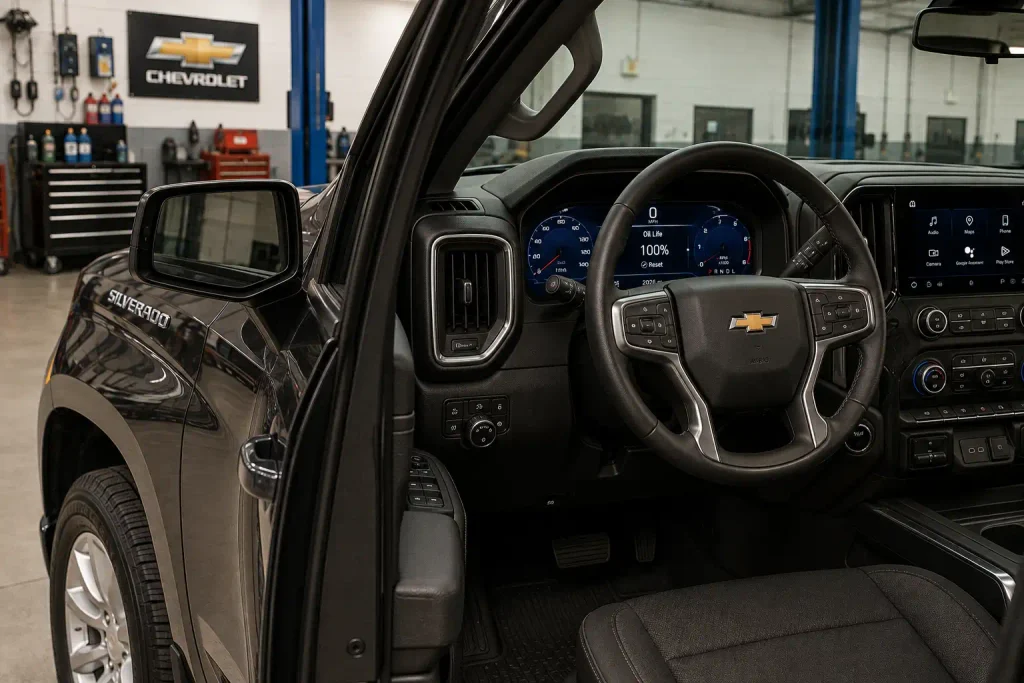
Older trucks can use the accelerator pedal method. Later Silverado models may also reset through the Driver Information Center, or DIC, using steering-wheel controls or the trip odometer reset stem.


Chevrolet says the oil-life monitor should be reset after an actual oil change. It does not measure the physical oil level, so resetting it does not replace checking the dipstick or correcting an oil-level problem.
Chevy Silverado Oil Life Reset by Year


Match your Silverado year and dashboard controls to the correct reset method.
Accelerator Pedal Method


Most early Silverado trucks use the ignition and accelerator sequence.
- Turn ignition to RUN.
- Keep the engine off.
- Press accelerator fully 3 times.
- Finish within 5 seconds.
DIC or Trip Stem
GMT900 trucks may use DIC controls or the trip odometer reset stem.
- Display Oil Life Remaining.
- Hold SET/RESET or trip stem.
- Wait for the percentage to reset.
Check Button or Trip Stem
Control type depends on the Silverado instrument-cluster configuration.
- Open Oil Life Remaining.
- Hold the checkmark control.
- Use the trip stem on base clusters.
Thumbwheel or Trip Stem


Newer Silverado trucks primarily reset through the Driver Information Center.
- Open the Oil Life screen.
- Hold the thumbwheel or reset control.
- Select Yes if prompted.
Factory Three-Pedal Reset Method
How Silverado Oil Life Reset Methods Change by Year


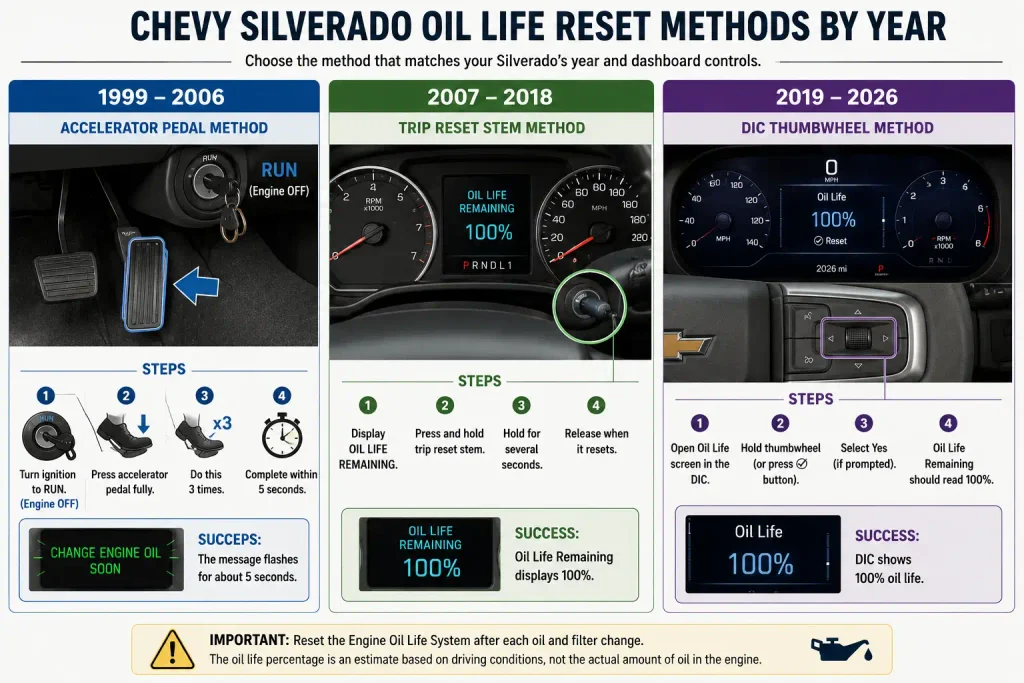
The fastest way to reset your Silverado is to identify its model year and dashboard controls first.
| Silverado Year | Main Reset Method | Alternate Method | Reset Confirmation |
|---|---|---|---|
| 1999 to 2006 | Accelerator pedal | DIC on equipped later trucks | Message flashes or Oil Life Reset appears |
| 2007 to 2013 | DIC or trip reset stem | Accelerator pedal | 100% oil life |
| 2014 to 2018 | DIC check button or trip stem | Accelerator pedal | 100% oil life |
| 2019 to 2026 | DIC thumbwheel or trip stem | Accelerator pedal | 100% oil life |
Dashboard designs changed considerably across Silverado generations. If you are also comparing older and newer trucks, our guide to the best years for Chevrolet Silverado 1500 provides more context on model-year differences.
The key point is simple: use the controls available on your truck, then verify that the displayed oil life reaches 100%.
How to Reset 2019 to 2026 Silverado Oil Life


Most 2019 to 2026 Silverado trucks use the Driver Information Center for the primary reset procedure. Base and uplevel clusters can use different physical controls.


Using Steering Wheel Controls
On a Silverado equipped with the appropriate steering-wheel Driver Information Center controls:
- Turn the truck on and display the oil-life percentage in the DIC.
- Navigate to the Oil Life or Remaining Oil Life screen.
- Press and hold the applicable thumbwheel or reset control.
- Select Yes if the instrument cluster asks for confirmation.
- Check that the oil-life display changes to 100%.
The exact button appearance can differ between instrument-cluster configurations, so use the control shown for your truck in its owner’s manual.
Chevrolet’s 2026 Silverado manual confirms that the oil-life percentage must reach 100% for a successful reset.
Using the Trip Reset Stem
Some base-level clusters use the trip odometer reset stem instead of the more advanced steering-wheel controls.
- Place the Silverado in Park.
- Display the oil-life percentage.
- Press and hold the trip reset stem as instructed by the cluster.
- Confirm the reset if prompted.
- Verify that the display reaches 100%.
If your cluster menu looks different, the accelerator method below provides another factory-documented option on supported recent trucks.
How to Reset 2014 to 2018 Silverado Oil Life


The 2014 to 2018 Silverado uses two main dashboard arrangements. Trucks with DIC buttons use the steering-wheel control, while base configurations may use the trip odometer stem.


Trucks With DIC Controls



- Turn the ignition on.
- Display OIL LIFE REMAINING in the Driver Information Center.
- Press and hold the checkmark or reset control for several seconds.
- Release the control after the display changes.
- Verify that Oil Life Remaining reads 100%.
Chevrolet’s 2018 Silverado manual specifically identifies the checkmark control for equipped trucks.
Trucks Without DIC Buttons
If your Silverado does not have the relevant steering-wheel buttons:
- Put the transmission in Park.
- Navigate to OIL LIFE REMAINING with the trip odometer reset stem.
- Press and hold the stem for several seconds.
- Wait for the percentage to change to 100%.
This difference between base and uplevel clusters is why one reset instruction does not perfectly describe every Silverado trim.
How to Reset 2007 to 2013 Silverado Oil Life
The 2007 to 2013 Silverado can normally be reset through the DIC or with the accelerator pedal procedure.
Using the Driver Information Center
- Put the Silverado in Park.
- Display OIL LIFE REMAINING.
- Press and hold the SET/RESET button.
- If the truck does not have DIC buttons, hold the trip odometer reset stem instead.
- Continue holding for more than five seconds where specified.
- Confirm that Oil Life Remaining changes to 100%.
The 2013 Silverado factory manual documents both the SET/RESET button and trip-stem procedures.
Using the Accelerator Pedal
You can also use the factory pedal procedure:
- Turn the ignition to ON/RUN with the engine off.
- Fully press the accelerator pedal slowly.
- Release it completely.
- Repeat until you have pressed it three times within five seconds.
- Check the Oil Life Remaining display.
- Confirm that it reads 100%.
The timing matters. Three slow presses spread over a longer period may not trigger the reset.
How to Reset 1999 to 2006 Silverado Oil Life
First-generation Silverado trucks use one of the simplest oil-reset procedures.
Chevrolet’s original 1999 Silverado manual already documents the three-pedal method, so this procedure is not limited to later GMT800 trucks.
Using the Accelerator Pedal


For a 1999 Silverado:
- Turn the ignition key to RUN.
- Leave the engine off.
- Fully press and release the accelerator pedal.
- Repeat the pedal action three times within five seconds.
- Watch the CHANGE ENGINE OIL message.
On the 1999 Silverado, a successful reset causes the Change Engine Oil message to flash for approximately five seconds.
Later GMT800 trucks continued using the same basic accelerator procedure.
Using DIC Controls on Equipped Trucks
Some later first-generation Silverado trucks added Driver Information Center functions.
The 2003 Silverado manual, for example, identifies an OIL LIFE RESET DIC message that appears for about 10 seconds after resetting the oil-change message.
Do not look for DIC controls on a truck that does not have them. The pedal method remains the simpler path on many early Silverado configurations.


How to Use the Three Pedal Oil Reset Method
The accelerator method spans multiple Silverado generations and remains one of the easiest procedures to remember.
For most applicable trucks:
- Keep the engine off.
- Put the ignition in the required ON or RUN mode.
- Display the oil-life screen first when the owner’s manual requires it.
- Fully press and release the accelerator three times within five seconds.
- Check for a confirmation message or 100% oil life.
- Restart the truck and check the display again.
The 1999, 2013, 2018, and 2026 factory documentation all confirm versions of the three-press procedure.
Do not continue pumping the accelerator after the system has reset. Verify the display instead.
5 Reasons Silverado Oil Life Will Not Reset
A reset that fails usually comes down to the procedure, ignition state, or dashboard control being used.
Wrong Oil Screen Selected
Later Silverado trucks often require the Oil Life or Oil Life Remaining page to be displayed before using the reset control.
If you are on the trip, fuel economy, tire pressure, or another DIC page, holding the same control may reset something else or do nothing.
Reset Control Released Early
A quick press is different from a press-and-hold command.
The 2013 and 2018 manuals specifically instruct owners to hold the appropriate reset control or trip stem for several seconds.
Pedal Sequence Was Too Slow
The accelerator method requires three full presses within five seconds.
Press the pedal smoothly all the way down, release it fully, and complete all three cycles inside the time window.
Ignition Mode Was Incorrect
Older Silverado instructions require the ignition in RUN or ON/RUN with the engine off.
If you start the engine before trying the pedal method, the expected reset sequence may not run.
Reset Did Not Complete
Restart the truck and check the oil-life percentage.
Chevrolet states that if CHANGE ENGINE OIL SOON returns after startup, or the displayed percentage remains near zero, the Engine Oil Life System was not reset successfully. Repeat the correct procedure.
How to Verify Silverado Oil Life Reset Worked
Do not assume the reset worked just because you held a button or pressed the accelerator.
Use this quick check:
- Later Silverado models: Oil Life Remaining should display 100%.
- 1999 Silverado: The Change Engine Oil message flashes for about five seconds after a successful reset.
- 2003-era DIC trucks: An Oil Life Reset message may appear after completion.
- Restart the engine and make sure the oil-change warning does not immediately return.
The oil-life percentage is a maintenance estimate, not a measurement of how much engine oil is physically in the crankcase.
Chevrolet explains that its Oil Life System estimates remaining oil service life from vehicle use. You still need to check actual oil level normally.
For Silverado HD owners working around the 6.6L Duramax V8 Turbo Diesel, our 6.6 Duramax cylinder-number reference can also help when identifying the engine layout during other maintenance or diagnostic work.
What to Do After Resetting Silverado Oil Life
Once your Silverado shows 100% oil life, restart the truck and verify that the oil-change message stays off.
The Silverado oil life reset should be performed after the oil and filter are actually changed. Chevrolet also says the oil and filter must be changed at least once a year even if favorable driving conditions allow the Oil Life System to run longer between alerts. If you are choosing the oil for that change, our best oil for Chevy Silverado 1500 guide explains the grade and dexos1 requirements.
Check the actual engine-oil level separately, especially after a DIY oil change. If the correct year-specific reset method still does not work after repeating it carefully, use Chevrolet’s manual lookup for your exact model year and instrument cluster before treating the problem as an electrical fault.
5 Silverado Oil Life Reset Questions
Can I Reset Silverado Oil Life Without Changing Oil?
Yes, the controls can physically reset the monitor without an oil change, but Chevrolet says the system should be reset only after the engine oil is changed. Resetting it early makes the displayed maintenance estimate inaccurate.
Why Does My Silverado Still Say Change Engine Oil Soon?
The Engine Oil Life System probably did not complete the reset. Repeat the correct procedure for your Silverado year and confirm the display reaches 100% before assuming there is a dashboard or electrical problem.
Does the Gas Pedal Reset Work on Every Silverado?
The three-pedal method is documented across many Silverado generations, including 1999, 2013, 2018, and 2026. The ignition and display instructions can vary, so follow the procedure for your exact model year rather than assuming every cluster behaves identically.
Should Silverado Oil Life Read 100 After Reset?
Yes, Silverado generations with percentage-based Engine Oil Life displays should show 100% after a successful reset. Older trucks may provide a message or flashing confirmation instead of the same percentage display.
Can I Reset Silverado Oil Life Without Steering Wheel Buttons?
Yes. Silverado trucks without the applicable steering-wheel DIC buttons can use the trip odometer reset stem on supported model years, and many generations also support the accelerator-pedal procedure.