Motorola MA1 Wireless Android Auto Adapter: Full Comparison [2026]

The Motorola MA1 is the top-rated solution for converting factory-installed wired Android Auto into a seamless wireless experience. It requires a vehicle with existing wired AA support and a smartphone running Android 11 or higher to function correctly.
🎯 Key Takeaways
Recommended Best Deal Products
![[2G+64G] for Honda Civic 2006-2011 Wireless Carplay Android 15.0 Car Stereo |…](https://m.media-amazon.com/images/I/41uEvl6hnfL._SS500_.jpg)

- Requires a vehicle with factory-installed wired Android Auto functionality.
- Compatible only with smartphones running Android 11 or newer.
- Standard MSRP is $89.99; avoid paying inflated third-party prices.
- Uses 5GHz Wi-Fi to ensure low-latency media and navigation.
- Check Amazon, Best Buy, and Target for official stock availability.
If you are looking to buy the android-auto-adapter-review” target=”_blank” rel=”noopener noreferrer” title=”comprehensive Motorola MA1 review from The Verge”>Motorola MA1, you likely already know the frustration of plugging in your phone every time you sit in the driver’s seat. This adapter is specifically designed to convert your existing factory-wired Android Auto setup into a wireless one. You can typically find the MA1 at major electronics retailers like Amazon, Best Buy, and Target, though you should aim for the official MSRP of $89.99 to avoid inflated third-party pricing.
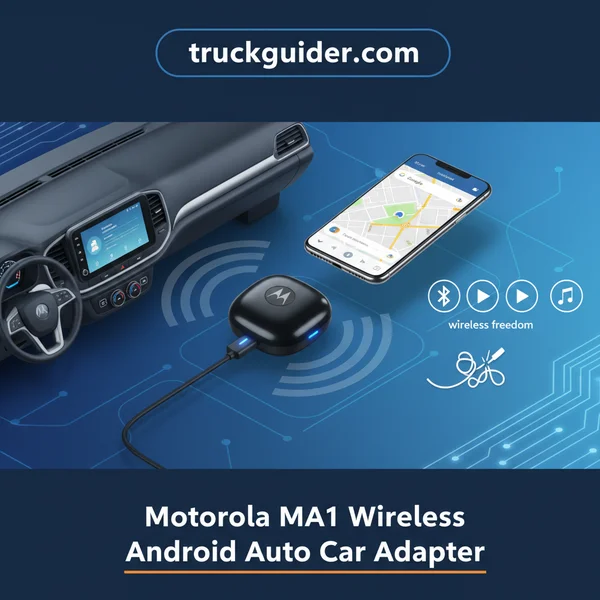
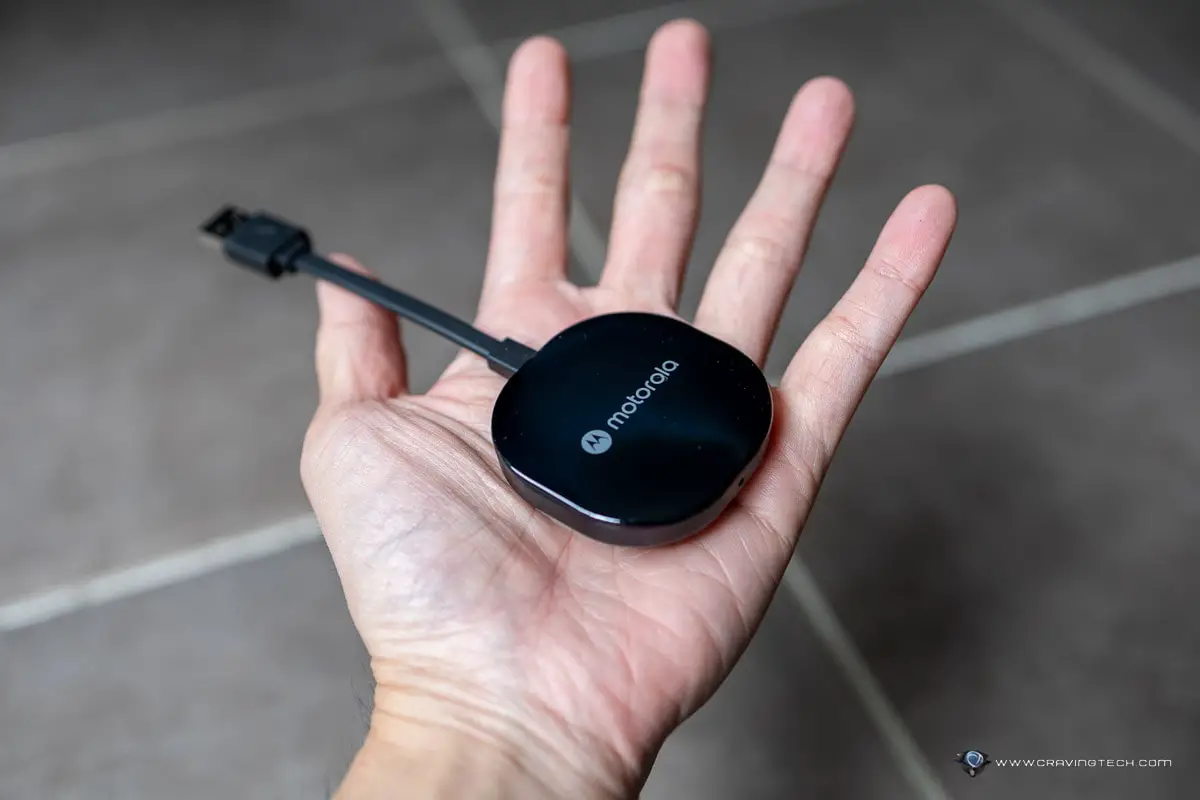
This matters because the Motorola MA1 is currently the only adapter that uses Google-licensed technology for its connection. While other brands exist, this unit provides a more “native” feel to the wireless handshake. To make it work, you must verify three specific hardware requirements before purchasing: your car’s head unit, your smartphone’s operating system version, and your phone’s Wi-Fi capabilities.
Compatibility Requirements for Vehicles and Smartphones
The Motorola MA1 is not a magic fix for cars that lack Android Auto functionality entirely. It acts as a bridge, not a source. Before you click buy, you must ensure your vehicle meets the physical and software prerequisites to handle a wireless data stream.
Vehicle and USB Port Prerequisites
Your vehicle must have a factory-installed infotainment system that already supports wired Android Auto. If your car requires an aftermarket head unit or doesn’t support the wired version of the app, the MA1 will not function. Additionally, note the physical connection requirements:
- USB-A Connection: The MA1 features a fixed, non-removable USB-A cable. If your car only features USB-C ports, you will need to purchase a high-quality USB-C to USB-A female adapter separately.
- Data-Enabled Port: The adapter must be plugged into the specific USB port designated for smartphone integration. It will not work if plugged into a “charge only” port or a rear-seat power outlet.
- Factory Units: Most vehicles from 2016 onwards with touchscreen displays are compatible, provided they aren’t restricted by specific manufacturer software lockouts found in some luxury imports.
Smartphone Hardware and Software Needs
The MA1 relies on a high-bandwidth connection to mirror your phone screen without lag. This requires modern internal hardware in your smartphone. Older budget phones often struggle with the thermal demands and data speeds of wireless projection.
- Android Version: Your phone must run Android 11 or higher. While a few older Pixel or Samsung phones on Android 10 might work, Google officially recommends Android 11 for stable wireless performance.
- 5GHz Wi-Fi Support: The MA1 communicates via 5GHz Wi-Fi. If your phone only supports 2.4GHz bands, the adapter cannot establish a fast enough connection to stream video data to your dashboard.
- Active Data Plan: Since the phone uses its Wi-Fi antenna to talk to the adapter, it must use cellular data for navigation and music streaming. Ensure your mobile plan allows for simultaneous data use while Wi-Fi is active.
Performance Analysis: Connection Speed and Latency
The primary concern for most users switching to wireless is the “boot-to-map” time. The Motorola MA1 is widely considered the fastest in its class because it mimics the native Google wireless protocol rather than using a workaround software skin or emulation.
Initial Startup and Pairing Speed
When you start your engine, the MA1 powers up immediately via the USB port. In most modern vehicles, the connection process follows a predictable and rapid timeline:
- Power On: 3 to 5 seconds after the car’s electrical system engages.
- Handshake: 10 to 15 seconds to locate your phone via Bluetooth and switch to the Wi-Fi stream.
- Full Projection: Your maps and music usually appear on the screen within 20 to 30 seconds of turning the key.
This speed is comparable to high-end luxury cars with built-in wireless Android Auto. It ensures that by the time you shift into reverse and check your mirrors, your navigation is already loaded and ready for an address input.
Latency and Touch Response
Latency refers to the delay between touching the screen and the system responding. Because the MA1 utilizes 5GHz Wi-Fi, the lag is almost imperceptible to the average user. You might notice a very slight 0.5-second delay when skipping tracks using steering wheel controls compared to a wired connection. However, GPS tracking remains fluid on the map, and Google Assistant voice commands react instantly without the stuttering often found in cheaper, generic adapters. This high-speed bandwidth is essential for maintaining a high frame rate on your car’s display, preventing the “slideshow” effect during navigation.
Pricing Trends and Authorized Retailer Availability
When the Motorola MA1 first hit the market, it was notoriously difficult to find at its suggested retail price of $89.99. Supply chain constraints and high demand led to inflated prices on third-party marketplaces. Today, the landscape has changed significantly, making it a much more accessible and affordable upgrade for the average driver looking to modernize their cockpit.
Finding the Sweet Spot in Pricing
Current pricing trends show the MA1 frequently retailing between $70 and $90. During major sales events like Amazon Prime Day, Black Friday, or back-to-school promotions, prices have been known to dip as low as $60. If you see a listing priced significantly above $100, it is likely a third-party reseller capitalizing on temporary stock fluctuations. Patience usually pays off, as restocks happen quickly at major outlets.
Authorized Retailers and Buying Tips
To ensure you receive a genuine product with a valid manufacturer warranty, it is essential to purchase from authorized channels. This also protects you from “grey market” units that may not be optimized for your specific region.
- Major Big-Box Stores: Retailers like Best Buy and Target often carry the MA1 both in-store and online. Checking local inventory can sometimes snag you a unit faster than waiting for shipping.
- Amazon Presence: While Amazon is a primary seller, always verify that the item is “Shipped and Sold by Amazon.com” to avoid counterfeit issues from unverified third-party sellers.
- Open-Box Savings: Don’t overlook “Open-Box” deals at electronics stores. Because some users purchase the MA1 without checking if their car is compatible, many perfectly functional units are returned and sold at a 15-20% discount.
Comparing the Motorola MA1 to Generic Wireless Adapters
The market is currently flooded with budget-friendly wireless adapters, many of which look identical to the Motorola MA1 on the surface. However, the internal technology tells a different story. The MA1 was developed in direct collaboration with Google, which gives it a significant edge in terms of native integration and long-term stability.
Licensed Technology vs. Software Emulation
Most generic adapters use a “bridge” software that essentially tricks your car into thinking a phone is plugged in. This middle-man software often leads to audio lag, slow map rendering, and frequent disconnections. In contrast, the Motorola MA1 uses Google-licensed technology designed specifically for the Android Auto protocol. This creates a direct, high-speed 5GHz Wi-Fi bridge that maintains the integrity of the data stream.
Reliability in the Real World
Cheap alternatives often suffer from poor heat management, causing them to reboot or throttle performance during long summer drives. The MA1 is built with higher-quality components designed to handle the constant data heavy-lifting required for simultaneous navigation and music streaming.
- Faster Connection Times: The MA1 typically boots and connects within 15 to 30 seconds of starting your engine. Generic dongles can often take over a minute to handshake with the vehicle.
- Visual Fluidity: Because of the optimized 5GHz connection, map scrolling on the MA1 is noticeably smoother. Generic adapters often show “stuttering” or dropped frames in high-density urban areas on Google Maps.
- Official Support: Unlike many “no-name” brands found on discount sites, Motorola provides a clear warranty path and customer support, which is vital for a device that lives in the harsh temperature environment of a car.
Conclusion
The Motorola MA1 remains the gold standard for anyone looking to ditch the USB cable without sacrificing the stability of their Android Auto experience. By leveraging official Google technology, it provides a seamless “get in and go” workflow that generic competitors simply cannot match. While it may carry a slightly higher price tag than budget alternatives, the reduction in lag, faster boot times, and overall reliability make it a worthy investment for any daily commuter or road-tripper.
Ready to reclaim your center console? Start by double-checking your vehicle’s compatibility with wired Android Auto, then keep an eye on major retailers for the latest price drops. It is time to cut the cord and enjoy a truly wireless, clutter-free driving experience.
💬 Quick Questions & Answers
Will the Motorola MA1 work in any car?
No, it only works in vehicles that already have factory-installed wired Android Auto.
Does this adapter work with iPhones?
No, the Motorola MA1 is strictly for Android Auto and does not support Apple CarPlay.
How long does it take to connect?
It typically establishes a wireless connection within 20 to 30 seconds of starting your car.
Does it require an app to function?
No, it is a plug-and-play device that uses your phone’s native Android Auto settings.
Can I use it with an aftermarket radio?
It works with most name-brand aftermarket units (like Sony or Pioneer) that feature wired Android Auto.
❓ Frequently Asked Questions
What are the specific phone requirements for the Motorola MA1?
Your smartphone must run Android 11 or higher and support 5GHz Wi-Fi. Google or Samsung phones with Android 10 may also work, but Android 11 is the official requirement for stable performance.
Where is the best place to buy the Motorola MA1 at MSRP?
The most reliable retailers are Amazon, Best Buy, and Target. Be cautious of third-party sellers on these platforms who may list the device at significantly higher prices during stock shortages.
Does the Motorola MA1 cause audio lag or navigation delays?
Because it uses a 5GHz Wi-Fi bridge, latency is minimal. Most users report that audio quality and navigation responsiveness are indistinguishable from a wired connection.
Will using the wireless adapter drain my phone battery?
Wireless Android Auto is more power-intensive than a standard Bluetooth connection. For long road trips, it is recommended to keep your phone on a dedicated fast charger or wireless charging pad.
How many phones can the Motorola MA1 remember?
The adapter can pair with multiple devices, but it will automatically connect to the last used phone found in the vehicle. You may need to manually switch if two paired phones are present.
Are there firmware updates for the Motorola MA1?
Currently, the Motorola MA1 does not have a dedicated companion app for firmware updates. It is designed to be a static hardware bridge that relies on Android Auto updates on your phone.



![5.7 Hemi Head and Cam Package [2026]](https://truckguider.com/wp-content/uploads/2026/04/featured-non-mds-57-hemi-lifters-camshaft-cam-kit-whead-gas-768x403.webp)