Toyota Tacoma Maintenance Light Reset By Generation 1995-2026

The Toyota Tacoma maintenance light does not turn off on its own after service. You have to reset it manually, and the exact steps depend on which generation you’re driving.
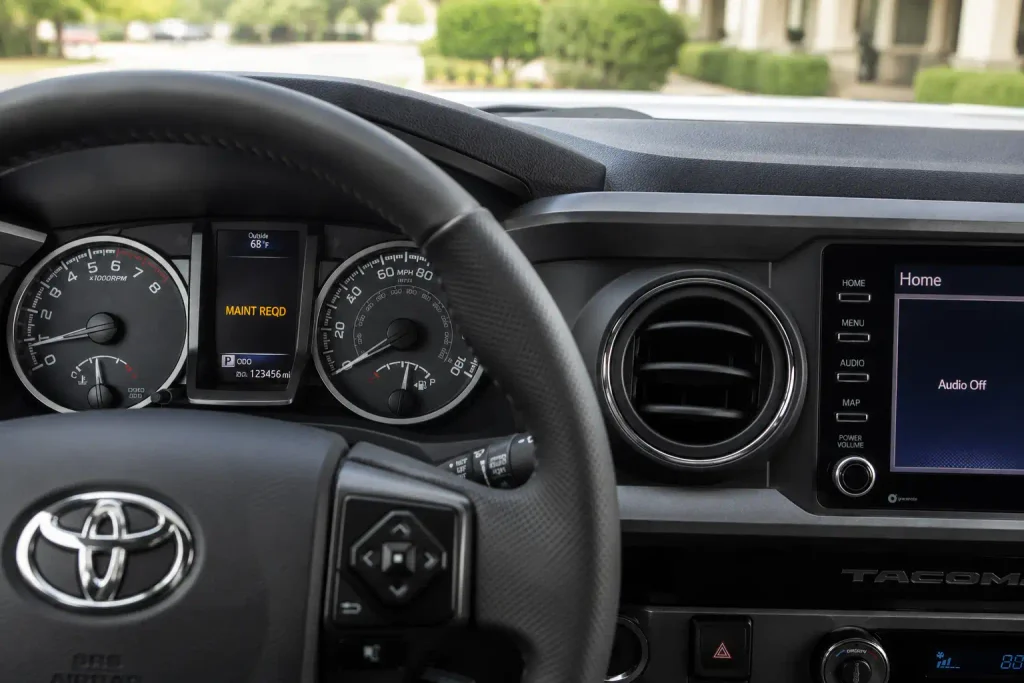
Trucks built before 2016 use a physical trip meter knob. Trucks from 2016 onward use a menu inside the steering wheel controls. Using the wrong method for your dash type is the main reason owners think the reset “isn’t working.”

Prime for Young Adults — 6 Months Free
Students and 18–24s get six months of Prime free, then half price.
Start 6 Months FreeThis guide breaks the process down by generation, covers what to do if the light won’t clear, and explains why disconnecting the battery is not the shortcut it seems to be.
Toyota Tacoma Maintenance Light Reset
Quick reference by generation, 1995 to 2026
Maintenance data lives in non-volatile memory, so pulling the battery usually will not clear the light. On 3rd and 4th Gen trucks it also risks resetting safety-sensor calibrations.
Why The Tacoma Maintenance Light Turns On
Recommended Best Deal Products


The “MAINT REQD” light on a Tacoma dash is a service reminder, not a warning. It is completely separate from the Check Engine light and does not mean the truck detected a mechanical fault.
Toyota ties this reminder to mileage and time, generally around every 5,000 miles or six months. It comes on whether or not you’ve already completed the service, because the truck’s computer has no way to know maintenance happened until you tell it.
An oil change is the most common reason drivers see this light. If your Tacoma is also due for a filter, the best oil filter for Toyota Tacoma is worth pairing with the reset so both jobs happen at once.
Which reset method you need next depends entirely on which Tacoma generation you’re driving.
Toyota Tacoma Maintenance Light Reset By Generation
Use your model year to find the right row before you start. The physical trip meter knob covers older analog dashboards, while the settings menu applies to trucks with a digital multi-info display.
| Generation | Model Years | Dash Type | Reset Method |
|---|---|---|---|
| 1st Gen | 1995-2004 | Analog | Trip meter knob |
| 2nd Gen | 2005-2015 | Analog | Trip meter knob |
| 3rd Gen | 2016-2023 | Digital multi-info display | Steering wheel settings menu |
| 4th Gen | 2024-2026 | Digital cluster | Steering wheel settings menu |
The redesign that split these two methods happened for the 2016 model year, when Toyota moved the Tacoma to a digital instrument cluster. Here’s exactly how each method works, starting with the older analog dash.

Audible — Listen Free for 30 Days
One free credit a month and thousands of titles included.
Listen Free for 30 DaysHow To Reset The Light On 1st And 2nd Gen Tacoma
Recommended Best Deal Products


This method applies to Tacomas built before the digital multi-info display arrived in 2016, covering both the 1995-2004 and 2005-2015 trucks.
Turn The Ignition To On
Turn the key to the “On” position without starting the engine. The dash lights should illuminate fully.
Locate The Trip Meter Reset Knob
Find the small button or knob near the odometer, usually just below or beside the digital mileage display. Confirm the display is showing total odometer mileage, not Trip A or Trip B.
Hold The Knob And Cycle The Ignition
Turn the ignition off, then press and hold the trip meter reset knob. While still holding it down, turn the ignition back to “On” without starting the engine.
Release When The Light Clears
Keep holding the knob. The display will cycle through a series of dashes, then zeros. Once the odometer returns to normal and the maintenance light blinks off, release the knob.
Exact knob position and wording can shift slightly by trim year, so check your owner’s manual if you can’t locate it right away. Tacomas from 2016 onward replaced this knob with a menu-driven process instead.
How To Reset The Light On 3rd And 4th Gen Tacoma
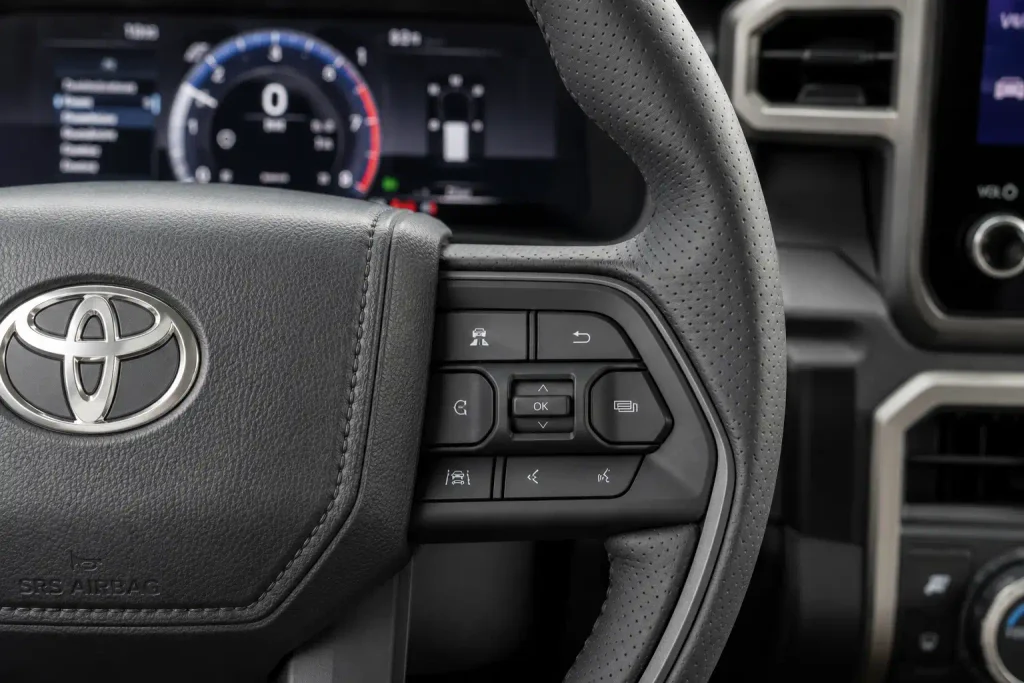
3rd and 4th Gen Tacomas replaced the trip meter knob with a digital settings menu controlled from the steering wheel, covering trucks from 2016 through the current 2026 model year.
Start The Truck Without The Engine Running
Press the push-to-start button twice, or turn the key to “On,” without touching the brake pedal or starting the engine.
Audible Premium Plus — Annual Membership
12 audiobook credits up front, plus the full Audible catalogue.
See Annual PlansOpen The Settings Menu On The Steering Wheel
Use the arrow buttons on the steering wheel to scroll to the Settings menu, typically marked with a gear icon on the multi-info display.
Navigate To Scheduled Maintenance
Scroll down within Settings until you reach “Scheduled Maintenance” or “Oil Maintenance.” The exact wording can vary slightly by model year and trim.
Confirm The Reset
Select the maintenance option and press the center button to confirm. When prompted “Reset Data,” choose “Yes.” A confirmation message appears, and the wrench icon or MAINT REQD text clears from the display.
If you followed the correct steps for your generation and the light is still on, the issue usually isn’t the reset procedure itself.
What To Do When The Light Wont Turn Off
Recommended Best Deal Products


A handful of causes explain most stuck maintenance lights.
- The engine was running during the attempt. It has to stay off the entire time.
- The wrong method was used for the generation, most often trying the old trip meter steps on a 2016-or-newer digital dash.
- The reset display wasn’t showing total odometer mileage when the knob was pressed.
If you’ve used the correct method for your generation and the light still won’t clear, or it comes back within a day or two, the cause is usually something other than the reset itself. That can mean an incomplete service item, degraded oil, or a sensor fault unrelated to routine maintenance.
At that point, an OBD-II scan can identify whether a stored trouble code is triggering the light, and a shop estimate through a resource like RepairPal can give you a ballpark cost if a sensor repair turns out to be necessary.
One reset shortcut you should avoid altogether is disconnecting the battery.
Why You Should Never Disconnect The Battery To Reset It
Disconnecting the battery is not a real shortcut, and it can cause more problems than it solves. Maintenance interval data lives in the truck’s non-volatile memory, so pulling the battery usually will not even clear the light.
On 3rd and 4th Gen Tacomas, a battery disconnect carries a real risk on top of not working. It can reset calibrations for safety systems like the Pre-Collision System and disrupt idle learning, both of which take extra effort to relearn afterward.
If your battery itself is aging while you’re already working under the hood, it’s worth checking separately. The best battery for Toyota Tacoma guide covers replacement options if yours is more than four or five years old.
Stick to the knob or menu method that matches your generation instead. With the right method, resetting the light takes under a minute.
Keep Your Tacoma’s Maintenance Schedule Accurate
Resetting the Tacoma maintenance light comes down to knowing your generation. Analog dashes from 1995 through 2015 use the trip meter knob, while 2016-and-newer trucks use the steering wheel settings menu.
Only reset the light after the service is actually done. Resetting it early clears the reminder without fixing the underlying interval, which throws off the next warning.
Match the reset to the right method for your dash, and you’ll have an accurate maintenance schedule and a clear dash in under a minute.
Frequently Asked Questions
How do I reset the maintenance light on a Toyota Tacoma?
The method depends on your generation. Trucks from 1995-2015 use the trip meter reset knob near the odometer, while 2016-2026 trucks use the Settings menu accessed through the steering wheel controls.
Why is my Tacoma maintenance light still on after an oil change?
The light does not clear automatically after service. It has to be manually reset using the method that matches your truck’s generation, or it will stay on regardless of whether the oil change happened.
Does resetting the maintenance light delete any service data?
No. The reset only clears the dashboard reminder and restarts the mileage interval count. It does not erase any other vehicle data or settings.
Can I reset the Tacoma maintenance light without an OBD scanner?
Yes. Both the trip meter knob method and the steering wheel settings menu method are built into the truck and require no scan tool. A scanner is only useful if the light stays on after a correct reset attempt.
What generation is my Toyota Tacoma?
Model years 1995-2004 are 1st Gen, 2005-2015 are 2nd Gen, 2016-2023 are 3rd Gen, and 2024-2026 are 4th Gen. Your model year determines whether you use the trip meter knob or the settings menu.
Is it safe to drive with the maintenance light on?
Yes, in most cases. The light is a service reminder rather than a fault warning, though it’s still worth completing the overdue maintenance and resetting the light as soon as possible.