Chevy Silverado Key Fob Programming: 2026 Guide by Year and Key Type


Silverado key fob programming depends on the truck’s model year, remote design, and ignition system. Many older Silverado remotes can be paired through an onboard procedure. Other trucks need a diagnostic programming tool, while certain Keyless Access models offer a separate transmitter-learning process.
This guide covers the methods documented for specific Chevrolet Silverado configurations and explains when to use a dealer or automotive locksmith.


How to Identify Your Silverado Key Fob System


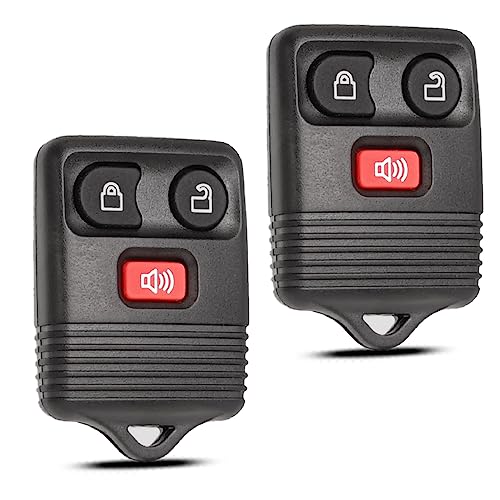
Start with the truck’s model year, ignition and remote design, not just the number of fob buttons.
Separate ignition key and remote: A metal key turns the ignition; a separate transmitter operates the door locks. This is common on older Silverados.
Keyed ignition with integrated remote: The key starts the truck, but remote-button pairing can require a separate procedure. Learning an ignition key does not automatically pair the remote.
Keyless Access with push-button start: A proximity transmitter supports engine starting. Some versions use an interior transmitter pocket and Driver Information Center (DIC) instructions.
Use our truck VIN decoder to confirm the model year, then verify the fob’s GM part number in a VIN-specific catalog. A VIN decoder alone does not establish transmitter compatibility.


Which Silverado Years Support DIY Key Fob Programming


No single sequence applies to every Silverado from 2000 to 2026. Confirm your ignition system and the Programming Transmitters section of the exact owner manual before proceeding.Year or system Programming route Verify 2000–2006, compatible RKE Ignition-and-door-lock relearn may work Factory-style remote and working key 2007 Classic May use earlier method Classic body designation 2007–2010, newer-body RKE DIC or trip-odometer learning RELEARN REMOTE KEY menu 2011–2013 keyed RKE Varies; certain replacements require scan tool Exact part number and manual 2014–2018 and some 2019 LD/HD Professional transmitter programming Separate key learning from RKE 2019–2020 Keyless Access Owner learning on supported configurations Recognized fobs and push-button start 2021–2026 1500/HD Exact-year procedure or dealer Key system, VIN and fob part number
The presence of a relearn menu is more useful than a generic online year chart. The 2020 Keyless Access procedure does not automatically apply to newer trucks.
How to Program 2000 to 2006 Silverado Remotes


Compatible older Silverado RKE systems commonly use the power door unlock switch and ignition to enter remote-learning mode. This is an aftermarket-documented procedure for certain original-style systems, not a universal factory instruction for every 2000–2006 build.




Have the working ignition key and every remote you intend to keep using. 1. Sit in the truck, close the doors, and insert the key without turning it.
2. Press and continue holding UNLOCK on the driver’s power door-lock switch.
3. While holding that switch, turn the ignition to ON, back to OFF, then ON and OFF again. Do not crank the engine.
4. Release the door unlock switch. A lock-and-unlock cycle indicates that this system entered learning mode.
5. Hold LOCK and UNLOCK together on the first remote until the door locks cycle again. This can take roughly 15–30 seconds.
6. Repeat the previous step for every other remote, including working spares.
7. Turn the ignition to ON to exit, then turn it off and test every remote.
The 2007 Classic is a separate case from the redesigned 2007 Silverado.
How to Program 2007 to 2010 Silverado Remotes


The 2010 Silverado owner’s manual documents an onboard RKE relearn through the DIC. The method below applies when the truck actually displays the specified menu. See the 2010 Chevrolet Silverado owner’s manual, pages 4-54 and 4-59.
Silverado Models with DIC Buttons


- Park the truck, switch on the ignition without starting, and keep all remotes ready.
- Press the vehicle information button until the display prompts you to relearn the remote key.
- Press set/reset until REMOTE KEY LEARNING ACTIVE appears.
- Hold LOCK and UNLOCK simultaneously on the first remote for about 15 seconds.
- Listen for a chime indicating that the remote was accepted.
- Repeat the button-hold step for every remaining remote, then turn the ignition to LOCK/OFF to exit.
Silverado Models Without DIC Buttons
- Put the truck in Park and use the trip-odometer reset stem to find RELEARN REMOTE KEY.
- Hold the reset stem for approximately three seconds until REMOTE KEY LEARNING ACTIVE appears.
- Hold LOCK and UNLOCK together on the first remote for about 15 seconds.
- Wait for the chime, repeat for remaining remotes, and cycle the ignition to LOCK/OFF.
The 2010 procedure can register up to eight transmitters. Starting a relearn clears previously learned remotes, so bring every spare. For a 2007, 2008, or 2009 truck, check its own manual and menu before using these 2010 instructions.
What Changes for 2011 to 2018 Silverado Remotes
Later keyed Silverado systems cannot all be programmed with the older DIC method. Some GM replacement-remote instructions identify 2012–2013 Silverado 1500 models as requiring a professional scan tool. The exact requirement depends on the transmitter part and truck configuration.


The 2018 Silverado owner’s manual directs owners to the dealer for RKE transmitter programming. It also describes an ignition-key learning procedure in a different section. Programming the engine-start key is not the same as pairing the lock-and-unlock transmitter.
For a 2014–2018 Silverado 1500 or a similarly equipped HD model, check the correct remote part number and arrange professional RKE programming rather than trying the 2000–2006 ignition-cycle method.
How to Program a 2020 Silverado Keyless Access Fob
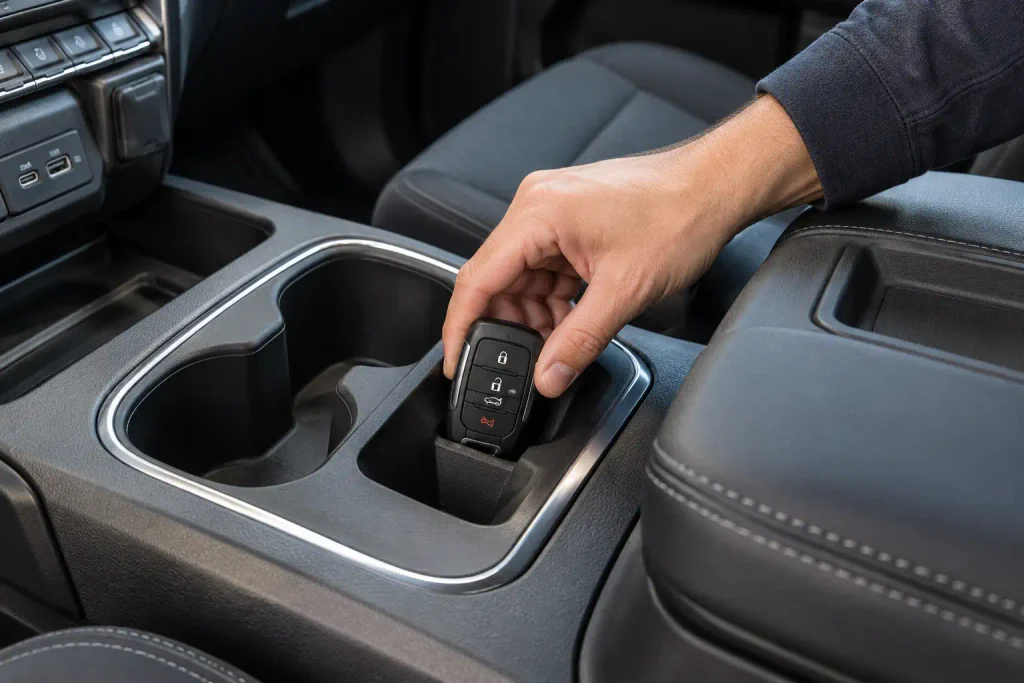
The 2020 Silverado 1500 owner’s manual, pages 20–22, documents two Keyless Access transmitter-learning paths. They apply to the described 2020 push-button-start configuration, not automatically to Key Access trucks or other model years.
Programming with Two Recognized Transmitters
You need two working, recognized transmitters, the new compatible transmitter, and the mechanical key released from a recognized fob. Switch the truck off and gather all transmitters first.
- Remove the mechanical key from one recognized transmitter.
- Put both recognized transmitters in a cupholder or on the passenger seat.
- Insert the mechanical key into the driver’s exterior door lock and turn it toward unlock five times within 10 seconds.
- Watch for a DIC message showing that the truck is ready for the next remote number.
- Place the new remote in the designated transmitter pocket or insert inside the cabin.
- Press ENGINE START/STOP. The DIC should advance to the next available remote number when the transmitter is learned.
- Remove the new transmitter and press its lock or unlock button. Repeat Steps 5–7 for additional new transmitters.
- Hold ENGINE START/STOP for approximately 12 seconds to exit learning mode, then return the mechanical key to its transmitter.
Programming Without Two Recognized Transmitters


The same 2020 manual documents a separate procedure when two recognized transmitters are unavailable. This option is not available in Canada, takes approximately 30 minutes, and can invalidate previously recognized remotes. It requires access to the truck’s mechanical door lock and the correct transmitter hardware.
- With the truck off, remove the mechanical key from the transmitter.
- Turn the mechanical key toward unlock five times within 10 seconds in the driver’s exterior door lock.
- Confirm that the DIC enters a remote-learning wait state.
- After approximately 10 minutes, follow the DIC instruction to press ENGINE START/STOP.
- Repeat the 10-minute waiting and button-confirmation stage two more times. After the third stage, the truck should be ready for the first new remote. Previously recognized transmitters will no longer operate unless relearned.
- Put a compatible transmitter in the prescribed pocket and press ENGINE START/STOP to learn it.
- Remove it, press lock or unlock, and repeat the pocket procedure for any other remotes you want to keep.
- Hold ENGINE START/STOP for approximately 12 seconds to exit. Reinstall the mechanical key and test every transmitter.
If the DIC prompts do not match the 2020 manual, do not improvise. Check your exact owner’s manual or use an appropriately equipped professional.
Which 2021 to 2026 Silverado Fobs Require Professional Programming
Do not assume that the 2020 owner-learning sequence works on a 2022, 2024, 2025, or 2026 Silverado. Hardware, market, trim, and firmware differences matter. For example, the 2025 Silverado 1500 owner’s manual directs owners to the dealer for programming replacement remote keys.
A genuine GM remote identified as part 13560202 is listed for certain 2022–2026 Silverado 1500 and 2024–2026 Silverado HD configurations, with programming required. GM’s parts listing shows an MSRP of $125.80 at the time of this review, before programming labor, taxes, or other services. Check the GM replacement transmitter specification and fitment before purchase.
That part number is not universal. If the manual sends you to a dealer, book a dealer or qualified automotive locksmith with GM-compatible equipment rather than relying on an unverified button sequence.
Can You Program a Silverado Without the Original Fob
Sometimes. The answer depends on what you still have and which programming system the Silverado uses.
You still have the ignition key: On a compatible older truck, the key may let you enter an RKE learning mode and add a replacement remote. That does not mean it can learn a new immobilizer key.
You have one recognized proximity transmitter: Some systems require two recognized transmitters for the quickest add-a-fob procedure. The one-transmitter situation does not meet that prerequisite.
You have no recognized proximity transmitters: The 2020 Keyless Access procedure above provides a US-market exception for supported configurations. Other years may require a dealer or locksmith, especially where all keys are lost.
How to Fix Five Silverado Key Fob Programming Problems
An unresponsive remote does not always mean it needs programming. Check these five causes before buying another.
The Replacement Fob Does Not Match
Wrong frequency, part number or factory options can block pairing. Verify the GM service number against your VIN. The TruckGuider parts interchange database offers research leads, not a guarantee of remote compatibility.
The Remote Battery Is Weak
Replace the correct coin cell with the specified polarity. Battery replacement ordinarily does not erase an existing pairing. Check the contacts and try another working fob before assuming programming was lost.
The Truck Never Enters Learning Mode
Confirm Park, ignition type and the exact documented procedure. A 2010 DIC menu and a 2020 transmitter pocket are different systems. If the expected display prompt never appears, stop.
The Door Locks or Electrical System Do Not Respond


Test the interior power-lock buttons and watch for wider electrical faults. A weak truck battery can affect multiple systems; our truck battery life and warning signs guide covers the vehicle-side battery. A fob battery cannot repair a vehicle wiring fault.
The Remote Works but the Truck Will Not Start
Working door-lock buttons do not prove that ignition authorization was learned. A security warning may require separate diagnosis with suitable equipment.
When to Use a Silverado Dealer or Automotive Locksmith
Professional programming is appropriate when the manual requires a scan tool, the replacement fob is not recognized, or no working key remains. A Chevrolet dealer can use GM service information to identify the required procedure. A qualified automotive locksmith may also have compatible programming equipment.
Ask for a quote that separates the remote itself, mechanical key cutting, programming labor, and any mobile visit fee. The $125.80 GM part example above is an MSRP for one specified transmitter, not a complete programming price and not a quote for every Silverado.
How to Confirm Silverado Key Fob Programming Worked
A completed programming message is only the first confirmation. Test the actual functions before leaving the truck or service provider.
- Lock and unlock the doors using the new remote.
- Check the panic, tailgate, or remote-start buttons if the truck and remote support those features.
- Start the truck using the appropriate ignition key or Keyless Access transmitter.
- Test every old remote that you intend to keep, because some procedures erase earlier registrations.
- Check for remaining security or key-detection warnings.
If the buttons work but starting fails, distinguish RKE pairing from ignition authorization before attempting another relearn.
Which Silverado Key Fob Programming Method Should You Choose
The correct Silverado key fob programming method follows the truck’s actual system, not a generic Chevrolet button sequence. Older factory RKE systems may allow an ignition-and-lock-switch relearn. Compatible 2010 configurations provide a DIC menu, while a documented 2020 Keyless Access system uses its own transmitter-learning process.
For other configurations, especially replacement fobs that require diagnostic equipment, follow the exact Chevrolet owner’s manual or use a qualified professional. Identify the Silverado year, confirm Key Access or Keyless Access, and match the GM transmitter part number first.
After learning, test the locks, start authorization, and every spare remote. Those checks confirm whether the entire system works, not simply whether one button responds.
Five Silverado Key Fob Programming Questions Answered
Can I Program My Chevy Silverado Key Fob Myself?
Yes, on certain trucks with a documented onboard relearn procedure. Compatible early RKE, 2010 DIC and some 2020 Keyless Access systems allow owner programming. Other configurations need a professional tool. Always check the exact year and remote type.
How Do I Program a Silverado Key Fob Without the Original?
A compatible older system may learn a replacement using a working ignition key. Certain US-market 2020 Keyless Access trucks have a separate no-recognized-transmitter procedure. Other systems, especially all-keys-lost cases, may need a dealer or qualified automotive locksmith.
Does a Silverado Key Fob Need Reprogramming After Battery Replacement?


Usually not. Replacing a coin cell normally retains the remote’s registration. Confirm battery type, polarity and contact before attempting programming. If the truck still reports no key, follow its low-battery instructions and check transmitter condition.
Can AutoZone Program a Chevy Silverado Key Fob?
Do not assume your local AutoZone supports your Silverado’s remote. Store services and equipment availability vary. Ask whether they can handle your VIN and part number, or use a Chevrolet dealer or qualified automotive locksmith.
How Much Does Silverado Key Fob Programming Cost?
There is no standard nationwide price. Total cost depends on the remote, key cutting, security programming and labor. GM lists transmitter 13560202 at $125.80 MSRP as a parts-only reference; get an exact service quote for your truck.