Silverado Auto Start Stop Disable Methods for 2019-2026

Silverado auto start stop disable options depend on whether you want the system off for one drive or every time you start your truck. On an equipped Chevrolet Silverado 1500, pressing the factory Stop/Start OFF switch disables automatic engine stopping for the current ignition cycle. The factory setting normally returns to ON at the next startup.
If you want the truck to restore your OFF preference after every restart, a compatible aftermarket memory module is another option. But 2022 Silverado 1500 trucks have an important compatibility split, and some 2021–2022 trucks were built without Auto Stop/Start at all. Identify your truck’s equipment before buying anything.


Truck Guider | Quick Decision Guide
Which Silverado Auto Stop Start Option Fits Your Truck?


2019 to 2026 Chevrolet Silverado 1500 | Factory OFF versus preference-memory modules
Does Your Truck Have Factory Auto Stop Start?
Some 2021 to 2022 Silverado 1500 trucks were built without this feature.
Confirm the Stop/Start control and your truck’s build information.
How Long Do You Want Auto Stop Start Off?
No extra hardware. The setting normally resets when you restart.
Restores your OFF preference; it is not an ECM software delete. Continue to Step 3.
Match the Module to Your Model Year
Manufacturer-listed option for properly equipped Silverado 1500 trucks.
*Older AE039 refreshed-truck applications may exist.
Verify current fitment and the under-dash versus behind-switch installation.
2022 VIN rule: This is the named module manufacturer’s product-selection rule, not a universal GM part rule.
Fitment reminder: Silverado 1500 only. AE030, AE039 and AE079 are aftermarket manufacturer-listed products, not Chevrolet-approved factory settings. Verify the exact vehicle equipment, VIN and current product instructions before purchasing. Source context: Chevrolet/GM documentation and manufacturer listings reviewed October 2026.
Which Silverado Auto Start Stop Disable Method Fits You
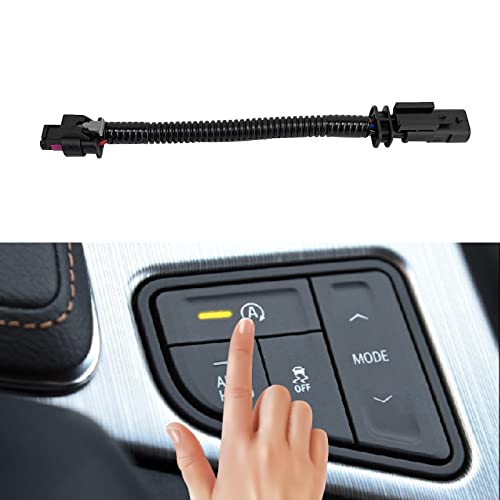
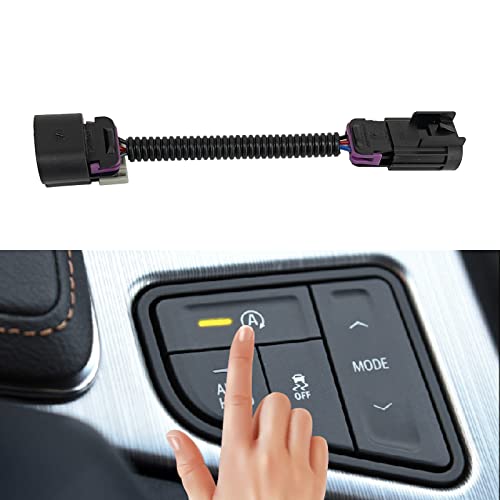


Three details determine the right approach: whether your Silverado has the factory feature, which model year you own, and what you mean by “disable.” Check factory equipment before trusting a broad-year aftermarket listing.
Confirm Your Model Year
This guide covers 2019–2026 Chevrolet Silverado 1500 trucks with factory-equipped automatic Stop/Start. Do not apply this 1500 fitment to Silverado 2500HD or 3500HD models.
Check Factory System Availability
Look for the factory Stop/Start control, usually marked with an encircled A and an OFF indication. An Auto Stop position on the tachometer is another clue. If both are absent, verify factory equipment.


For vehicle-identification basics, Truck Guider’s VIN decoder for trucks explains the 17-character VIN format. A VIN decoder alone cannot confirm every RPO or connector; also check the build record.
Choose Your Desired Result


- OFF for the current drive: Use the factory deactivation switch. No additional hardware is needed.
- OFF automatically after each restart: Consider a compatible preference-memory device for an equipped truck.
- Factory Stop/Start not installed: Do not purchase a disable device. First confirm the build configuration.
- Warning lights, hard starting, or charging trouble: Diagnose the problem before attempting any modification.
If you only need the feature off today, the factory switch is the simplest place to start.
How to Disable Silverado Auto Stop for One Drive




The factory Stop/Start switch turns the feature off without wiring or software changes.
- Start the truck in a safe location. Keep it in Park while locating the Stop/Start OFF switch using your model-year owner’s manual.
- Press the Stop/Start switch once. Chevrolet identifies the control with an encircled A symbol. On the documented GM switch, its LED is not illuminated when Stop/Start is disabled.
- Drive normally. The system should not perform its ordinary automatic engine shutdowns while the feature is switched off for that ignition cycle.
Chevrolet’s official Stop/Start instructions confirm both the switch-indicator behavior and the restart limitation. When you switch the ignition off and start the truck again, Stop/Start returns to its default enabled state.
The switch changes automatic Stop/Start, not the ignition itself. For automatic OFF restoration, check module support.
Which 2019 to 2021 Silverado Trucks Support Memory Modules


For a factory-equipped 2019–2021 Silverado 1500, TRL Automotive lists its AE030 Autostop Eliminator as a compatible preference-memory option. It is an aftermarket product, not a Chevrolet factory setting.


A memory module does not remove Stop/Start from the Engine Control Module (ECM). It restores the selected OFF preference at startup while retaining factory switch operation.
The AE030-style device connects at the factory switch assembly using a model-specific harness. Confirm that the truck actually has the applicable switch, and obtain the installation instructions for its dashboard arrangement. Do not assume every truck of that year qualifies.
The manufacturer’s current Silverado listings display a $99.99 USD price for these Autostop Eliminator variants as of October 2026. That excludes installation and may change.
For 2022 owners, compatibility needs one more check before a purchase.
How to Identify Your 2022 Silverado by VIN


A 2022 Silverado 1500 can be pre-refresh or refreshed, and these configurations do not use the same Autostop Eliminator version. The manufacturer’s fitment instructions use the 12th character of the 17-character VIN to distinguish its applications.


| 2022 Silverado 1500 | Manufacturer’s VIN Rule | Listed Module Option |
|---|---|---|
| Pre-refresh | 12th VIN digit is 4 or lower | AE030 |
| Refreshed | 12th VIN digit is 5 or higher | AE079; older AE039 applications also exist |
These are TRL Automotive’s product-selection rules, not a universal rule for every aftermarket brand or GM component. Follow the exact supplier’s selector and confirm the truck’s installed equipment.
Identify Pre Refresh Trucks
Find the complete VIN on the vehicle or official registration and count to its 12th character. For a 2022 truck in the manufacturer’s 4-or-lower group, its current 2022 product listing specifies AE030. Do not order by registration year alone.
Identify Refreshed Trucks
If the 12th VIN character falls in the manufacturer’s 5-or-higher group, the same current 2022 listing specifies AE079. AE079 installs at a driver-side under-dash connection, whereas the older AE039 product installs behind the Stop/Start switch. Installation procedures differ.
Verify the Module Variant
Check the manufacturer’s 2022 Silverado module listing and VIN instructions immediately before ordering. Match the year, 12th VIN character, switch equipment and chosen module version. Request written fitment confirmation if any detail is unclear.
Once you know which 2022 version you have, the same principle applies to later Silverado trucks: match the device to the actual application, not just the advertising headline.
Which 2023 to 2026 Silverado Modules Work
For equipped 2023–2026 Silverado 1500 trucks, TRL Automotive currently lists both the AE039 and AE079 Autostop Eliminator variations. Both restore switch preference but install differently.
- AE039: An earlier switch-based version installed behind the factory Stop/Start switch. Access varies with dash layout and trim.
- AE079: A newer version fitted at a driver-side under-dash connection. The manufacturer advertises a quicker installation without dashboard-panel removal.
Its 2023–2026 Silverado product page listed $99.99 USD during this October 2026 review and recommends AE079 for installation convenience. The advertised installation time is not independently verified.
Neither version should be described as a factory-supported permanent software delete. A functioning memory module simply restores the desired Stop/Start setting after startup. The factory switch remains available as documented.
The manufacturer’s compatibility statements also assume the system is actually installed. A truck built without Stop/Start needs neither AE039 nor AE079.
When Your Silverado Has No Factory Stop Start
Some 2021–2022 Chevrolet Silverado 1500 trucks left the factory without the automatic Stop/Start system. GM documents this production exception as RPO NSS, meaning Not Equipped with Automatic Stop/Start System.
GM’s January 2024 revision of service bulletin 21-NA-132 identifies affected configurations using the L84 or L87 engine RPOs with specified MQB, MQC, MHS or MHT transmission RPOs. The bulletin explains that, beginning in June 2021, affected production included trucks without the feature. Not every Silverado with those engines is affected.
For an NSS-equipped truck, GM states that the factory Stop/Start disable switch is absent and the cluster does not show the usual “Auto Stop” indication. Other related hardware may remain present.
The GM technical bulletin on RPO NSS provides the exact production context. A dealer can check the vehicle’s build information if you cannot confirm it.
If your truck has RPO NSS, there is nothing to disable. Do not install an eliminator or chase a nonexistent switch. For trucks with factory Stop/Start, however, the method you choose should leave unrelated systems working normally.
Which Silverado Bypass Methods Should You Avoid
An engine that no longer performs Auto Stop does not prove a modification is electrically sound. Prefer the factory switch or a correctly matched, reversible module over improvised shortcuts.
Unplugging a battery-current sensor is not a good default solution. Battery monitoring informs charging and power-management decisions. Deliberately interrupting that information can create diagnostic uncertainty, and it does not repair a weak battery. If you suspect a sensor problem, review the warning signs of a bad battery current sensor and have the fault confirmed with appropriate diagnostics.
Cutting switch wiring or using an undocumented harness risks affecting other circuits. A bypass built for one dashboard or connector arrangement should not be assumed compatible with another model year.
Unverified ECM tuning or diagnostic-port workarounds can change more than Stop/Start. Avoid coding changes without exact support and a saved configuration.
Auto Stop/Start is also not the same as Active Fuel Management (AFM) or Dynamic Fuel Management (DFM). Those systems manage cylinder operation under certain conditions. A product that remembers the Stop/Start switch position should not be represented as an AFM or DFM disabler.
A disabled engine-stop function is different from a malfunctioning one. That distinction matters when troubleshooting.
Why Your Silverado Auto Stop Is Not Activating
If your Silverado keeps running at a traffic light, the Stop/Start feature may simply be unavailable under current operating conditions. That is not permanent disabling.
Chevrolet identifies several conditions that can interrupt an Auto Stop or trigger an early restart:
- Battery charge: The battery may need additional charging, especially after disconnection or repeated short trips.
- Engine or transmission temperature: The powertrain may not yet be warm enough for an Auto Stop.
- Cabin heating or cooling demand: Air conditioning, heat or defogging may require the engine to remain running.
- Ambient temperature: Extreme outside conditions can prevent Auto Stop.
- Driver and vehicle conditions: Hood position, gear selection, accelerator use, certain drive modes or an insufficient speed interval can affect availability.
A weak battery can also produce starting or electrical symptoms unrelated to the driver’s Stop/Start preference. Truck Guider’s guide to how long a truck battery should last explains when testing is more useful than guessing at replacement.
If the truck has an electrical warning, repeated starting difficulty or a stored fault code, diagnose that issue instead of trying to suppress Stop/Start to conceal it.
How to Verify Your Silverado Module Works
After a compatible memory module is installed using its exact model and variant instructions, confirm its behavior before treating the job as finished. There is no single connector-access procedure shared by AE030, AE039 and AE079.
- Confirm the selected version. Match the module identification to the model year, 2022 VIN group where applicable, and documented installation location.
- Inspect the connection with the ignition off. Verify that the module is fully seated and that no wiring is pinched or left in a location where pedals or trim could damage it. Do not force a connector that does not match.
- Start the truck and select OFF. Check that the factory switch and its indicator behave as described by Chevrolet and the module supplier.
- Switch the ignition off, then restart. Allow the module to complete its normal startup behavior. Confirm that the previously selected OFF preference has returned without another manual press.
- Check for other symptoms. Confirm normal starting, dashboard indications and the absence of new electrical warnings. If a warning appears, stop testing and follow the product’s removal and diagnostic instructions.
Never create unsafe traffic conditions for testing. An unavailable Auto Stop event is not, by itself, evidence that the module works. Confirm the switch status after a restart.
Which Silverado Disable Method Should You Choose
The best Silverado Auto Stop/Start option depends on what you want the truck to do and how it was built. This decision table keeps factory operation separate from aftermarket compatibility.
| Your Silverado 1500 | Your Goal or Condition | Recommended Next Step |
|---|---|---|
| 2019–2026 with Stop/Start | OFF for the current drive | Press the factory OFF switch |
| 2019–2021 with Stop/Start | Restore OFF after restarting | Verify AE030 fitment |
| 2022 pre-refresh with Stop/Start | Restore OFF | Check 12th VIN digit and AE030 listing |
| 2022 refreshed with Stop/Start | Restore OFF | Check 12th VIN digit and AE079 or applicable AE039 variant |
| 2023–2026 with Stop/Start | Restore OFF | Verify AE079 or AE039 fitment and installation type |
| 2021–2022 with confirmed RPO NSS | Disable Stop/Start | No device needed; feature was not installed |
| Any year with warnings or hard starting | Resolve a suspected fault | Diagnose the charging or electrical system first |
Our recommendation: Use the free factory button if occasional disabling is enough. If you consistently want OFF after restarting, choose a reversible preference-memory product only after confirming factory equipment, model year, VIN exceptions and current supplier compatibility. Manufacturer fitment claims still require vehicle-specific confirmation.
How to Keep Your Silverado Electrical System Reliable
For Silverado auto start stop disable decisions, start with the simplest method that meets your goal. The factory button is appropriate when you do not mind switching the feature off for each trip. A verified memory module offers a way to restore the OFF preference automatically on supported trucks, without claiming to erase the factory system.
Treat 2022 compatibility as a separate decision, and check for RPO NSS when a 2021 or 2022 truck appears to lack the feature. Avoid interfering with battery monitoring, wiring or undocumented software settings just to prevent engine stops.
Before purchasing hardware, confirm the exact Silverado 1500 configuration and read the installation instructions for the selected variant.
Common Silverado Auto Start Stop Questions Answered
Can You Permanently Disable Silverado Auto Stop?


The factory OFF switch resets after the ignition cycle. A compatible memory module can restore OFF after restarting. This is persistent preference restoration, not permanent removal of factory Stop/Start programming.
Why Does Silverado Stop Start Reset?
Chevrolet designed the documented factory switch setting to last for one ignition cycle. When you start the truck again, the system defaults to enabled. If you want OFF restored at each startup, first confirm that a compatible memory module exists for your exact Silverado configuration.
Which 2022 Silverado Stop Start Eliminator Fits?
The correct 2022 Silverado 1500 device depends on whether your truck is pre-refresh or refreshed. TRL Automotive’s current selector uses the 12th VIN digit: 4 or lower for AE030, and 5 or higher for AE079. Other product versions may use their own compatibility instructions.
Will an Eliminator Void My Silverado Warranty?
Installing an aftermarket part does not automatically cancel the entire U.S. factory warranty. However, a manufacturer may deny coverage for damage caused by a defective or improperly installed aftermarket part. Read your specific warranty terms, keep installation records and do not rely on a seller’s blanket promise of zero warranty consequences.
Must You Unplug Silverado Sensors?


No. On an equipped Silverado 1500, use the factory Stop/Start OFF switch for the current drive. To restore that preference after each restart, check the correct year- and equipment-specific memory module. Unplugging a battery-current sensor is not necessary for either approach.