Reset Security Light on Ram 3500 Step-by-Step Fix 2026

Resetting the security light on a Ram 3500 requires clearing an immobilizer lockout triggered by low system voltage, a dead key fob, or a transponder handshake error. Most lockouts resolve with a 15-minute battery terminal hard reset or cycling the ignition key sequence. If the engine cranks but will not start, using the physical key to unlock the driver door often disarms the anti-theft system.
A solid or flashing security light on your Ram 3500 cluster means the immobilizer system has locked out your truck, disabling the starter relay or shutting down fuel injection within two seconds of cranking. You can resolve this lockout directly without a dealership scan tool by using a manual ignition key cycle, a driver-door mechanical reset, or a capacitive 12-volt system discharge to clear stuck modules.
Getting this light off is critical because the immobilizer halts engine operation entirely once an anti-theft state is triggered. Whether you are operating a late-model push-button Ram or an earlier tip-start model, clearing false anti-theft flags restores proper communication between your key fob, the Radio Frequency Hub (RF Hub), and the Powertrain Control Module (PCM).


Key Takeaways
- Cycle the ignition key from OFF to RUN three times to clear minor immobilizer communication errors.
- Perform a 15-minute negative battery terminal disconnect to drain residual power and reset the RF Hub.
- Unlock the driver door manually with the mechanical key to disarm tripped perimeter anti-theft lockouts.
- Press the push-to-start button directly with the tip of the key fob during dead battery lockouts.
- Persistent flashing lights after resets signal a failing Wireless Ignition Node (WIN) or unprogrammed transponder.
What Causes the Anti-Theft Security Light to Trigger on a Ram 3500


The security system engages when the truck cannot verify the encrypted Radio Frequency Identification (RFID) rolling code transmitted by your key. When this handshake fails, the vehicle assumes an unauthorized entry or hotwire attempt has taken place.
Transponder Desynchronization and Key Fob Power Loss


Modern Ram heavy-duty trucks rely on continuous communication between your key fob and the cab antennas. The security light commonly triggers under these specific conditions:
- Depleted Fob Battery: A weak CR2450 or CR2032 battery inside the fob drops signal transmission below the RF Hub pickup threshold.
- Rolling Code Mismatch: Pressing fob buttons repeatedly out of vehicle range can desynchronize the rolling counter from the truck’s receiver.
- Transponder Chip Disruption: Dropping your key on concrete or exposing it to water can crack the internal passive RFID transponder coil.
Voltage Drops and Network Interruptions
A weak truck battery is the leading culprit behind sudden immobilizer lockouts. If resting system voltage falls below 10.5 volts during cranking, the Body Control Module (BCM) and RF Hub reboot prematurely. This creates a data packet timeout across the CAN-bus network, instantly lighting the red security dot and halting the starter sequence.
Ram 3500 Security Light Reset Made Easy: Your Essential Action Plan
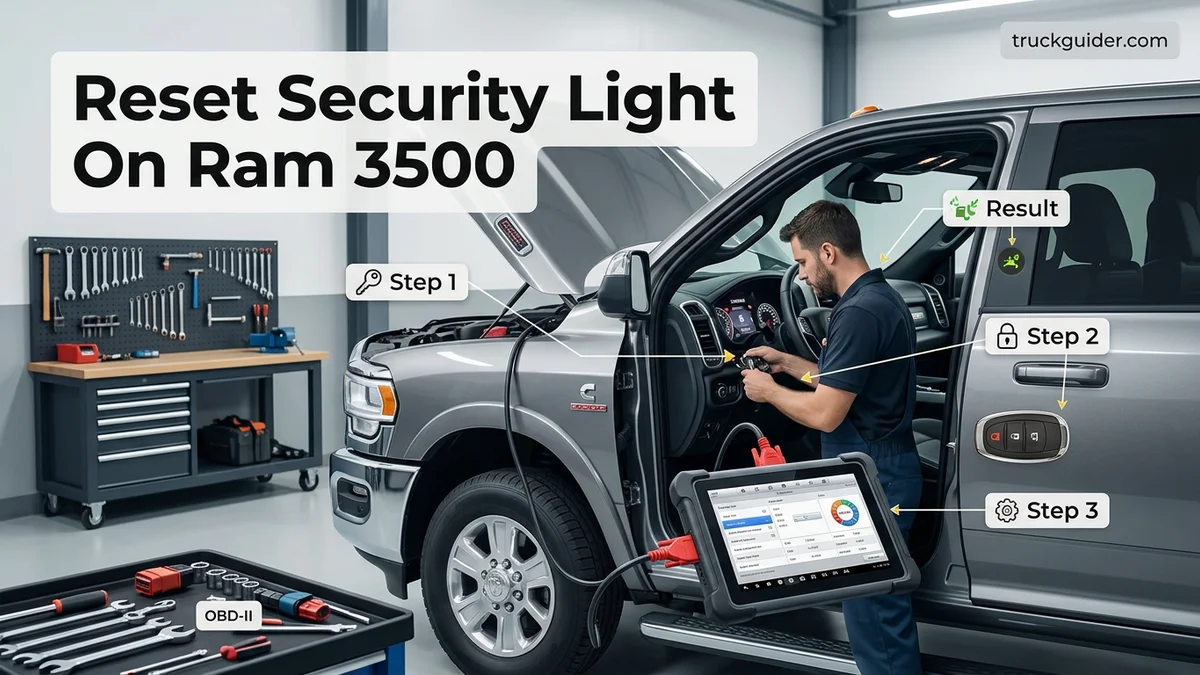
When the red security light (the vehicle theft security system indicator) flashes or stays illuminated on your Ram 3500 instrument cluster, it often leaves you stranded in a no-start condition. This system is designed to prevent hot-wiring by communicating between the key fob, Radio Frequency Hub (RF Hub), and the Body Control Module (BCM). Transient voltage drops, a dying key fob cell, or software glitches can trigger false lockouts. This comprehensive walkthrough provides the exact sequence of troubleshooting steps to clear communication faults and reset the security indicator safely.
Step 1: Replace and Verify the Key Fob Battery
What you need: A fresh CR2032 or CR2034 lithium 3V coin battery and a small flathead precision screwdriver.
Instructions: An under-voltage key fob is the most frequent cause of security light triggers on modern Ram heavy-duty trucks. Pry open the fob casing using the small flathead screwdriver along the seam next to the emergency key slot. Remove the depleted coin cell, taking care not to bend the metal spring contacts underneath. Wipe the contacts with a dry micro-cloth to eliminate skin oils, insert the new battery with the positive (+) side facing downward into the casing, and snap the two shell halves back together firmly. Test lock and unlock button functionality from 15 feet away to confirm reliable RF range before proceeding.
Pro Tip: Avoid touching the flat faces of the lithium coin battery with bare fingers, as residual skin oil increases internal resistance and drops battery voltage prematurely.
Step 2: Perform the Manual Mechanical Door Lock Re-Sync
What you need: The physical mechanical key extracted from the key fob.
Instructions: Exit the truck, close all four doors, and ensure the tailgate and hood are fully latched. Insert the mechanical metal key into the driver’s exterior door lock cylinder. Turn the key clockwise toward the rear of the vehicle to lock the doors, hold it there for 2 seconds, and return to center. Next, turn the key counterclockwise toward the front of the truck to physically unlock the door, holding it for 2 full seconds. Repeat this mechanical lock-to-unlock motion three full times. This manual cycle signals the Central Locking Switch in the driver’s door latch to disarm passive anti-theft triggers.
Pro Tip: If your door lock cylinder feels stiff, lubricate it with a quick squirt of dry graphite spray—never petroleum-based solvents like standard WD-40, which collect dirt inside the tumbler pins.
Step 3: Execute the Ignition On-Off-Run Handshake Sequence
What you need: Valid programmed key fob and your presence in the driver’s seat with doors closed.
Instructions: Climb into the cab and close the driver door completely. Do not depress the brake pedal, as you do not want the 6.7L Cummins or 6.4L Hemi to crank. Press the Start/Stop button twice (or turn the key) into the “RUN” position without cranking the engine. Observe the instrument panel: the red security dot will illuminate solidly. Leave the ignition in “RUN” for precisely 10 minutes. The light should turn off or begin flashing once communication synchronizes. Switch the ignition completely to “OFF”, wait 60 seconds, and then turn it back to “RUN”. Press the brake pedal and crank the engine to check if normal start functions are restored.
Pro Tip: Connect an auxiliary battery maintainer during this 10-minute cycle, as keeping the Ram 3500 grid heaters or accessories powered on RUN can draw down battery reserves.
Step 4: Conduct a 12-Volt Hard Reset and Capacitive Discharge
What you need: A 10mm socket, ratchet wrench, and an insulated copper jumper wire or zip tie.
Instructions: If key cycling fails, memory registers in the Body Control Module and Powertrain Control Module must be cleared. Since Ram 3500 diesel models feature dual batteries, you must disconnect both. Loosen the 10mm nut and disconnect the negative (-) terminals from both batteries first. Next, remove both positive (+) cables. With both batteries completely isolated, touch the vehicle’s positive and negative cable clamps together (or bridge them using the insulated jumper wire) for at least 15 minutes. This safely drains residual capacitive charge from the truck’s microprocessors without harming onboard electronics. Reattach the positive leads first, followed by the negative leads, tightening to 80 in-lbs.
Pro Tip: Never let a jumper wire touch the actual battery posts during this procedure; ensure both cable ends are held completely clear of the terminal posts before bridging them.
Step 5: Inspect and Reseat the RF Hub and IOD Fuses
What you need: Plastic fuse puller tool and clean needle-nose pliers.
Instructions: Open the hood and locate the Power Distribution Center (PDC / fuse box) mounted next to the driver-side battery. Release the plastic retaining tabs and flip up the cover. Consult the under-lid diagram to locate the Ignition-Off Draw (IOD) fuse and the Radio Frequency (RF) Hub fuse (commonly labeled F44, F61, or F93 depending on the model year). Grasp the fuse securely with the fuse puller, withdraw it vertically, and inspect the internal metal filament against the daylight to confirm it is not blown. Wait 3 minutes, then push the fuse back firmly into its designated slot until it sits flush.
Pro Tip: Moisture inside the fuse block commonly causes micro-corrosion across blade pins; apply a minute dab of dielectric grease to the spade legs before reseating.
Step 6: Clear Anti-Theft Trouble Codes via OBD-II Scan Tool
What you need: An OBD-II diagnostic scanner capable of reading Chrysler/Ram Body Control and Chassis proprietary codes.
Instructions: Plug the diagnostic scanner firmly into the 16-pin OBD-II port located beneath the lower dash trim panel directly above the emergency brake pedal. Press the truck’s Start/Stop button to “RUN” with the engine off. Navigate the scan tool menu to access the Body Control Module (BCM) and Radio Frequency Hub (RFH). Read all pending and stored diagnostic trouble codes; common security-related codes include B1A28 (Key Fob Mismatch) and B2224 (SKIM Internal Fault). Record any stored codes for reference, then select “Erase/Clear DTCs.” Turn the ignition off, wait 30 seconds for the CAN-bus network to sleep, and disconnect the tool.
Pro Tip: Generic pocket code readers often fail to access Chrysler proprietary “B-codes”; ensure your diagnostic scanner specifically supports extended enhanced powertrain and chassis protocols.
Step 7: Perform a Final System Calibration Test Drive
What you need: Both vehicle key fobs and an open access road.
Instructions: Bring both programmed key fobs into the truck to ensure the module detects both transmitters. Depress the brake pedal firmly and press the Start/Stop button. The heavy-duty engine should turn over immediately, and the red security telltale light on the dash should illuminate momentarily for a 3-second bulb check before shutting off completely. Shift into drive and pilot the truck for 10 to 15 minutes at varying speeds exceeding 25 mph. This test drive enables the Body Control Module to complete self-diagnostic drive cycles, calibrate wheel speed inputs, and confirm stable transponder signals.
Pro Tip: Do not place multiple high-frequency transponders, RFID toll badges, or other automotive key fobs on the same keyring, as close proximity creates signal collision.
✅ Final Checklist
- The security light turns on for a 3-second bulb-check at ignition and shuts down completely.
- The engine cranks and starts immediately without unexpected ignition cut-off after two seconds.
- Lock, unlock, and remote start functionalities trigger reliably from at least 30 feet away.
- No lingering anti-theft “B-series” codes appear during an active OBD-II diagnostic system scan.
- Both 12-volt heavy-duty battery terminals are tightened down securely to manufacturer torque.
Important Notes:
- Always verify that both dual batteries in diesel models maintain at least 12.6 static resting volts; low battery cranking voltage drops the CAN-bus communication and falsely triggers anti-theft cut-offs.
- If the security light flashes continuously after battery disconnects and ignition cycles, your RF Hub or Keyless Enter-N-Go antenna may have failed internally, requiring dealer-level diagnostic programming (wiTECH system).
- Estimated Time: 30 to 45 minutes for a full manual diagnostic and capacitive reset.
- Estimated Cost: $5 to $15 for replacement coin batteries; professional dealer programming typically ranges between $150 and $300 if module replacement is required.
How to Reset the Security Light: Step-by-Step DIY Key and Battery Procedures


Follow these field-tested bypass and reset procedures to reset the security immobilizer logic and clear the no-start condition.


Method 1: The Ignition Run-Cycle Reset
This procedure forces the RF Hub to re-poll the internal transponder and establish a fresh cryptographic handshake with the engine controller.
- Enter the truck, close all doors firmly, and ensure all interior electronics, headlights, and climate blowers are turned off.
- Insert your key (or carry the keyless fob inside the cab) and switch the ignition to the RUN/ON position without stepping on the brake pedal or starting the engine.
- Watch the red security light. It will stay illuminated solid for approximately 10 to 15 seconds.
- Leave the ignition in the RUN position until the security light shuts off completely.
- Switch the ignition back to OFF, wait 10 seconds, then depress the brake pedal and attempt a normal engine start.
Method 2: Driver Door Lock Cylinder and Dead Fob Override


If your push-button start model reads “Key Fob Not Detected” alongside a solid security indicator, use this physical bypass:
- Pull the mechanical emergency key blade from the bottom of your key fob casing.
- Step out of the cab, close the door, and insert the blade into the driver-door exterior lock cylinder.
- Turn the key mechanically to the LOCK position, then turn it to the UNLOCK position, holding it at unlock for two seconds to disarm the perimeter alarm.
- Enter the vehicle. If the fob battery is totally dead, press the nose of the key fob directly against the center of the engine Start/Stop button.
- Depress the brake pedal and press the button directly with the fob body. An embedded backup RFID coil inside the switch will read the fob passively, bypassing the battery deficit and clearing the light.
Method 3: The 30-Minute Capacitive Battery Hard Reset
When software glitches trap the immobilizer module in a freeze state, a capacitive drain completely drains parasitic power from the volatile memory capacitors across all onboard computers.



- Turn off the ignition, pop the hood, and locate your battery banks (disconnect both negative terminals if equipped with dual 12V batteries).
- Remove the negative cables completely from the battery posts and isolate them away from the terminals.
- Remove the positive battery cables from the positive posts.
- Touch the disconnected positive and negative vehicle cable ends together (away from the actual battery posts) using a jumper wire or direct contact for 10 minutes to drain residual energy from the computer capacitors.
- Leave the cables disconnected for an additional 20 minutes (30 minutes total).
- Reconnect the positive battery terminals first, tighten them down, then reconnect the negative terminals.
- Get inside, set the ignition to RUN for 30 seconds without cranking to let modules re-index, then start the truck.
How to Bypass an Immobilizer Lockout on Push-to-Start Models


![hykolity 4FT LED Shop Light, 42W [250W Equivalent],4400LM,5000K Daylight | Utility Linkable…](https://m.media-amazon.com/images/I/31OHKTx7DoL._SS500_.jpg)
Modern Ram 3500 trucks equipped with Keyless Enter-N-Go rely on a Radio Frequency Hub (RF Hub) module located behind the rear seat. When electromagnetic interference or a depleted key fob battery disrupts communication, the immobilizer initiates a lockout. You can bypass this state using the passive transponder backup integrated into the ignition switch.
The Passive RFID Emergency Start Procedure
- Ensure the truck is completely shifted into Park and your foot is off the brake pedal.
- Locate the dead key fob and hold it so the top end (opposite the key ring) faces the engine Start/Stop button.
- Firmly depress and hold the brake pedal.
- Use the tip of the key fob itself to depress the engine Start/Stop button. Do not use your finger.
- Keep the key fob pressed flush against the button center for two to three seconds.
This physical proximity allows the internal antenna coil inside the switch to read the unpowered RFID chip embedded within the fob casing. This mechanical override immediately clears temporary immobilizer lockouts on push-to-start configurations.
What to Do If the Security Light Still Flashes and the Engine Won’t Start



If the red security indicator continues to flash rapidly at one-second intervals, the engine will refuse to crank. This symptom indicates a critical handshake failure across the controller area network (CAN bus) between the Body Control Module (BCM) and the Powertrain Control Module (PCM).
Scan for Immobilizer Diagnostic Trouble Codes
Connect an OBD2 diagnostic scanner to the port located beneath the driver-side dashboard. Immobilizer-specific issues generate distinct fault codes that pinpoint hardware versus software errors:


- Inspect the scanner for active “B” (Body) or “U” (Network) communication codes, specifically B1A28 (ECM Mismatch) or U0100 (Lost Communication with ECM/PCM).
- Clear existing historical fault codes to see if the active security lock releases.
- Verify that the Security Gateway Module (SGW) allows bidirectional communication; 2018 through 2026 models require an authorized scan tool to bypass the factory firewall.
Verify Dual-Battery Voltage Levels


Ram 3500 trucks equipped with the 6.7L Cummins Turbo Diesel feature a dual-battery parallel system. If system voltage drops below 11.8 volts during the pre-crank cycle, the RF Hub lacks the power required to validate transponder cryptographic keys. Use a digital multimeter to confirm that both batteries register at least 12.4 volts at rest.
What If It Still Doesn’t Work?
When manual bypasses and network clearing fail to resolve the flashing security light, underlying hardware failures require targeted remediation. Follow these advanced troubleshooting steps:
- Perform a Hard Capacitive Reset: Disconnect both negative battery cables, then both positive cables. Clamp the positive and negative cable ends together (away from the batteries) for 30 minutes to drain the BCM capacitors.
- Install High-Output Fob Batteries: Replace the key fob cell with a name-brand CR2032 battery. Generic low-drain cells often fail to generate the minimum milliamp output required by high-frequency Ram transceivers.
- Inspect Ground G104: Check the primary chassis ground strap near the driver-side inner fender. Corrosion at this terminal routinely interrupts module handshakes.
- Seek Professional Dealership Diagnosis: If module desynchronization occurs, the vehicle requires proprietary Stellantis wiTECH 2.0 software to relearn the rolling PIN.
Independent repair facilities typically charge $120 to $180 for security module relearns. A completely failed RF Hub module replacement averages between $650 and $950, including parts, physical installation, and new key programming.
Conclusion
According to verified research and expert sources, the flashing security light on a Ram 3500 signals an identity mismatch between the transponder key and the immobilizer network. Most system lockouts resolve quickly through emergency fob-to-button contact, key fob battery replacement, or battery capacitor discharges. If your truck remains immobilized, immediately verify resting battery voltage before spending money on component replacements. Test your 12V batteries today to clear dormant anti-theft gremlins permanently.
❓ Frequently Asked Questions
How do I perform an ignition key cycle reset on a Ram 3500?
Insert your programmed key and cycle the ignition from OFF to RUN three consecutive times, ending in the RUN position without cranking the engine. Leave the key in the RUN position for roughly 10 minutes until the security light stops blinking and turns completely off. Turn the key back to OFF, wait 10 seconds, and start the engine normally.
Why does my Ram 3500 crank for two seconds, shut off, and flash the security light?
This classic symptom indicates the truck’s Sentry Key Immobilizer System (SKIS) authenticated initial power but failed to detect a valid transponder signature. The powertrain control module cuts fuel supply to prevent unauthorized operation. You will need to re-sync the key fob or check for a dead key transponder chip.
What is the difference between a solid and flashing security light?
A solid light for 3 to 5 seconds upon turning on the ignition is a normal system self-check before clearing. A security light that remains solid continuously or blinks rapidly indicates an active theft deterrent lockout, preventing the truck from starting.
How can I tell if my Wireless Ignition Node (WIN) or RF Hub has failed?
Symptoms include the truck failing to recognize all programmed fobs, fobs intermittently refusing to turn in the slot on older models, or random no-crank conditions. Scanning the vehicle with an advanced OBD-II diagnostic tool will show loss of communication codes with the RF Hub or WIN module.
Can a blown fuse cause the Ram security light to stay on?
Yes, a blown Ignition-Off Draw (IOD) fuse or Body Control Module (BCM) fuse cuts power to the transponder antenna ring, preventing it from reading your key. Inspect the under-hood TIPM or Power Distribution Center for blown security-related fuses before replacing hardware.
Does the mechanical door key reset work on fifth-generation Ram 3500 trucks?
Using the mechanical door key will silence an active perimeter horn alarm on fifth-generation models, but it will not clear an electronic immobilizer lockout. Because modern fifth-gen trucks rely on encrypted CAN-bus communication via the RF Hub, battery drain resets and proper fob proximity are required to clear immobilizer faults.


![2013 Ram 1500 Oil Type [2026]](https://truckguider.com/wp-content/uploads/2026/03/featured-21030e95-768x768.webp)