F150 Auto Start Stop Disable Methods by Year Through 2026

F150 auto start stop disable is straightforward if your truck has the factory OFF button: press it once to stop the engine from shutting down automatically during the current drive. However, Ford’s factory setting normally returns to ON the next time you start the truck.
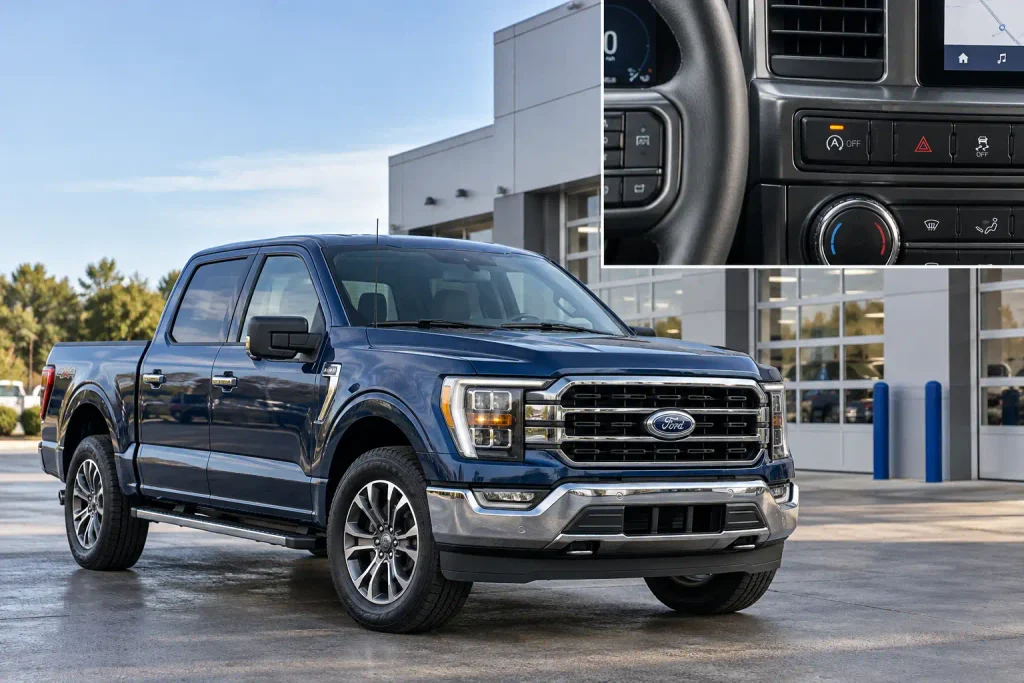
If you want Auto Start-Stop to remain off after a restart, a compatible preference-memory module may help. FORScan modifications are another option on certain older configurations, but there is no verified universal programming change for every 2015–2026 F-150.
The correct method depends on model year, equipment and whether you have the 3.5L PowerBoost Hybrid.
What to Check Before Disabling F150 Auto Start Stop
Recommended Best Deal Products
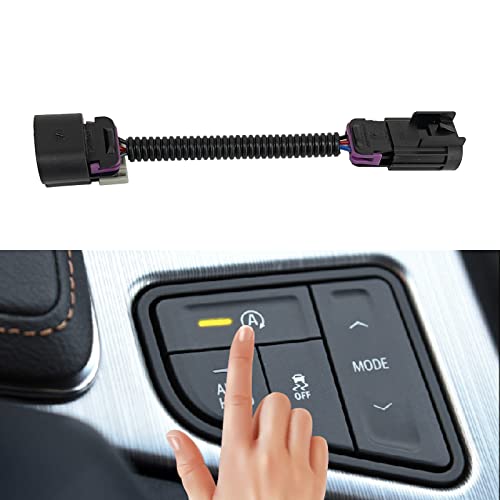
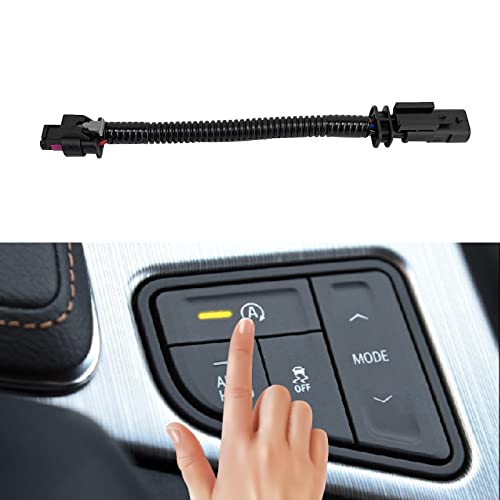

Start by confirming that your Ford F-150 actually has conventional Auto Start-Stop. It shuts the gasoline engine off during certain stops, but equipment varies by engine and year.
Check these details before choosing a method:
- Model year: Locate it on your registration or driver’s door label.
- Engine: Identify the 2.7L EcoBoost V6, 3.5L EcoBoost V6, 5.0L V8 or other fitted powertrain. A 3.5L PowerBoost Hybrid requires separate guidance.
- Factory switch: Look for a button with an encircled A and an OFF marking. Its exact position varies by dashboard.
- Owner’s manual: Confirm that the truck is equipped with the feature and how its indicators work.
Don’t confuse Auto Start-Stop at traffic lights with Automatic Engine Stop, which can shut down a parked, idling truck after an extended period. They have separate controls.
How to Disable F150 Auto Start Stop With the Button
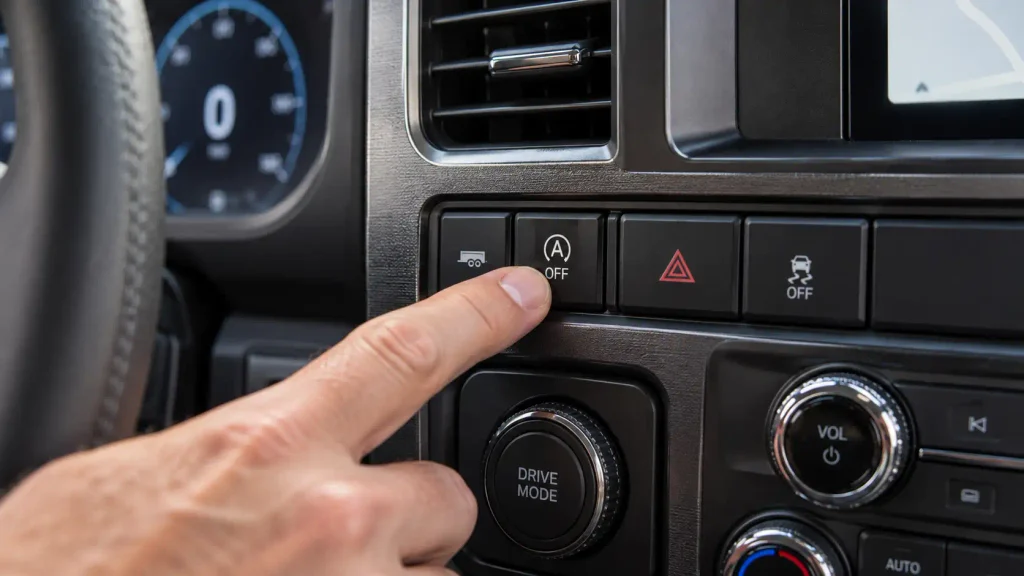
The factory button is the quickest, no-cost option. Ford’s 2024 F-150 owner’s manual confirms that pressing the switch deactivates Auto Start-Stop for one ignition cycle.
- Start the truck. Keep it stationary in a safe location while identifying the control.
- Find the Auto Start-Stop switch. Look for the A OFF symbol on the center controls or the location specified in your model-year manual.
- Press the switch once. On documented models, the switch’s OFF indicator illuminates to confirm that you selected the disabled setting.
- Drive normally. The engine should no longer make its usual Auto Start-Stop shutdowns during that ignition cycle, assuming no other condition requires an engine shutdown.
Press again to restore normal operation.
What happens after a restart? On F-150 models covered by Ford’s documented one-cycle behavior, the system is enabled again when the ignition is switched on. A factory OFF button is therefore a temporary setting, not permanent reprogramming.
Before opening the hood, select Park, set the parking brake and turn off the ignition. Auto Start-Stop can restart an idling engine unexpectedly.
Which F150 Years Support Each Disable Method
Recommended Best Deal Products


Ford offered Auto Start-Stop on selected 2015 F-150 engines before expanding availability. Trucks without it need no disabling hardware.
The table separates documented factory operation, aftermarket fitment listings and programming reports. A listed module range does not mean every engine, trim or switch layout in that range is supported.
| F-150 Model Years | Factory OFF Button | Memory Module | FORScan | Important Exception |
|---|---|---|---|---|
| 2015–2020 | Yes, if equipped; resets after ignition cycle | Year-specific products listed | Owner-reported methods; verify configuration | Some 2015 trucks lack Auto Start-Stop |
| 2021–2023 | Yes, if equipped; one-cycle setting | Separate 2021–2023 products listed | Some owner-reported solutions | PowerBoost Hybrid requires separate treatment |
| 2024–2025 | Yes, if equipped; one-cycle setting | Separate 2024–2025 products listed | No universal verified solution | Newer module behavior differs from earlier trucks |
| 2026 | Yes, if equipped; check exact manual | Separate 2026 products listed | No universal verified solution | Tow/Haul inhibits it in documented configurations; PowerBoost exclusions apply |
The distinction between these four hardware groups comes from current manufacturer applications, not an assumption that a single device fits 12 model years. Confirm the exact application.
For example, the 2015 2.7L EcoBoost V6 was among the early F-150 applications with standard Auto Start-Stop. Other engines and configurations from that period must be checked individually rather than assumed to have the same equipment.
How F150 Drive Modes Affect Auto Start Stop
You may already have a factory operating mode that inhibits Auto Start-Stop. But a drive mode changes more than the engine-stop function, so it is not automatically the best setting for everyday commuting.
Ford’s 2026 F-150 Tow/Haul documentation states that Auto Start-Stop is inhibited in the documented Tow/Haul configuration. Tow/Haul also changes transmission shift behavior, enhances engine braking and can alter steering response.
To check your truck:
- Open the available drive-mode selection using the factory control.
- Select Tow/Haul only when it suits the driving and load conditions.
- Check the Start-Stop status display for your particular model.
- Return to your normal drive mode when Tow/Haul is no longer appropriate.
Other years may inhibit Start-Stop in different modes. Check your manual rather than assuming Sport or Off-Road always disables it.
Do not engage 4H or 4L on dry pavement simply to suppress Auto Start-Stop. Transfer-case restrictions still apply.
If you’re using Tow/Haul for actual trailer work, compare your configuration with the Ford F-150 towing capacity chart for 2013–2023 rather than assuming a drive mode increases the truck’s rated towing limit.
How F150 Start Stop Memory Modules Keep It Off
A preference-memory module typically restores your previously selected OFF setting at startup instead of deleting the factory system.
One manufacturer, Autostop Eliminator, currently separates its F-150 compatibility listings into 2015–2020, 2021–2023, 2024–2025 and 2026 applications. Its catalog has advertised prices starting around $89.99, while its 2026 product page listed a $109.99 model when checked in October 2026. Prices vary.
There are two installation styles to distinguish:
- Diagnostic-port devices: Connect through a compatible data-link connector, where supported by the specific product.
- Inline harness devices: Connect at a manufacturer-specified switch or control harness. Installation location and connector shape depend on the truck and module version.
Check engine, switch layout, driver-monitor-camera and hybrid exclusions before buying.
How to Install and Verify a Compatible Module
- Check the exact product fitment. Match the year, powertrain and required control or harness configuration.
- Shut the truck down. Place the transmission in Park, apply the parking brake and follow the manufacturer’s power-off instructions.
- Locate the specified connector. Follow the instructions supplied with that exact module; do not substitute another model year’s wiring location.
- Install the device as directed. Avoid cutting wires or forcing connectors that do not match.
- Set the factory button to OFF and restart. Confirm whether the selected preference is restored after the next ignition cycle.
The device must remain installed. Removing it typically restores factory button behavior because it does not erase vehicle software.
Hybrid warning: The reviewed 2026 Autostop Eliminator product specifically excludes PowerBoost Hybrid models. Its conventional F-150 modules must not be treated as universal hybrid solutions.
When FORScan Can Disable F150 Auto Start Stop
FORScan reads and configures supported Ford modules. It is not Ford’s universal Auto Start-Stop OFF control.
Some 2015–2023 owners report inhibiting Auto Start-Stop through the Power Steering Control Module or battery-management settings. These have different side effects.
The newer trucks are less straightforward. In a 2024 F-150 FORScan discussion, owners describe options missing from the software interface and uncertainty about whether older steering-related changes still work. These are owner reports, not Ford-approved procedures.
What to Check Before Making Any FORScan Change
- Confirm the exact truck configuration. Record model year, engine, drivetrain and available module software information.
- Use a supported diagnostic adapter. Confirm compatibility with the installed FORScan version.
- Save original module data. Export the original configuration and preserve a separate copy before editing anything.
- Verify the proposed change against that configuration. Do not paste an As-Built value copied from a different year or module revision.
- Test for warnings and diagnostic trouble codes. If an error appears, restore the saved configuration and diagnose it before proceeding.
No universal FORScan coding values are provided because none was verified across 2015–2026 trucks.
In particular, disabling the Battery Monitoring System (BMS) simply to prevent Auto Start-Stop is a poor default recommendation. BMS informs the truck’s charging strategy, and owner discussions document unwanted diagnostic warnings after certain configuration changes.
For daily driving, prefer the factory button or a compatible memory device.
Why PowerBoost F150 Requires Different Disable Advice
The 3.5L PowerBoost Full Hybrid V6 uses a hybrid propulsion system, so conventional gasoline-engine Auto Start-Stop instructions cannot automatically be transferred to it.
Ford also describes Eco Idle on the hybrid. Eco Idle manages engine running and high-voltage battery charging while the truck is in Park. It is not merely a new name for the conventional F-150’s Auto Start-Stop OFF button.
On documented 2026 hybrid configurations, Eco Idle can be adjusted through Settings > Vehicle Settings > Eco Idle while the truck is running in Park. This setting affects the hybrid’s parked-idle behavior. It should not be described as a permanent disable for all hybrid engine stops.
The reviewed conventional F-150 Autostop Eliminator applications exclude PowerBoost Hybrid. Matching the year alone is insufficient.
If your main concern is frequent hybrid engine cycling, consult the hybrid-specific owner’s manual or a qualified Ford technician before changing module settings.
Which F150 Start Stop Modifications Should You Avoid
Some shortcuts interfere with unrelated systems. An engine that stays running does not prove the modification is harmless.
Avoid disconnecting the battery monitoring sensor. An unplugged sensor can affect charging-system information and trigger warnings. A low battery or charging problem needs diagnosis, not intentional concealment.
Avoid cutting or shorting the Auto Start-Stop switch wiring. Wiring layouts and module inputs vary; an internet bypass built for an older dashboard can be inappropriate for a newer truck.
Avoid copying unfamiliar FORScan values. An As-Built modification that works on one owner’s truck is not evidence of compatibility with yours.
Avoid using tow electrical adapters or four-wheel-drive settings as tricks. These can affect trailer detection, dashboard behavior or driveline operation beyond Auto Start-Stop.
Warranty outcomes depend on the modification, the failure and applicable warranty terms.
How to Confirm F150 Auto Start Stop Is Off
Distinguish selected OFF from temporary unavailability caused by battery charge or temperature.
- Check the switch: With the engine running, press the Auto Start-Stop OFF button and verify its OFF indication on your model.
- Confirm normal operation: Drive in a permitted environment and observe the Start-Stop status. Never create an unsafe traffic situation just to test the feature.
- Restart the truck: If using only the factory button, expect the one-cycle setting to reset. With a compatible memory module, check that the OFF preference returns.
- Check for faults: Look for charging warnings, malfunction messages or diagnostic trouble codes after installation or software changes.
One important distinction: A gray or crossed-out Start-Stop indicator does not necessarily prove that a disabling device worked. It may simply mean operating requirements have not been met.
If an aftermarket device fails to restore the OFF preference, verify its exact application and connections before replacing parts or changing software.
What F150 Auto Start Stop Warnings Actually Mean
Ford’s indicators distinguish normal shutdown, unavailability and warnings. Displays vary by year.
| Indication | What It Usually Means | Next Action |
|---|---|---|
| OFF light at the switch | Driver has selected Auto Start-Stop OFF | Expect a reset after the key cycle unless a compatible memory module restores it |
| Green Start-Stop indicator | Engine is currently stopped by the system | Remain prepared for an automatic restart |
| Gray symbol with a slash | Automatic engine stopping is temporarily unavailable | Check the status message and operating conditions |
| Flashing amber indicator and message | The system needs driver attention | Follow the specific cluster instruction; restart manually if directed |
Ford documents several reasons why the engine may remain running: low battery charge, engine warm-up, extreme outdoor temperatures, windshield defogging, cabin climate demand or an open driver door. These conditions do not mean Auto Start-Stop has been permanently disabled.
Short-trip drivers should monitor battery condition. For testing and replacement timing, see our guide to how long a truck battery should last.
If an amber warning persists or the truck reports a charging-system fault, correct the underlying problem before attempting another bypass.
Which F150 Disable Method Is Best for You
For most owners, the best F150 auto start stop disable method is the factory OFF button when they only need temporary control. It costs nothing, requires no wiring and preserves the original operating system.
If your goal is to keep the OFF preference across restarts, choose only a confirmed compatible memory module for your exact year, engine and control layout. Treat FORScan as configuration-specific technical work, not a universal five-minute shortcut. PowerBoost owners should use hybrid-specific guidance rather than conventional gas-engine module recommendations.
Start with the button and your vehicle’s owner’s manual. Consider modifications only after confirming the feature is fitted, the solution matches your truck and there are no existing battery or charging faults.
Common F150 Auto Start Stop Disable Questions
Can You Permanently Disable Auto Start Stop on a Ford F150?
The factory OFF button does not permanently disable it; the documented setting resets at the next ignition cycle. Compatible aftermarket memory modules can automatically restore the OFF preference, while some older-truck software modifications are owner-reported and require configuration-specific verification.
Does the Ford F150 Auto Start Stop Button Reset?
Yes, on the factory systems documented by Ford, the button’s OFF selection lasts one ignition cycle. Start the truck again and Auto Start-Stop normally returns to its default enabled state unless an appropriate device restores your preference.
Can FORScan Disable Auto Start Stop on a 2024 F150?
No universal, verified 2024 F-150 FORScan procedure was established in this research. Some owners report that older configurations no longer work or produce warnings; confirm exact module support before making any change.
Does Tow Haul Mode Disable F150 Auto Start Stop?
Ford’s 2026 F-150 manual confirms that Tow/Haul inhibits Auto Start-Stop in the documented configuration. Other years and equipment packages may behave differently, and Tow/Haul also changes transmission behavior, so check your own manual before using it for this purpose.
Can You Disable Auto Start Stop on an F150 PowerBoost?
Do not assume conventional F-150 Auto Start-Stop devices will work on a PowerBoost Hybrid. The checked aftermarket applications exclude that powertrain, and Ford’s hybrid Eco Idle control addresses a different operating function. Use hybrid-specific documentation for your exact year.