2004 Dodge Ram Headlights: Best Assemblies & LED Upgrades

Upgrading your 2004 Dodge Ram headlights to modern LED or projector assemblies is the most effective way to improve nighttime visibility and safety. Whether you prefer OEM-style chrome or custom blacked-out housings, ensuring compatibility across 1500, 2500, and 3500 trims is essential for a perfect fit.
🎯 Key Takeaways
- Takeaway 1:Choose between factory-style chrome or modern blacked-out projector housings for your Ram.
- Takeaway 2:LED upgrades provide superior brightness compared to aging, yellowed halogen factory bulbs.
- Takeaway 3:Verify if your 2004 Ram uses the standard 9007 dual-filament bulb configuration.
- Takeaway 4:Ensure all replacement assemblies are DOT and SAE compliant for street legal use.
- Takeaway 5:Replacing the entire housing is more effective than polishing heavily oxidized lenses.
If your 2004 Dodge Ram headlights look yellow, hazy, or dim, you have three primary upgrade paths: factory-style replacements, custom projector housings, or high-output LED bulb conversions. Finding the right fit depends largely on whether your truck uses the standard single-beam (9007 bulb) or the dual-beam Sport package configuration. Upgrading these assemblies is one of the most effective ways to restore the front-end look of your 3rd Gen Ram while significantly improving night-time safety.
Replacing the entire assembly is often more cost-effective than trying to polish old, oxidized plastic that will just turn yellow again in six months. Modern aftermarket options offer better seals and improved light dispersion compared to the original 20-year-old technology. Whether you want to maintain the classic chrome look or move toward a smoked “blacked-out” aesthetic, there are specific kits designed to plug directly into your factory harness without cutting or soldering wires.
Top Replacement Headlight Styles for 2004 Dodge Ram
Choosing a new set of assemblies involves balancing your budget with your desired light output. For most 2004 Dodge Ram owners, the choice boils down to maintaining the stock appearance or upgrading to a more aggressive, modern look with enhanced optics. You can find these options on major platforms like Amazon, eBay, or specialized truck retailers like RealTruck and AmericanTrucks.
OEM Style and Chrome Replacements
If you want to keep your truck looking original, factory-style chrome housings are your best bet. These are typically the most affordable option and offer the easiest installation. Brands like TYC and DEPO are industry standards, providing CAPA-certified parts that match the fit and finish of the original Mopar units. These are ideal if you just want to pass inspection or clear up your field of vision without changing the truck’s character.
- Best for: Daily drivers, work trucks, and restoration projects.
- Bulb Compatibility: Designed specifically for standard 9007 halogen bulbs but can accept LED drop-ins.
- Pros: Excellent peripheral light spread and the lowest price point for a full set.
- Purchasing Tip: Always look for “plug-and-play” kits that include the mounting brackets to save time during the swap.
Projector and Blacked-Out Custom Assemblies
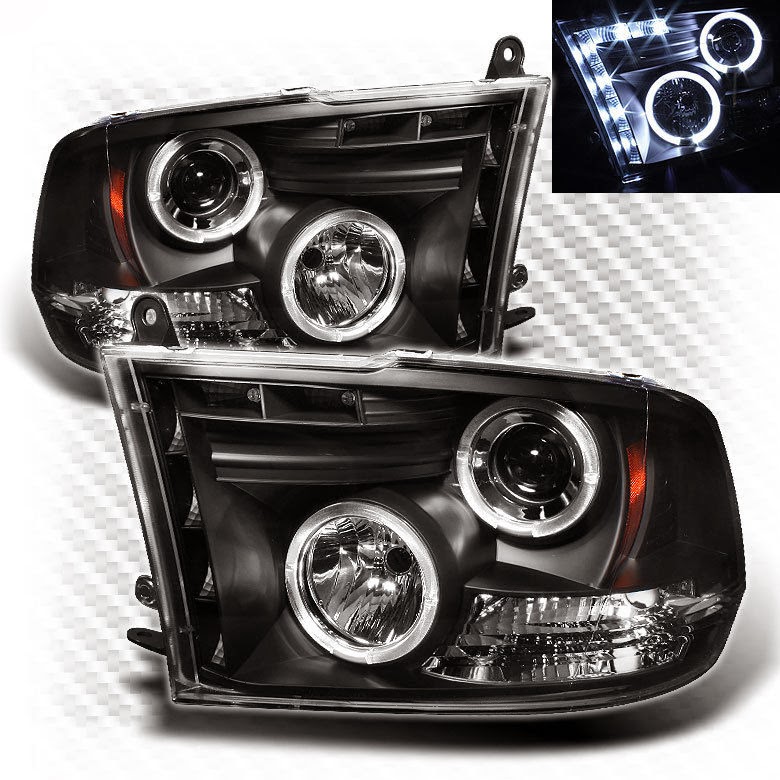
For a significant performance jump and a modern aesthetic, projector-style headlights are the way to go. Unlike the standard reflector bowls that scatter light, projectors use a specialized lens to focus the beam directly onto the road. This prevents glare for oncoming traffic and provides a sharper “cut-off” line. Popular brands for the 2004 model year include Spec-D Tuning, Spyder Auto, and AlphaRex.
- Smoke/Black Housings: These offer a “murdered out” look. Note that heavily tinted lenses can slightly reduce total light output unless paired with high-lumen LEDs.
- Halo/CCFL Rings: Many custom units feature integrated LED rings or “angel eyes” that act as daytime running lights (DRL), giving your 2004 Ram a 5th Gen appearance.
- Fitment Note: Verify if your Ram is a “Sport” model. The Sport trim often uses a quad-lamp setup, meaning a standard 1500/2500/3500 headlight housing may not fit without a wiring adapter.
2004 Dodge Ram Headlights Made Easy: Your Essential Action Plan
The 2004 Dodge Ram is a workhorse, but like any vehicle of its age, the headlight assemblies can become clouded, or the bulbs can burn out, significantly reducing your nighttime visibility. Whether you are replacing a single bulb or installing entirely new aftermarket housing units, understanding the specific three-bolt mounting system used on the third-generation Ram is crucial. This guide covers everything from the “hidden bolt” location to the final aiming process, ensuring your truck stays safe on the road while looking its best. Following these steps will save you a trip to the dealership and prevent the common mistake of breaking the plastic alignment tabs during removal.
Step 1: Gathering Tools and Preparing the Workspace
What you need: A 10mm socket, a socket extension (at least 6 inches), a ratchet, a flat-head screwdriver or trim removal tool, and a pair of latex or nitrile gloves.
Instructions: Before you begin, ensure your Dodge Ram is parked on a level surface with the engine off and the parking brake engaged. Open the hood and locate the primary mounting points above the headlight. On the 2004 model, the headlight is held in by three specific 10mm bolts. It is highly recommended to wear gloves, not just for cleanliness, but to protect the new bulbs from skin oils later in the process. Clear the area around the grille and the wheel wells of any debris or mud, as you will need to reach into the inner fender liner to access one of the mounting points. Having a small magnetic tray nearby to hold your bolts is a life-saver, as these specific 10mm bolts are easily lost in the engine bay.
Pro Tip: Spray the three mounting bolts with a small amount of penetrating oil (like WD-40 or PB Blaster) five minutes before you start. These bolts are exposed to road salt and moisture, making them prone to rusting and snapping if forced.
Step 2: Removing the Upper Mounting Bolts
What you need: 10mm socket and ratchet.
Instructions: Locate the two visible 10mm bolts on the top of the headlight assembly. One is positioned toward the inner edge near the radiator shroud, and the other is toward the outer edge near the fender. Use your 10mm socket to loosen these bolts counter-clockwise. They are usually not extremely tight, but they are long, so it may take several turns to free them completely. Once the bolts are loose, carefully pull them out and place them in your magnetic tray. You will notice that even with these two bolts removed, the headlight housing remains firmly in place. Do not attempt to yank the housing out yet, as there is a third fastener and two plastic alignment pins still securing the unit to the truck’s frame.
Pro Tip: Keep the hood fully propped open to its highest position. This gives you a better angle to apply downward pressure on the ratchet, preventing the socket from slipping and rounding off the bolt heads.
Step 3: Accessing and Removing the Hidden Bolt
What you need: 10mm socket, long extension (8-10 inches), and a flashlight.
Instructions: This is the step where most DIYers get stuck. There is a third 10mm bolt located behind the headlight, accessible through a small gap between the bumper and the fender or through the wheel well liner. For the 2004 Ram, the easiest method is often reaching up from behind the front bumper. Reach into the space directly below the outer corner of the headlight. You will feel a bolt head facing toward the rear of the truck. Use your long extension to reach this bolt. It is tucked into a tight corner, so use your flashlight to verify the socket is seated correctly. Turn the ratchet counter-clockwise until the bolt is free. Be careful not to drop it into the bumper structure, as it can be difficult to retrieve.
Pro Tip: If you find it too tight to reach from the front, turn your steering wheel all the way to the side. This opens up the wheel well, allowing you to peel back the plastic liner and access the bolt from the side with much more room to move your arm.
Step 4: Detaching the Headlight Assembly
What you need: A plastic trim removal tool (optional) and a firm grip.
Instructions: With all three bolts removed, the housing is now held only by two plastic “snap-in” studs located on the outer edge of the assembly near the fender. To remove the housing, grasp the edges firmly. Pull the headlight straight forward toward the front of the vehicle. You may need to use a slight wiggling motion to break the seal of years of road grime. If it feels stuck, do not pry with a metal screwdriver, as this will chip your paint or crack the plastic housing. Instead, use a plastic trim tool to gently nudge the outer edge away from the fender. You will hear a distinct “pop” when the plastic studs release from their sockets. Support the weight of the headlight as it comes free so it doesn’t drop and scratch your bumper.
Pro Tip: Apply a small amount of silicone grease to these plastic studs before reinstallation. This makes the “snap-in” process smoother and ensures that if you ever need to remove the lights again, they won’t be seized in place.
Step 5: Disconnecting the Electrical Harnesses
What you need: Your hands and a small flat-head screwdriver.
Instructions: Once the housing is pulled away from the body, it will still be attached by the wiring. There are typically two main connectors: the primary headlight bulb (9007 bulb type) and the turn signal/parking lamp. Most 2004 Rams use a red locking tab on the main electrical connector. Slide this red tab back (away from the bulb) to unlock it. Once unlocked, depress the black plastic release lever and pull the connector straight off. For the turn signal, you can usually twist the entire bulb socket counter-clockwise about 45 degrees to remove the socket from the housing without unplugging the wires. This keeps the bulbs protected inside the socket while you swap out the large plastic housing units.
Pro Tip: Inspect the plastic connectors for any signs of melting or corrosion (green crust). The 2004 Ram is known for drawing high current through these wires, and if the plastic is melted, you should replace the pigtail harness now to avoid a fire hazard or flickering lights.
Step 6: Installing New Bulbs and Reassembling
What you need: Replacement 9007 bulbs (if needed) and the new/cleaned housing.
Instructions: If you are replacing the bulbs, remove the old one by unscrewing the plastic retaining ring. Insert the new 9007 bulb, ensuring the three plastic tabs on the bulb base align with the notches in the housing. Screw the retaining ring back on until tight. Reconnect the electrical harnesses, ensuring the red locking tabs are clicked back into the “locked” position. Before bolting everything back in, set the headlight housing loosely in its cavity and turn on your truck’s lights. Check both high and low beams, as well as the turn signals. It is much easier to fix a loose connection now than it is after you have reinstalled all three bolts.
Pro Tip: NEVER touch the glass of a new halogen bulb with your bare fingers. The oils from your skin create “hot spots” on the quartz glass, which will cause the bulb to shatter or burn out within weeks of installation. Use your gloves or a clean paper towel.
Step 7: Final Mounting and Alignment Pins
What you need: 10mm socket and ratchet.
Instructions: Line up the two plastic alignment studs on the back of the housing with the plastic grommets on the truck’s fender. Push the housing straight back until you hear or feel the “pop” of the studs seating. Now, replace the three 10mm bolts. Start with the “hidden” bolt in the wheel well/bumper area to ensure the housing is pulled flush against the frame. Then, install the two top bolts. Tighten them until they are snug, but do not over-tighten, as the plastic housing can crack under excessive pressure. Ensure the gaps between the headlight and the hood/fender are even on both sides to maintain the truck’s aesthetic lines.
Pro Tip: While the bolts are out, take a moment to clean the mounting surfaces on the truck frame. Removing dirt and rust ensures a more secure fit and prevents the headlight from vibrating while you drive, which can lead to premature bulb failure.
Step 8: Aiming the Headlights
What you need: A Phillips head screwdriver and a flat wall.
Instructions: Park your truck on level ground exactly 25 feet away from a vertical wall. Measure the distance from the ground to the center of your headlight lens and mark that height on the wall with a piece of tape. Turn on your low beams. On the 2004 Ram, there is an adjustment screw accessible from the top of the housing (usually through a small hole in the radiator shroud). Turn this screw to raise or lower the beam. The brightest part of the beam (the “hot spot”) should be about 2 inches below the tape line you made on the wall. This ensures you have maximum down-road visibility without blinding oncoming traffic. Repeat this for the passenger side, ensuring both beams are level with each other.
Pro Tip: Do this adjustment at twilight or night. It is nearly impossible to see the beam cutoff accurately in direct sunlight, and proper aiming is the difference between great visibility and getting flashed by every driver you pass.
✅ Final Checklist
- Verify all three 10mm bolts (two top, one hidden) are tightened and secure.
- Ensure the red locking tabs on the electrical connectors are pushed into the locked position.
- Check that both high beams and low beams are functioning correctly.
- Confirm turn signals and parking lights are operational and not “hyper-flashing.”
- Verify that the headlight housing is flush with the fender and the alignment pins are fully seated.
Important Notes:
- Safety: Always disconnect the negative battery terminal if you are doing extensive wiring work, though for simple bulb/housing swaps, it is generally not required.
- Professional Help: If you notice heavy melting on the wire harness connectors, seek an auto electrician to replace the pigtails to prevent a vehicle fire.
- Estimated Time: 45 to 60 minutes for both sides.
- Cost Range: $20 – $50 for premium bulbs; $150 – $300 for a pair of complete replacement housing units.
Comparing Performance: LED vs. Halogen vs. HID Kits
Once you choose your housing, the internal light source determines how much you can actually see at night. The 2004 Dodge Ram primarily uses a 9007 dual-filament bulb, which handles both high and low beams in one unit. However, the performance between traditional halogen and modern alternatives is vast.
The LED Advantage for 3rd Gen Rams
LED bulbs are the most popular upgrade today because of their cool white color temperature (usually 6000K) and instant-on capability. Unlike older bulbs, high-quality LEDs from brands like Fahren, Beamtech, or Sylvania mimic the filament position of a halogen bulb to prevent scattered light and “dark spots” in your beam pattern.
- CANBUS Compatibility: 2004 Rams are known for sensitive electrical systems. You should prioritize LEDs with built-in resistors or “anti-flicker” decoders to avoid dashboard errors or the “bulb out” warning chime.
- Brightness: A standard halogen puts out about 1,000 lumens, while mid-range LEDs can reach 6,000 to 12,000 lumens per pair.
- Heat Management: Look for bulbs with integrated fans or large aluminum heat sinks to ensure they don’t overheat inside the sealed 2004 housing.
HID Kits vs. High-Performance Halogens
High-Intensity Discharge (HID) kits were the gold standard for years and are still preferred by some for their sheer light volume. They provide an incredibly bright, wide beam but require external ballasts and more complex wiring. For the 2004 Ram, HIDs are best reserved for projector housings. If you put HIDs in a standard reflector housing, the light will bleed everywhere and blind other drivers.
- HID Pros: Strongest light penetration in heavy rain or fog.
- Halogen Upgrades: If you don’t want to deal with electronics, high-output halogens like Philips CrystalVision or GE Nighthawk offer a whiter light than stock while remaining 100% street-legal and flicker-free.
- The Downside: HIDs have a “warm-up” period of 5-10 seconds before reaching full brightness, which can be annoying when switching from low to high beams.
Fitment Guide: Compatibility Across 1500, 2500, and 3500 Models
When shopping for 2004 Dodge Ram headlights, the first thing you need to understand is how compatibility works across the different weight classes. The 2004 model year sits firmly within the third generation (2002–2008 for 1500; 2003–2009 for 2500/3500). For the most part, the headlight housings are interchangeable between the 1500, 2500, and 3500 series for this specific year. However, there is one major caveat you need to watch out for before you click “buy.”
The “Sport” Model Distinction
The most common fitment issue arises from the difference between the Standard trim and the Sport trim. While they may look nearly identical from a distance, the internal wiring and the number of bulbs often differ.
- Standard Models: Usually utilize a single dual-beam bulb (9007) for both high and low beams.
- Sport Models: Often feature a quad-lamp system, meaning they have separate bulbs for high and low beams.
- Physical Mounting: Thankfully, the physical mounting points and the shape of the outer lens are the same, but the electrical connectors will not match if you buy the wrong version.
Year Range Interchangeability
If you are looking for parts at a local yard or online, keep in mind that the 2004 headlights are typically compatible with 1500 models from 2002 to 2005 and 2500/3500 models from 2003 to 2005. In 2006, Dodge introduced a “facelift” that changed the bottom shape of the headlight, adding a distinct “dip” that makes them incompatible with your 2004 front bumper and grille setup. Stick to the 02-05 range to ensure a flush, factory-style fit.
Key Features to Look for in Aftermarket Headlight Assemblies
Once you’ve confirmed your fitment, it’s time to choose the right assembly. Not all aftermarket headlights are created equal. Since the 2004 Ram is a workhorse known for longevity, you want an assembly that can withstand the elements without yellowing or leaking within six months.
High-Quality Lens Materials and Sealing
The “foggy” look on older Rams is caused by oxidation of the plastic lens. When browsing aftermarket options, prioritize units that specifically mention UV-resistant polycarbonate. This coating prevents the sun from breaking down the plastic. Additionally, pay close attention to the moisture seal. Look for assemblies that use high-grade butyl sealant rather than cheap silicone, as this prevents condensation from building up inside the lens during temperature swings.
Projector vs. Reflector Housings
If you are planning an LED upgrade, the internal design of the housing is critical for performance and safety.
- Reflector Housings: These are the traditional style with chrome “bowls.” They work great with halogen bulbs but can cause “scatter” and blind oncoming traffic if used with poorly designed LEDs.
- Projector Housings: These use a magnifying lens to focus the light into a sharp, controlled beam. This is the gold standard for LED upgrades because it provides a clear “cutoff line,” ensuring the light hits the road rather than other drivers’ eyes.
- Black vs. Chrome Interior: This is purely aesthetic. Blacked-out housings offer a modern, aggressive “street” look, while chrome maintains that classic heavy-duty truck appearance.
Direct Plug-and-Play Design
Avoid any assembly that requires “universal” wiring or splicing unless you are comfortable with custom electrical work. The best aftermarket options for the 2004 Ram are fully plug-and-play. This means they utilize the factory harness connectors, allowing you to swap the units out using only basic hand tools. This ensures that your turn signals, daytime running lights, and main beams function exactly as the manufacturer intended without triggering “lamp out” warnings on your dashboard.
Conclusion
Upgrading your 2004 Dodge Ram headlights is one of the most rewarding projects you can undertake. Whether you choose a modern projector assembly for better night visibility or simply replace yellowed factory units with fresh chrome reflectors, the impact on your truck’s safety and curb appeal is immediate. By paying close attention to the distinction between Sport and Standard trims and prioritizing UV-resistant materials, you ensure that your investment lasts as long as your Cummins or Hemi engine does.
Ready to see the road clearly? Start by checking your current trim level, then browse for a high-quality projector assembly if you’re planning on moving to LEDs. A brighter, safer drive is just a simple upgrade away!
💬 Quick Questions & Answers
What bulb size does a 2004 Dodge Ram use?
Most 2004 Dodge Ram models use a 9007 dual-beam bulb for both high and low beams.
Will 2500 headlights fit a 1500 model?
Yes, the headlight housings are interchangeable between the 1500, 2500, and 3500 models for the 2004 year.
Are LED headlights better than factory halogens?
Yes, LEDs offer significantly higher lumen output and a cleaner white light for better road clarity.
Can I install projector headlights on my 2004 Ram?
Absolutely, many aftermarket assemblies feature projector lenses designed to fit the 2004 mounting points perfectly.
How do I fix yellowed, foggy headlights?
While restoration kits work temporarily, replacing the full assembly is the best long-term solution for clarity.
❓ Frequently Asked Questions
What is the difference between single and dual beam setups for the 2004 Ram?
The factory 2004 Ram typically uses a single 9007 bulb that handles both beams. Some aftermarket ‘dual beam’ housings split these into two separate bulbs for improved light distribution and aesthetics.
Do I need a CANbus adapter for LED headlight bulbs on a 2004 Ram?
Yes, many 2004 Dodge Rams require a CANbus anti-flicker resistor or decoder to prevent ‘bulb out’ dashboard errors or flickering issues common with LEDs.
What are the benefits of projector lens headlights over reflector styles?
Projector lenses provide a much sharper ‘cut-off’ line, which prevents blinding oncoming traffic while focusing more light directly onto the road surface ahead.
Are smoked or blacked-out headlight lenses street legal?
As long as the assemblies are DOT/SAE compliant and the light output meets safety standards, they are generally legal, though extremely dark tints can reduce visibility.
Will 2004 Dodge Ram headlights fit a 2002 or 2005 model?
These headlights are compatible with the 2002-2005 3rd Generation Ram range (1500) and 2003-2005 (2500/3500), but always verify specific trim fitment before purchasing.
Why are my factory headlights so dim even with brand new bulbs?
The 2004 factory reflector housings often suffer from internal degradation or external oxidation, which scatters light rather than projecting it, making a full housing replacement necessary.