
Dodge Ram Tail Light Wiring Color Code: Year-by-Year Guide [2026]

Most Dodge Ram tail light wiring follows a generation-specific color scheme where the driver and passenger sides often use different wire colors for signals. Understanding the TIPM (Totally Integrated Power Module) and the difference between LED and halogen factory harnesses is essential for successful troubleshooting.
🎯 Key Takeaways
- Identify your Ram’s generation to ensure color code accuracy.
- Driver and passenger sides usually feature different signal wire colors.
- 4th and 5th Gen Rams use different wiring for LED vs halogen.
- Always verify wires with a multimeter before splicing or tapping.
- The TIPM can disable circuits if it detects a short or overload.
Identifying the correct wires in your Dodge Ram’s tail light harness is essential for installing trailer wiring, LED upgrades, or troubleshooting a dead signal. While color codes vary significantly by generation, the core functions remain the same: you are looking for the ground, tail/parking lamp, brake, and turn signal leads. Getting these right prevents short circuits that can damage your truck’s Totally Integrated Power Module (TIPM) or body control module.


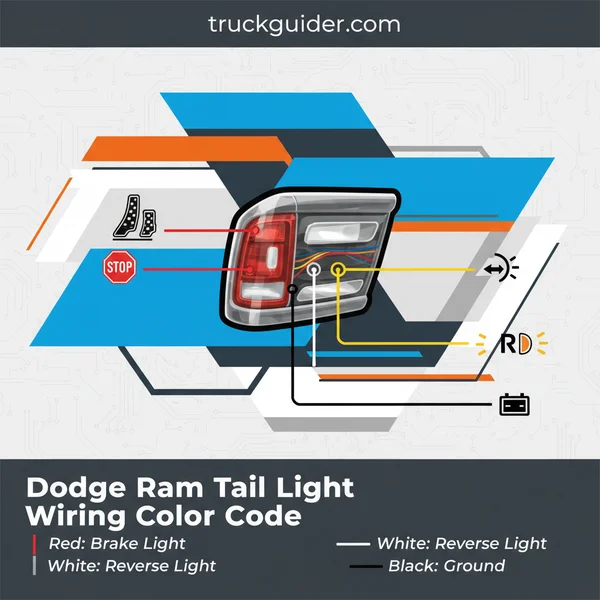
Below, we break down the specific color-to-function mapping for every major generation of the Dodge Ram 1500, 2500, and 3500. This data ensures you tap the right wire the first time without needing a multimeter for every single pin in the plug. We focus strictly on the factory harness colors found at the rear of the vehicle.
Dodge Ram Tail Light Wiring Charts by Generation
2nd Gen (1994–2001) and 3rd Gen (2002–2008)
In the second-generation Rams, the wiring is relatively straightforward because the trucks used a standard bulb-and-socket system without complex computer monitoring. However, as the third generation arrived in 2002, Chrysler introduced more sophisticated electronics that combined the brake and turn signal functions into a single wire for each side.
📤 Share
💾 Download
- 1994–2001 (2nd Gen):
- Ground: Black or Black/Tan
- Tail/Running Lights: Black/Yellow
- Left Turn/Brake: Dark Green/Red
- Right Turn/Brake: Brown/Red
- Reverse: Violet/Black
- 2002–2008 (3rd Gen):
- Ground: Black
- Tail/Running Lights: White/Yellow or White/Grey
- Left Turn/Brake: White/Dark Green
- Right Turn/Brake: White/Yellow (Note: Some 2002-2005 models use White/Violet)
- Reverse: White/Light Blue
4th Gen (2009–2018) and 5th Gen (2019–Present)
The fourth generation introduced significant changes, especially with the transition to factory LED options on higher trims like the Laramie or Limited. If your truck has factory LEDs, the wiring colors might stay consistent, but the signal logic is different. The fifth generation (DT models) continues this trend with even thinner gauge wires that require careful handling.
- 2009–2018 (4th Gen Halogen):
- Ground: Black or Black/White
- Tail/Running Lights: White/Light Green
- Left Turn/Brake: White/Dark Green
- Right Turn/Brake: White/Yellow
- Reverse: White/Tan
- 2019–Present (5th Gen DT):
- Ground: Black
- Tail/Running Lights: White/Brown
- Left Turn/Brake: White/Orange
- Right Turn/Brake: White/Grey
- Reverse: White/Light Green
Differences Between Driver Side and Passenger Side Wiring Schemes
Shared vs. Independent Circuits
When you are looking at the wiring harness, you will notice that some colors are identical on both sides of the truck, while others are unique. This is a critical distinction to make before you begin splicing. The Ground, Running Lights (Parking), and Reverse Lights almost always use the same color-coded wire on both the driver (left) and passenger (right) sides. This is because these lights always function simultaneously.
The Turn/Brake signals are the independent circuits. Because your truck needs to signal a left turn without the right light flashing, the color coding must change. For example, on a 4th Gen Ram, you will see a White/Dark Green wire on the driver side for the turn signal, but when you move to the passenger side, that specific wire is replaced by a White/Yellow wire. Never assume that a color found on the driver side will serve the same function on the passenger side for directional signals.
Identifying Pins by Connector Position
If your wiring is faded or covered in road grime, identifying the wire by its position in the plug (pinout) is more reliable than color alone. Most Ram tail light connectors are 3-pin or 4-pin configurations for halogen models. Looking at the back of the plug (where the wires enter), the pinouts generally follow this logic for 2009–2018 models:


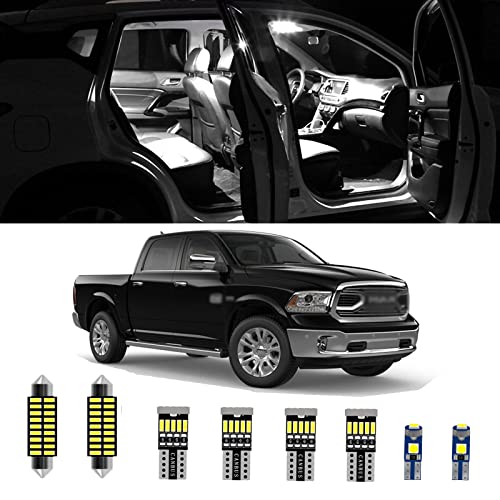
- Pin 1 (Top or Leftmost): Ground. This is usually the thickest wire in the bundle to handle the return current for all bulbs.
- Pin 2 (Middle): Tail/Running Light. This wire receives lower voltage or a specific pulse-width modulation (PWM) signal for the dim “on” state.
- Pin 3 (Bottom or Rightmost): Major Filament (Turn and Brake). This wire carries the high-intensity signal for both braking and indicating a turn.
- Separate 2-Pin Connector: In many generations, the reverse light sits in its own dedicated housing or a separate part of the plug, often using a White wire with a Tan or Light Blue stripe.
When working with these connectors, always check the “tab” side of the plug to orient yourself. Pin 1 is typically located nearest to the locking plastic tab. By mapping the wire position, you can confirm the color code matches the generation data provided above, ensuring a failsafe connection for your project.
Comparing Factory Halogen vs. OEM LED Tail Light Connectors
One of the biggest hurdles for Ram owners is the massive difference between standard halogen housings and the premium OEM LED assemblies. While they might occupy the same space on the truck’s body, the internal logic and physical connectors are worlds apart. If you are looking at your wiring harness and the pin count doesn’t match your new lights, this is likely the cause. Standard trucks were often built with different sub-harnesses depending on the trim package selected at the factory.
The Fundamental Pinout Differences
On halogen models, the wiring is straightforward. You typically have a ground, a dedicated line for the reverse light, and a dual-filament circuit for the running lights and brake/turn signals. However, high-trim LED units utilize a much more complex 6-pin or even 8-pin connector. These extra wires handle specific signals for the LED driver boards which regulate voltage to prevent burnout and manage the specific dimming required for parking lights.
- Halogen Setup: Usually relies on a 3-wire or 4-wire configuration consisting of Ground, Park, Stop/Turn, and Reverse.
- LED Setup: Often includes dedicated signal lines for the LED array and separate internal circuits for the signature “halo” running light effect.
- Compatibility: Putting an LED housing on a halogen-wired truck typically requires a conversion harness to “bridge” these different pin counts and signal types.
Hyperflash and Resistor Logic
Because LEDs draw significantly less current than halogen bulbs, the truck’s computer often assumes a bulb has burnt out. This triggers “hyperflash”—that rapid, frantic blinking on your dashboard. When analyzing the wiring code, you’ll notice that many aftermarket LED setups include a load resistor tapped into the turn signal and ground wires. These resistors mimic the electrical load of a traditional bulb, tricking the system into thinking the circuit is “full” and preventing error messages.
The Role of the TIPM in Dodge Ram Tail Light Logic and Troubleshooting
In a modern Dodge Ram, the tail lights aren’t just connected to a simple switch and a fuse. They are controlled by the Totally Integrated Power Module (TIPM). Think of the TIPM as the “brain” of your truck’s electrical system. It doesn’t just provide power; it monitors every circuit for resistance and shorts, which fundamentally changes how you should approach wiring repairs or custom light installations.
How the TIPM Monitors Your Tail Lights
Unlike older trucks where a short would simply pop a plastic fuse, the TIPM uses solid-state drivers to detect faults. If the TIPM detects an unusual voltage drop or a spike on the tail light circuit, it will proactively shut down power to that specific wire to protect the module’s internal circuitry. This is why you might see a “Bulb Out” message even if you have just installed a brand-new, functioning light.
- Smart Fusing: The TIPM can “reset” itself once a fault is cleared, but persistent shorts can lead to a permanent software lockout.
- Current Sensing: It precisely measures amperage. If your custom wiring adds too much load, such as tapping in extra heavy-duty trailer lights, the TIPM may disable the circuit entirely to prevent overheating.
- Software Limits: In some model years, the TIPM must be “flashed” by a dealer or an OBDII tool to recognize that LED lights have been installed.
Troubleshooting “Ghost” Electrical Issues
If you have verified your wiring color codes and the connections are solid, but the light still won’t turn on, the TIPM might be in a protected state. A common symptom of a struggling TIPM is a tail light that works intermittently or a turn signal that functions while the brake light does not—even though they share the same physical wire. In many 2006-2009 models, the TIPM was particularly sensitive, and internal failures in this module are often mistaken for simple wiring breaks.


Conclusion
Mastering the Dodge Ram tail light wiring color code is the first step toward a successful repair or upgrade. Whether you are dealing with the simple 4-wire setups of the early 2000s or the complex, computer-monitored LED configurations of modern Rams, understanding how these wires interact with the TIPM is essential. Remember that the color of the wire is only half the battle; the electrical logic provided by the truck’s central computer dictates how that power is actually used.
Before you finalize any splice or connection, always verify your specific circuit with a multimeter and check for any stored fault codes in the TIPM. Your next step should be to identify your specific model year and trim to ensure you have the correct pinout diagram handy. With the right information, you can get your lights back in working order and stay safe on the road. Happy hauling!
❓ Frequently Asked Questions
What are the wire colors for a 2009-2018 (4th Gen) Dodge Ram?
For the driver side, the turn/brake is White/Light Green. For the passenger side, it is White/Yellow. Both sides usually share White/Gray for running lights and White/Light Blue for reverse.
How do I identify the tail light wires on a 5th Gen Ram with factory LEDs?
5th Gen Rams with factory LEDs use a complex multi-pin connector. Look for the Green/White wire for the left signal and Yellow/Blue for the right signal, but always verify with a digital multimeter.
Why are there different colors for the left and right turn signals?
Dodge uses distinct colors so the vehicle’s computer can monitor each circuit independently for ‘bulb out’ warnings and to manage specific trailer tow configurations.
What is the most common ground wire color for a Dodge Ram?
While most automotive grounds are black, Dodge frequently uses a Black wire with a Light Green stripe as the primary ground for the rear light harness.


How does the TIPM affect tail light wiring projects?
The Totally Integrated Power Module acts as a smart fuse box; if it detects an incorrect voltage or a short, it will digitally cut power to that specific wire until the fault is cleared and the system is reset.
Can I tap directly into the tail light wiring for a trailer hitch?
Yes, but it is highly recommended to use a T-connector or a powered converter to avoid overloading the factory circuits and triggering TIPM error codes.
![Ram 1500 Steering Wheel Cover Size: Specs & Fitment Guide [2026]](https://truckguider.com/wp-content/uploads/2026/03/ram-1500-steering-wheel-cover-size-featured-1.webp)

![Dodge Key Fob Battery Replacement: Easy DIY Guide [2026]](https://truckguider.com/wp-content/uploads/2026/03/dodge-key-fob-battery-replacement-featured.webp)