F150 Oil Life Reset by Year: 2009-2026 Quick & Easy Fix

An F150 oil life reset is performed through the instrument-cluster controls after changing the engine oil and filter. On most later Ford F-150s, you navigate to Oil Life or Oil Life Reset and hold OK until the dashboard confirms the reset. Older trucks use SETUP and RESET buttons or a SELECT/RESET stem.

The exact menu depends on the model year and dashboard display, not just the engine or trim badge. Use the year guide below to find the right procedure, then confirm the remaining oil life returns to 100%.
Oil Life Reset by Model Year
Choose your truck’s year, match the instrument-cluster menu, then hold the indicated button until the reset completes.
SETUP → Oil Life → Hold RESET
Some clusters use a SELECT/RESET stem instead. Follow the prompt shown on your display.
Settings → Vehicle → Oil Life Reset → Hold OK
Or on some larger clustersTruck Info → Engine Information → Oil Life → Hold OK
An Advanced Settings submenu may appear before Vehicle.
Truck Info → Oil Life → Reset Oil Life → Hold OK
Or on larger clustersSettings → Vehicle Maintenance → Oil Life → Hold OK
Settings → Convenience → Oil Life Reset → Hold OK
Look for “Reset Successful.”
Settings → Vehicle Maintenance → Oil Life → Hold OK
OrTruck Info → Engine Information → Hold OK
Reset confirmed
Check for a success message or 100% remaining oil life. If the prior value remains, use the matching procedure again.
Which F150 Dashboard Menu Controls Your Oil Life
Recommended Best Deal Products


Park the truck safely, shift into Park, and switch the ignition on without starting the engine. On keyed trucks, turn the key to the on position. On push-button models, power on the displays without pressing the brake pedal. The oil-life menu is in the instrument cluster behind the steering wheel, not the center SYNC touchscreen.
| F-150 model years | Controls to look for | Main reset location |
|---|---|---|
| 2009–2014 | SETUP/RESET buttons or SELECT/RESET stem | Oil Life message in the cluster |
| 2015–2020 | Steering-wheel arrows and OK | Settings, Vehicle, or Engine Information |
| 2021–2023 | Steering-wheel Menu and OK | Truck Info or Vehicle Maintenance |
| 2024 | Steering-wheel display controls | Settings, Convenience, Oil Life Reset |
| 2025–2026 | Steering-wheel Menu and OK | Vehicle Maintenance or Engine Information |
Screen size and equipment can change the path within one model year. Identify the menu labels actually displayed in your truck instead of relying on the trim name alone. If the table’s first path is missing, use the documented alternative for that generation.
How to Reset 2009 to 2014 F150 Oil Life
Many 2009–2014 F-150s use physical message-center controls rather than a modern steering-wheel Settings menu. Two common factory procedures appear in Ford’s older documentation.
Reset With SETUP and RESET Buttons
- Switch the ignition on without starting the engine.
- Press and release SETUP until the display reads OIL LIFE XXX% HOLD RESET = NEW or similar wording.
- Press and hold RESET for approximately two seconds.
- Release the button when the display confirms OIL LIFE SET TO 100%.
- Reopen the oil-life message to verify the new reading.
Reset With the SELECT/RESET Stem
- Switch the ignition on, leaving the engine off.
- Use the SELECT/RESET stem to reach the oil-life message in the message center. Some displays require entering the Setup menu first.
- Stop when OIL LIFE XXX% HOLD RESET = NEW appears.
- Hold the SELECT/RESET stem for approximately two seconds, then release it.
- Look for OIL LIFE SET TO 100%.
These are distinct message-center configurations, not two steps that must both be performed. The 2009 F-150 owner’s guide from Ford documents both methods. Later 2009–2014 trucks may have different button layouts, so follow the wording visible in your cluster.
Certain older displays let the driver lower the oil-life starting value in 10% increments after a reset. Leave the value at 100% for a standard complete reset unless your service instructions call for something else.
How 2015 to 2020 F150 Oil Reset Menus Differ
Recommended Best Deal Products


The 2015–2020 F-150 uses steering-wheel controls, but Ford fitted different productivity displays. Switch the ignition on with the engine off, then use the method that matches your display. Hold the OK button until the reset finishes rather than tapping it once.
Reset on the Small Display
For a basic approximately 2.3-inch instrument display, the menu sequence is generally:
- Open Settings using the steering-wheel controls.
- Select Vehicle.
- Select Oil Life Reset.
- When Hold to Reset appears, hold OK.
- Check for Oil Life Reset or a 100% remaining-life reading.
Reset on the Four Inch Display
On the approximately 4-inch productivity display, a common route is:
- Select Settings.
- Open Advanced Settings if shown.
- Select Vehicle.
- Choose Oil Life Reset.
- Press and hold OK until the remaining oil-life reading reaches 100%.
Some software and cluster versions put Vehicle directly under Settings. The displayed menu takes priority over the example sequence.
Reset on the Eight Inch Display
On a larger approximately 8-inch productivity display:
- Open Truck Info or Display Mode, depending on the cluster layout.
- Select Engine Information.
- Locate the Oil Life percentage.
- Follow the Hold OK to Reset prompt.
- Keep holding OK until the display shows 100%.
Some 8-inch configurations also list Settings → Advanced Settings → Vehicle → Oil Life Reset. Ford’s 2019 F-150 instrument-display documentation shows both the vehicle reset menu and Engine Information on applicable cluster types.
F150 Oil Life Reset for 2021 to 2023 Models
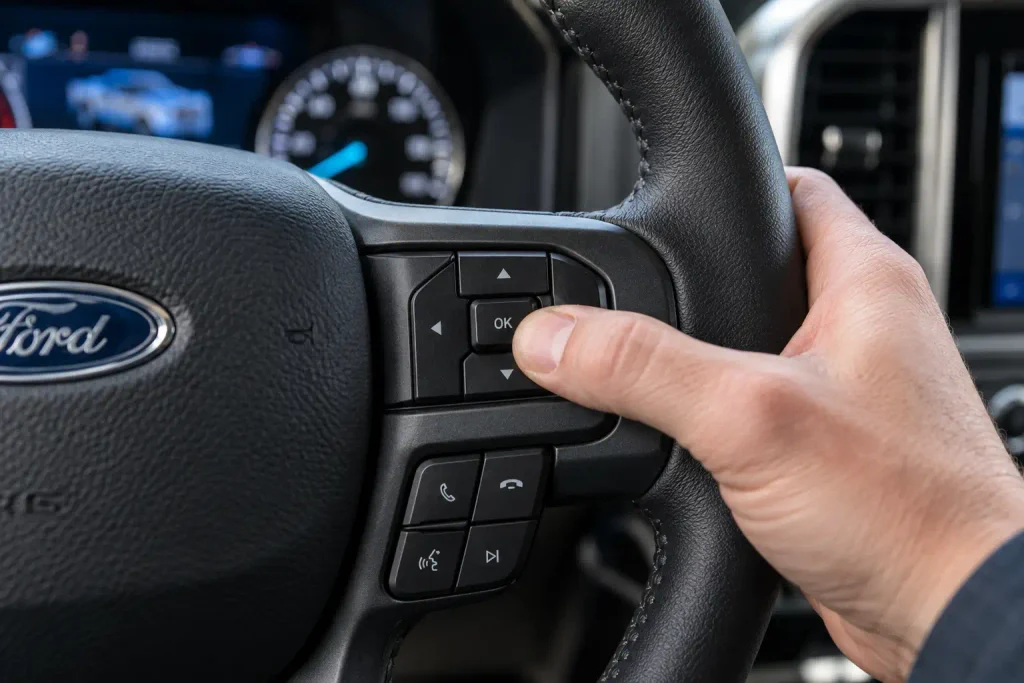
Ford’s 2021–2023 F-150 generation uses a Menu button and steering-wheel controls to operate the information display. The smaller and larger instrument clusters do not always show the same reset path.
Reset With a Smaller Cluster Screen
For an equipped 4.2-inch display:
- Switch the ignition on without starting the engine.
- Press the steering-wheel Menu button.
- Select Truck Info.
- Select Oil Life.
- Select Reset Oil Life.
- Press and hold OK until the reset confirmation appears.
Reset With a Larger Cluster Screen
On equipped 8-inch and 12-inch-class clusters, start with this route:
- Press Menu on the steering wheel.
- Select Settings.
- Select Vehicle Maintenance.
- Open Oil Life.
- Hold OK until the reset is confirmed.
If Vehicle Maintenance does not appear, try Menu → Truck Info → Engine Information. When the Engine Information page offers an oil-life reset, press and hold OK to complete it. These alternative paths are documented in Ford’s 2022 and 2023 owner instructions. Do not reset unrelated engine-hour or trip information by selecting a different on-screen prompt.
Where to Find 2024 F150 Oil Life Reset
Recommended Best Deal Products


For the 2024 F-150 configuration covered by Ford’s reset instructions, Convenience replaces the Vehicle Maintenance route used on some other years. Use the steering-wheel information-display controls:
- Turn the ignition on without starting the engine.
- Open Settings in the instrument cluster.
- Select Convenience.
- Choose Oil Life Reset.
- Follow the Hold OK to Reset prompt.
- Keep holding OK until Reset Successful appears.
Ford states that a successful reset displays 100% remaining life. If the display instead says Not Reset or Reset Cancelled, repeat the process. These confirmation messages and this menu path come from the 2024 F-150 owner’s manual.
If your 2024 cluster presents another path, use the oil-life screen identified in the owner’s manual for your particular truck. Do not assume a center-touchscreen Settings menu performs this reset.
How to Reset 2025 and 2026 F150 Oil Life
Ford documents two cluster-dependent paths for the 2025 and 2026 F-150. Both use the steering-wheel Menu and OK buttons. The correct choice is whichever path appears on your instrument cluster.
Use the Vehicle Maintenance Path
- Switch on the instrument cluster with the engine stopped.
- Press the steering-wheel Menu button.
- Select Settings.
- Select Vehicle Maintenance.
- Select Oil Life.
- Press and hold OK until the system confirms the reset.
Use the Engine Information Path
- Press the steering-wheel Menu button.
- Select Truck Info.
- Open Engine Information.
- Find the oil-life information and its reset prompt.
- Hold OK until the confirmation appears.
These two procedures are listed in the 2026 Ford F-150 owner’s manual. The 2025 documentation uses the same two-path approach. Do not use a brake-and-accelerator pedal sequence as a universal shortcut. The published 2025–2026 F-150 instructions use cluster controls, and a pedal sequence found online may describe a different Ford model.
How to Confirm Your F150 Oil Reset Succeeded
The best confirmation is a displayed success message followed by 100% remaining oil life. The exact wording varies between clusters. For example, an older F-150 may display OIL LIFE SET TO 100%, while a later screen may display Reset Successful.
After resetting, return to the Oil Life or Engine Information screen and read the percentage again. If it still shows the previous value, the reset has not been confirmed. Repeat the correct procedure, holding the specified control until the display finishes updating.
A 100% oil-life reading is only the maintenance monitor’s starting value. It does not measure how much engine oil is physically in the crankcase. Owners servicing the 3.5L EcoBoost V6 can verify the correct refill separately in our 3.5 EcoBoost oil capacity chart.
Why Your F150 Oil Life Reset Fails
When a reset does not save, begin with the menu selection and button sequence. Do not assume the truck needs a diagnostic scanner merely because the first attempt failed.
| What you see | Likely explanation | What to do next |
|---|---|---|
| No Oil Life Reset option | Different cluster layout | Try the alternate documented path for your year |
| Percentage stays unchanged | OK or RESET was released too soon | Hold the button until the confirmation appears |
| Reset Cancelled or Not Reset | Procedure was interrupted or unsuccessful | Repeat the full sequence from the main menu |
| Engine Information page has several readings | Wrong item may be selected | Find the Oil Life prompt; do not reset engine hours |
| Warning returns after a successful reset | Different warning or persistent cluster issue | Read the exact message and diagnose it separately |
For button-operated older trucks, confirm whether the message center has a separate SETUP and RESET pair or one SELECT/RESET stem. For 2015–2020 trucks, distinguish the smaller Settings menus from the larger Engine Information screen. For 2021–2026 trucks, confirm the correct year-specific menu names.
If the cluster freezes, the percentage cannot be viewed, or the documented procedure repeatedly fails, consult the vehicle’s owner manual and arrange instrument-cluster diagnosis. Resetting other menus or disconnecting the battery is not a substitute for identifying the problem.
When Should You Reset Oil Life After Service
Reset the Ford Intelligent Oil-Life Monitor after changing the engine oil and oil filter, not merely when the dashboard reminder becomes inconvenient. The monitor estimates oil-service timing based on vehicle use; a reset tells it that fresh oil service has been completed.
The correct oil quantity and viscosity also depend on the engine and model year. Use the Ford F150 oil capacity chart by year when checking a refill specification. Follow the exact truck’s manual and verify the oil level after service.
A reset does not change the oil, replace the filter, fix an oil leak, or correct an overfilled or underfilled crankcase. If the oil change has not been completed, schedule that service before starting a new oil-life interval.
Which F150 Oil Warnings Need Immediate Action
Not every oil-related dashboard message calls for an oil-life reset. Ford uses separate warnings for scheduled maintenance and potentially dangerous oil-pressure conditions.
| Dashboard message | Meaning | Appropriate response |
|---|---|---|
| Change Engine Oil Soon | Oil-service reminder; on some older trucks, 10% or less remains | Plan the oil and filter change soon |
| Oil Change Required | The monitor indicates the oil service is due | Change the oil and filter, then reset the monitor |
| Low Oil Level | Oil level may be below the acceptable range | Check the level using the owner’s manual procedure |
| Low Engine Oil Pressure | Possible lubrication-system problem | Stop safely and shut off the engine; investigate before driving |
Never try to clear a low-engine-oil-pressure warning with an oil-life reset. If that warning appears while driving, pull over as soon as safely possible, turn off the engine, and check the oil level. If the warning persists or the cause is uncertain, have the truck inspected before driving again.
How to Finish Your Ford F150 Oil Reset
A successful F150 oil life reset starts with the right instrument-cluster menu, not a single sequence copied from another model year. Older trucks use SETUP, RESET, or SELECT/RESET controls. Later models use steering-wheel menus whose names differ by year and display.
After the oil and filter change, select the matching procedure, hold the reset button until confirmation, and check that the remaining oil-life value reads 100%. If the menu does not match your truck, use the owner manual for its exact model year and cluster rather than trying unrelated shortcuts. Keep the service date and mileage in your maintenance records.
5 Common Ford F150 Oil Life Reset Questions
How Do I Reset Oil Life on My Ford F150
Switch the ignition on with the engine off, find Oil Life or Oil Life Reset in the instrument cluster, and hold the specified OK or RESET control. The exact menu varies by model year and screen. Confirm the indicator returns to 100% after the oil and filter change.
Why Is My F150 Oil Life Not Resetting
The most common checks are the selected menu and whether the reset button was held until confirmation. Some clusters offer an alternate Oil Life or Engine Information path. If neither documented path works, use the specific owner’s manual and have a persistent display fault diagnosed.
Can I Reset F150 Oil Life Without a Scanner
Yes. Ford’s documented procedures use the truck’s built-in message-center buttons or steering-wheel controls. You do not normally need an OBD-II scanner to reset the standard oil-change reminder after completing service.
Can I Reset My F150 Oil Life Through the Ford App
Use the instrument cluster for the reset. Ford’s documented F-150 oil-life procedures specify controls inside the truck, not an in-app reset. Connected-app maintenance information may be available, but viewing an oil-life reading should not be confused with resetting it.
Should I Reset F150 Oil Life Before Changing Oil
No. Reset the monitor after the engine oil and filter have actually been changed. Resetting early restarts the maintenance calculation without performing the service, which can make the next reminder misleading.