How to Use a Trailer Brake Controller: Gain & Override Guide [2026]

To ensure safe towing, you must calibrate the gain settings so the trailer stops smoothly without locking the wheels. The manual override lever provides independent braking for the trailer, which is essential for stabilizing sway or testing connections at low speeds.
🎯 Key Takeaways
- Calibrate gain at 20-25 mph on a flat, paved surface.
- Adjust gain until wheels almost lock, then back off slightly.
- Use manual override to control trailer sway without truck brakes.
- Re-calibrate gain every time your trailer load weight changes.
- Recognize ‘jerking’ as too much gain and ‘pushing’ as too little.
To correctly use your trailer brake controller, you must synchronize the trailer’s braking force with your truck’s momentum by adjusting the gain until the wheels are just on the verge of locking at 20-25 mph. This calibration ensures that your trailer isn’t “pushing” the truck during a stop or, conversely, braking so hard that it causes the tires to skid and flat-spot. Finding this sweet spot is the only way to guarantee a controlled stop during an emergency maneuver.


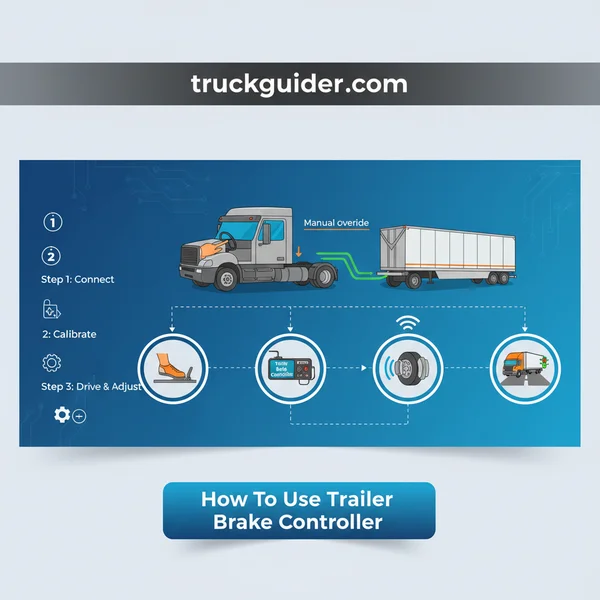
Proper calibration matters because every load is different. A setting that worked for an empty flatbed will be dangerously insufficient once you load a 5,000-pound tractor onto it. By mastering the gain settings and understanding the manual override, you take mechanical stress off your truck’s pads and rotors while significantly reducing the risk of a jackknife on slick or steep roads.
Core Components: Gain Adjustment vs. Manual Override
Before you start the truck, you need to identify the two primary ways you will interact with the controller. While most modern units are integrated into the dashboard, the fundamental controls remain the same across all brands.
Gain Adjustment Settings (+/-)
The gain setting determines the maximum amount of power sent to the trailer brakes when you step on the vehicle’s brake pedal. Think of this as the “sensitivity” or “volume” knob for your trailer’s stopping power. Most controllers use a digital display showing a scale (often 0 to 10). Increasing the gain (+ button) sends more voltage to the trailer’s brake magnets, while decreasing it (- button) reduces the force. Your goal is to find the highest possible gain setting without locking the wheels.
The Manual Override Slider
The manual override is a physical lever or slider located on the face of the controller. Unlike the brake pedal, which engages both the truck and trailer, the manual override only activates the trailer brakes. It is used for two specific purposes:
- Calibration: You will use this slider to test the “lock point” of the brakes during your setup runs.
- Sway Control: If the trailer begins to sway or “fishtail” at highway speeds, a brief, firm pull on the manual override can help straighten the trailer by pulling it taut behind the truck.
Master Trailer Brake Controllers in 8 Simple Steps
Towing a heavy trailer significantly changes your vehicle’s handling and braking dynamics. A trailer brake controller is the essential link between your truck’s brake pedal and the electric brakes on your trailer, ensuring they work in harmony to stop your entire rig safely. If the controller is set too low, your truck will do all the work, leading to overheated brakes; if set too high, your trailer wheels will lock up and skid. This guide provides a detailed walkthrough on how to calibrate and use your controller to achieve the perfect balance for a smooth, safe journey.
Step 1: Identify Your Controller Type and Interface
What you need: Your vehicle’s owner manual and the trailer brake controller unit (factory-installed or aftermarket).
Instructions: Before you hit the road, you must understand the specific interface of your controller. Most modern trucks have a factory-integrated controller with a “plus/minus” button for “Gain” and a manual override slider. Aftermarket units, like those from Tekonsha or Curt, often feature a dial and a digital display. Determine if your unit is “Proportional” or “Time-Delayed.” Proportional controllers use an internal accelerometer to sense how hard you are braking and apply the same intensity to the trailer. Time-delayed units apply a pre-set amount of power after a short lag. Locate the digital readout, which usually displays a number (often 0.0 to 10.0) representing the “Gain” or the percentage of power being sent to the trailer brakes.
Pro Tip: If your display shows “nc” or “No Connection,” it usually indicates a faulty 7-way plug connection or a blown fuse rather than a broken controller.
Step 2: Establish a Secure Electrical Connection
What you need: A 7-way blade-style trailer connector and electrical contact cleaner (optional).
Instructions: Back your vehicle up to the trailer and hitch it securely. Once hitched, plug the trailer’s 7-way electrical cable into the vehicle’s socket. Ensure the plug is seated fully and the locking tab on the socket lid clicks over the plug’s notch. Go back to your cab and check the brake controller display. It should transition from a “searching” or “disconnected” icon to a steady number or a “C” for connected. If you see a flashing light or an error code, unplug the cable, check for corrosion on the pins, and re-insert it. This connection is vital because it carries the variable voltage signal that tells the trailer’s magnets when to squeeze the brake shoes against the drums.
Pro Tip: Apply a small amount of dielectric grease to the 7-way pins to prevent moisture from causing “phantom” disconnects while driving in the rain.
Step 3: Set the Initial Gain Level
What you need: Access to the gain adjustment buttons or dial on your dashboard.
Instructions: The “Gain” setting determines the maximum amount of power sent to the trailer brakes. For a medium-loaded trailer, a good starting point is usually a gain of 5.0 or 6.0 on a 10-point scale. If you are towing a very light, empty utility trailer, start lower (around 3.0). If you are hauling a massive fifth-wheel or a heavy piece of machinery, start higher (around 7.0 or 8.0). To adjust this, use the “+” and “-” buttons or turn the rotary dial until the desired number appears on the display. This is just a baseline; you will likely change this number several times during your trip as your load weight changes or as the brake shoes heat up and expand.
Pro Tip: Never start with a gain of 10.0 for your first test, as this can cause the trailer brakes to lock instantly, flat-spotting your tires and causing a jarring jolt.
Step 4: Perform the Low-Speed Calibration Drive
What you need: A flat, paved surface at least 200 feet long (like an empty parking lot) and no traffic.
Instructions: With the trailer attached and the initial gain set to 5.0, drive forward at a steady speed of 20 to 25 mph. Ensure you are driving in a straight line. Reach for the manual override lever or slider on your brake controller—do not use the vehicle’s brake pedal for this step. Slowly but firmly push or squeeze the manual lever to its maximum position. The trailer should slow the entire vehicle down significantly. You are looking for a sensation where the trailer “tugs” the truck back without the trailer wheels actually skidding or locking up. If the vehicle barely slows down, your gain is too low. If the trailer tires chirp or smoke, the gain is too high.
Pro Tip: It is helpful to have a passenger watch the trailer tires in the side-view mirror during this test to see if they stop rotating completely (locking up).
Step 5: Fine-Tune the Gain for “Lock-Up” Limits
What you need: A few minutes of repetitive driving in the same testing area.
Instructions: If the trailer brakes did not lock up at 25 mph during the manual override test in Step 4, increase the gain by 0.5 increments (e.g., from 5.0 to 5.5, then to 6.0). Repeat the test drive and manual override squeeze after each adjustment. Continue increasing the gain until the trailer wheels just begin to lock up (skid). Once you find the lock-up point, back the gain setting down by 0.5. For example, if the wheels lock at a gain of 7.5, your “sweet spot” for that specific load is 7.0. This ensures you have the maximum possible braking force available without the danger of losing control or damaging the trailer tires during an emergency stop.
Pro Tip: Remember that as your trailer’s water tanks empty or you unload cargo, the trailer becomes lighter and will require a lower gain setting to avoid locking up.
Step 6: Adjust the “Boost” or “Sensitivity” Setting
What you need: The “Boost” or “B” button on your controller (common on Tekonsha Prodigy units).
Instructions: While “Gain” controls the total power, “Boost” controls how aggressively that power is applied the moment you touch the brake pedal. Most controllers have three boost levels (B1, B2, B3) or a “Low/Med/High” sensitivity toggle. If the trailer is much heavier than the tow vehicle (like a small SUV pulling a large camper), set the Boost to level 2 or 3. This tells the trailer brakes to lead the braking process, ensuring the trailer doesn’t “push” the truck during the initial second of braking. If the trailer is light, turn the Boost off or to level 1 to prevent “grabby” brakes that jerk the vehicle every time you lightly tap the pedal in stop-and-go traffic.
Pro Tip: Use a higher Boost setting when driving in mountainous terrain to ensure the trailer brakes are doing their fair share of the work on long descents.
Step 7: Master the Manual Override Lever
What you need: Muscle memory and an understanding of emergency scenarios.
Instructions: The manual override slider is not just for calibration; it is a critical safety tool. In the event of “trailer sway” (where the trailer begins to fishtail side-to-side due to wind or passing trucks), do NOT step on the vehicle’s brake pedal, as this can worsen the sway. Instead, stay on the gas or coast and manually engage the trailer brake controller slider. Squeezing the trailer brakes independently of the truck will “stretch” the rig back into a straight line, pulling the trailer back behind the truck like a taut string. Practice reaching for the slider without looking so that you can react instantly if the trailer starts to oscillate at highway speeds.
Pro Tip: You can also use the manual slider at very low speeds when hitching up to test if the trailer’s electric brakes are engaging at all before leaving your driveway.
Step 8: Adjust for Changing Road Conditions
What you need: Awareness of weather and road surfaces.
Instructions: A gain setting that works perfectly on dry asphalt will be dangerous on wet or icy roads. If it starts to rain or snow, manually decrease your gain setting. On slippery surfaces, trailer wheels lock up much easier; a locked trailer wheel will slide sideways, potentially leading to a jackknife. Reduce your gain by 1.0 or 2.0 points in the rain and test the brakes frequently at low speeds to ensure they aren’t grabbing too hard. Similarly, if you transition from a paved road to a gravel road, lower the gain, as the trailer will skid very easily on loose stones. Always prioritize smooth, gradual braking over aggressive gain settings when traction is limited.
Pro Tip: Periodically check your brake drums by touching the wheel hubs (carefully!) after a long drive; if one is significantly hotter than the others, that specific brake may be over-adjusted or dragging.
✅ Final Checklist
- Confirm the 7-way plug is seated and the controller shows a “Connected” status.
- Verify the gain is set high enough to slow the truck using the manual override, but low enough to avoid skidding.
- Ensure the “Boost” level is appropriate for the weight of the trailer relative to the truck.
- Test the manual override slider one last time at 10 mph before entering the highway.
- Check that all trailer lights (brake and turn signals) are functioning in sync with the vehicle.
Important Notes:
- Safety Warning: Never tow with a malfunctioning brake controller. If the display shows “Short” or “Overload,” pull over immediately as your trailer brakes may be non-functional.
- When to Seek Help: If your trailer brakes feel “weak” even at a gain of 10, your trailer’s brake shoes likely need a manual adjustment at the drum, which should be handled by a mechanic.
- Estimated Time: Initial setup and calibration usually take 15-20 minutes.
- Cost: Aftermarket controllers range from $80 to $250; installation labor can cost an additional $100-$200 if your vehicle isn’t pre-wired.
Factors Influencing Optimal Brake Sensitivity Settings
Your “perfect” gain setting is not a permanent number. It is a fluid variable that changes based on your current environment and equipment status. You should expect to recalibrate your controller at the start of every trip.
Total Load Weight
Weight is the most significant factor. A heavy trailer requires more voltage to engage the magnets with enough force to slow the mass. If you calibrate your gain while the trailer is empty and then load it with gear, the trailer will likely “push” the truck, making your stopping distances dangerously long. Always re-test your gain after adding or removing cargo.
Road and Weather Conditions
The friction between the trailer tires and the road dictates your maximum gain. On dry pavement, you can run a higher gain for maximum stopping power. However, if you are driving on wet roads, gravel, or ice, you must dial the gain back. In low-traction environments, the trailer wheels will lock up much sooner, which can lead to a loss of control if the trailer begins to slide sideways.
- Brake Temperature: As trailer brakes get hot (e.g., descending a mountain pass), they may experience “fade,” requiring a temporary increase in gain to maintain the same stopping power.
- Brake Bedding: Brand new brake shoes or trailers that have been sitting for months may have rust on the drums, requiring a few miles of “bedding in” before the gain settings become consistent.
The Step-by-Step Calibration Process: Finding the Lock Point
Now that you understand the controls, it is time to set the base gain. This process should be done in a large, level parking lot or a quiet side street with a paved surface. Ensure your trailer is fully loaded as it will be for your journey before starting these steps.
Step 1: Set Your Initial Base Gain
Start with the vehicle at a complete stop and the transmission in park. Set your brake controller to a starting gain of 5.0 (or the midpoint of your specific controller’s range). This provides a baseline. If you know your trailer is exceptionally heavy, you might start at 6.0; if it is a light utility trailer, start at 3.0.
Step 2: The 20-25 MPH Test Run
Accelerate your truck and trailer to approximately 20 to 25 mph on a straight path. Ensure there is no traffic behind you. Once you reach a steady speed, take your foot completely off the gas pedal. Do not touch the truck’s brake pedal. Instead, use your hand to firmly slide the manual override lever all the way to its maximum position.
Pay close attention to how the trailer reacts. You are looking for one of three outcomes:
- The Wheels Lock Up: You will hear the tires chirp or see smoke in the rearview mirror as the trailer tires skid.
- The Trailer Slows Aggressively: The truck and trailer slow down significantly, but the tires continue to rotate.
- Weak Braking: The trailer barely slows the truck down at all.
Step 3: Adjusting to the “Just Sub-Lock” Point
If the trailer brakes locked up in Step 2, your gain is too high. Decrease the gain by 0.5 increments and repeat the 25 mph test until the wheels no longer skid.
If the brakes did not lock up, increase the gain by 0.5 increments and repeat the test. You want to keep increasing the gain until you finally reach the point where the trailer wheels skid. Once they lock, dial the gain back down by 0.5. This represents your optimal setting: the maximum amount of braking force possible just below the point of losing traction.
Troubleshooting Common Braking Performance Issues
Even with a high-end brake controller, you might encounter performance hiccups on the road. Identifying these issues early is the key to maintaining a smooth towing experience and avoiding unnecessary stress on your vehicle’s mechanical systems. When the connection between your truck and trailer feels “off,” it is usually a sign that your settings or hardware need a quick check.
Recognizing Over-Aggressive or Weak Braking
The most common issue is a trailer that feels like it is fighting your tow vehicle. If your trailer tires chirp or lock up during a gentle stop, your gain is set too high for the current load. Conversely, if you feel the weight of the trailer pushing your truck forward even after applying the brakes, your gain is likely too low. Regularly adjusting for weight changes—such as when you empty your RV’s water tanks or unload heavy equipment—is essential to keep performance consistent and predictable.
- Jerking or Pulsing: This is often caused by warped trailer drums or an incorrectly leveled controller if you are using an older inertia-based model.
- Intermittent Power: Usually points to a loose ground wire or a dusty 7-way plug connection that needs cleaning with electrical contact cleaner.
- Delayed Response: This can occur if the “boost” setting on proportional controllers is set too low for the trailer’s weight class, causing the truck to do the heavy lifting initially.
Dealing with Environmental Factors
Remember that road conditions change how your brakes behave. A gain setting that worked perfectly on dry pavement might cause wheel lock-up on wet or gravel roads. If you notice the trailer sliding or fishtailing during rain, it is a signal to dial the gain back immediately to regain traction. Temperature also plays a role; as brakes get hot during a long mountain descent, they may lose some effectiveness, requiring you to rely more on engine braking rather than just cranking up the controller gain.
Safety Benefits of Proper Trailer Brake Synchronization
Synchronization isn’t just about driving comfort; it is a critical safety measure. When your trailer and tow vehicle work in perfect harmony, you significantly reduce the physical strain on both machines and lower the risk of accidents during high-stress maneuvers.
Preventing the “Push” and Jackknifing
The primary goal of a well-set brake controller is to ensure the trailer slows down at the same rate as the truck. If the trailer brakes too slowly, its massive momentum can actually lift the rear of your truck or push it out of alignment. This is the leading cause of jackknifing during sudden stops. Proper synchronization keeps the entire rig straight and stable, especially during emergency braking where every millisecond of control counts toward a safe outcome.
- Reduced Stopping Distances: Correct settings ensure all wheels on the rig are contributing to the stop, drastically shortening the distance required to reach a full halt.
- Improved Heat Management: By sharing the braking load, you prevent the tow vehicle’s pads and rotors from overheating and suffering from “brake fade.”
- Enhanced Sway Control: A quick, strategic tap of the manual override can often “stretch” the rig out, pulling a swaying trailer back into a straight line behind the vehicle.
Saving Your Equipment and Your Wallet
Beyond safety, synchronization protects your long-term investment. When the trailer handles its own weight, you aren’t burning through your truck’s expensive brake pads and rotors every few thousand miles. It is a simple way to extend the life of your entire braking system. Furthermore, avoiding the “jerking” motion of an un-synchronized rig prevents premature wear on your hitch, receiver, and suspension components, saving you significant maintenance costs over the life of your trailer.
Conclusion
Mastering your trailer brake controller is one of the most important skills any driver can develop. By understanding how to fine-tune your gain settings and recognizing the signs of poor synchronization, you transform your towing setup from a stressful burden into a smooth, controlled machine. Safety on the road starts with balance; when your truck and trailer act as a single unit, you can navigate steep grades and busy traffic with total confidence.
Before your next big trip, take five minutes to test your settings in a vacant parking lot or a quiet side street. Make it a habit to check your wiring connections for debris and ensure your controller is responsive. Safe travels, and enjoy the peace of mind that comes with a perfectly balanced rig!
❓ Frequently Asked Questions
How do I know if my trailer brakes are locking up during calibration?
Watch the trailer tires in your side mirrors during a low-speed test; if they smoke, skid, or stop rotating completely, the gain is set too high.
Is the manual override meant for emergency stopping?
While it can help in emergencies to straighten a swaying trailer, the vehicle’s brake pedal should remain your primary tool for stopping the entire rig.
Does the gain setting change for highway vs. city driving?
The setting typically stays the same, though you may need to lower it slightly in rain or snow to prevent the trailer from skidding on slick surfaces.
Can I use the same gain setting for different trailers?
No, every trailer has different weights and brake magnet strengths, requiring a fresh calibration process for each specific trailer you tow.
What is the difference between proportional and time-delayed controllers?
Proportional controllers apply brake pressure based on the truck’s actual deceleration, while time-delayed units apply a pre-set amount of power after a short lag.
What should I do if the trailer brakes feel ‘spongy’ despite high gain?
Check the gain settings first, but if the issue persists, it may indicate worn brake shoes, a weak electrical ground, or a faulty magnet.
![Dodge Ram Key Replacement Cost: 2024 Price Guide [2026]](https://truckguider.com/wp-content/uploads/2026/03/dodge-ram-key-replacement-cost-featured.webp)
![Paint Code Px8: Diagnosis & Repair [2026]](https://truckguider.com/wp-content/uploads/2026/03/featured-cf60a646-768x768.webp)