
2003 GMC Sierra Radio Wiring Diagram: Pinout Guide (2026)

The 2003 GMC Sierra 24-pin harness uses orange (Pin B1) for constant 12V battery power and black/white (Pin A12) for the ground wire. Switched 12V ignition is controlled via Class 2 serial data (Pin A1), requiring a data interface module or an auxiliary keyed hot wire tapped into the instrument panel fuse block.
📌 Key Takeaways
- Orange hot wire at Pin B1 supplies continuous 12-volt battery power protected by the 15A RADIO fuse.
- Pin A1 is a Class 2 serial data wire; connecting standard accessory leads directly to it can damage vehicle computers.
- Factory ground wire (black/white, Pin A12) requires zero chassis resistance to eliminate audio hum and alternator whine.
- Vehicles equipped with factory Bose systems send low-level pre-amp signals rather than high-level speaker outputs.
- Use an interface module (Axxess or PAC) to retain door chime alerts and avoid cutting the OEM wiring harness.
The electrical architecture of the 2003 GMC Sierra 1500, 2500HD, and 3500 represents a major transition point within General Motors’ full-size truck line. As part of the mid-cycle GMT800 platform refresh, GM transitioned the Sierra and its platform siblings from traditional analog switched ignition circuits to an integrated micro-controller local area network governed by the Class 2 Serial Data bus.
Performing audio system retrofits, troubleshooting intermittent dropouts, or splicing into factory harness leads requires an accurate understanding of Delphi connector pinouts, circuit functions, wire colors, and voltage characteristics. This technical manual details the complete pin assignments, color-coding conventions, signal specifications, and integration requirements for both standard base audio and factory-amplified Bose sound systems.
[DIAGRAM_PLACEHOLDER: Delphi 24-Pin C1 and 12-Pin C2 Connector Pinout Schematics, including Class 2 Data Bus Terminal A1, Constant +12V Battery B1, and Speaker Circuit Paths]
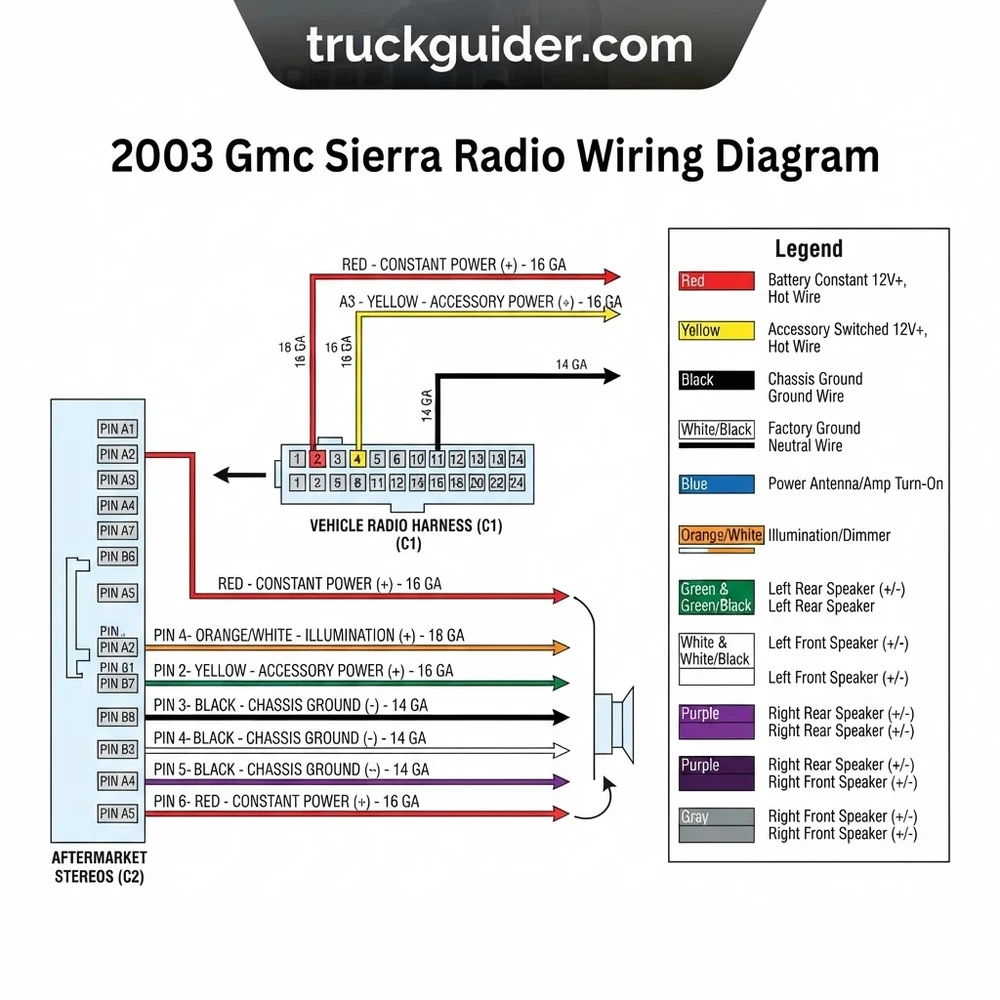
2003 GMC Sierra Radio Wiring Diagram and Pin Assignment


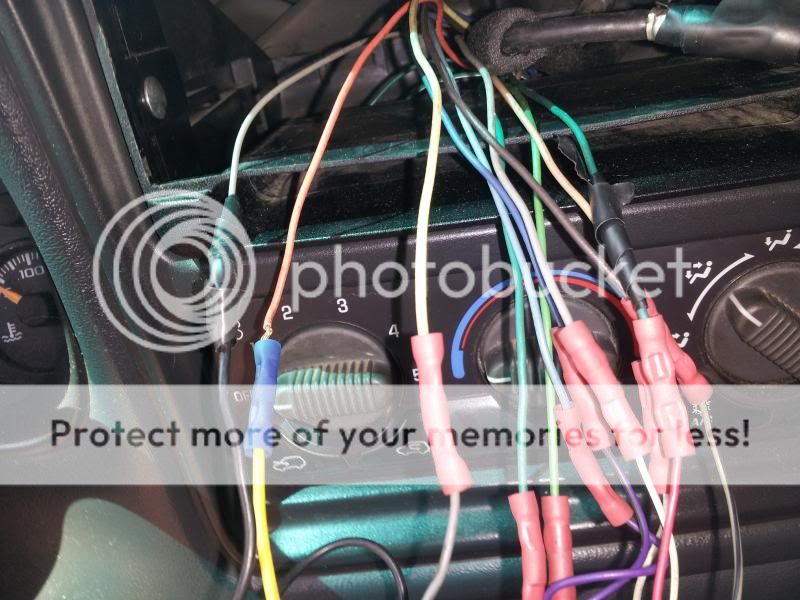
The dashboard center stack of the 2003 GMC Sierra houses the primary infotainment chassis, interfaced through two distinct Delphi Micro-Pack Series connectors. Unlike pre-2003 GMT800 trucks that utilized a dual-connector 21-pin configuration with hardwired +12V ignition leads, the 2003 platform utilizes a Delphi 24-pin grey main connector (designated C1 or Connector 1) and an auxiliary 12-pin black connector (designated C2 or Connector 2). Accurate pin identification is essential before probing or tapping any individual conductor.
Delphi 24-Pin Main Radio Harness Connector (C1) Layout

Connector C1 provides the primary electrical interface for power delivery, chassis grounding, serial bus communication, and high-level speaker outputs (in non-Bose configurations) or low-level differential balanced audio signals (in Bose configurations). The connector shell is molded in grey nylon with positive-locking secondary terminal locks (TPA) to prevent pin back-out under vibration. It features two tiered rows of twelve cavities: Row A (terminals A1 through A12) along the top tier and Row B (terminals B1 through B12) along the bottom tier.
When viewing the mating face of the factory female harness connector (wire entry facing away, locking tab oriented upward):
- Pin A1: Class 2 Serial Data Bus. This terminal connects directly to the vehicle splice pack (SP205) and communicates with the Body Control Module (BCM), Powertrain Control Module (PCM), and Instrument Panel Cluster (IPC).
- Pins A2 to A7: Audio signal negative and positive pairs for front and rear cabin speaker output or amplifier pre-amp input.
- Pin A8 to A11: Secondary signal lines, steering wheel control reference logic, and optional mute lines depending on specific RPO trim packages.
- Pin A12: Primary Chassis Ground Wire, routed directly to Instrument Panel Ground splice pack G103 or G104.
- Pin B1: Constant +12V Unswitched Battery Hot Wire, fed from the 15A “RADIO” fuse located in the underhood electrical center.
- Pins B2 to B7: Opposing phase channels for right/left front and rear audio transducers.
- Pin B8 to B11: Auxiliary sensor and illumination voltage controls.
- Pin B12: Low Reference/Audio Ground circuit return.
The 2003 GMT800 vehicle platform lacks a dedicated +12V switched accessory wire at the radio harness. The head unit remains energized by unswitched constant battery voltage on Pin B1 and relies on high-speed digital state packets over the Class 2 Serial Data line (Pin A1) to trigger power-on, power-off, and Retained Accessory Power (RAP) modes.
Auxiliary 12-Pin Harness Connector (C2) Configuration
The auxiliary 12-pin C2 connector (Delphi Micro-Pack 100 series, molded in black) interfaces factory peripheral equipment. In base and mid-level packages without optional equipment, this connector cavity often sits empty. When equipped with RPO U2K (XM Satellite Radio), RPO U42 (Rear Seat Entertainment / Over-Head DVD), or factory remote multi-disc CD changer systems (mounted in the lower center console on high-trim SLT models), connector C2 carries balanced low-level left and right audio input lines, sensor drain shields, and module wake-up triggers. The pin numbering runs C2-1 through C2-6 on the upper row and C2-7 through C2-12 on the lower tier. Modifying these conductors without an interface bridge will disable factory rear seat audio (RSA) controls and satellite signals.
Wire Color Code and Voltage Chart for 2003 GMC Sierra Harness


Every electrical branch within the 2003 GMC Sierra head unit wiring harness utilizes SAE cross-linked polyethylene (XLPE) insulated primary wire, typically in 18 AWG (0.8 mm²) for signal lines and 16 AWG (1.0 mm²) for heavy current-carrying battery and ground lines. Verifying terminal voltage with a high-impedance digital multimeter (DMM) is critical prior to mechanical splicing or crimping.
| Pin Position | Wire Color Code | Circuit Function | Operating Voltage / Signal Type | Conductor Gauge |
|---|---|---|---|---|
| A1 | Violet (DK PUR) | Class 2 Serial Data Bus | 0V – 7.0V Pulse Width Modulated (PWM) | 20 AWG |
| A2 | Dark Green / White | Right Rear Speaker Out (+) / Pre-Amp | AC Signal (Audio Frequency, 0 – 6V RMS) | 18 AWG |
| A3 | Light Green / Black | Right Rear Speaker Out (-) / Pre-Amp | AC Signal (Inverted Phase Reference) | 18 AWG |
| A4 | Grey | Left Front Speaker Out (-) / Pre-Amp | AC Signal (Includes Safety Chimes) | 18 AWG |
| A5 | Tan | Left Front Speaker Out (+) / Pre-Amp | AC Signal (Includes Safety Chimes) | 18 AWG |
| A8 | Dark Green | Steering Wheel Controls (Analog Key) | Variable 0V – 5.0V Resistance Matrix | 20 AWG |
| A9 | Brown / White | Dimming / Illumination Signal | 0V – 12V DC Variable Resistance | 20 AWG |
| A12 | Black | Chassis Ground Wire | 0.0V Ground Potential (< 0.2 ohms to chassis) | 16 AWG |
| B1 | Orange | Constant 12V Battery Lead (Hot Wire) | +12.0V to +14.4V DC Constant (Hot at all times) | 16 AWG |
| B2 | Dark Blue | Right Front Speaker Out (+) / Pre-Amp | AC Signal (Audio Frequency, 0 – 6V RMS) | 18 AWG |
| B3 | Dark Blue / White | Right Front Speaker Out (-) / Pre-Amp | AC Signal (Inverted Phase Reference) | 18 AWG |
| B4 | Yellow | Left Rear Speaker Out (-) / Pre-Amp | AC Signal (Audio Frequency) | 18 AWG |
| B5 | Brown | Left Rear Speaker Out (+) / Pre-Amp | AC Signal (Audio Frequency) | 18 AWG |
| B12 | Black / White | Signal Ground / Low Reference | 0.0V Ground Potential | 18 AWG |
Antenna Cable and Micro-Tip Plug
The 2003 Sierra uses a GM-proprietary mini-barbed antenna connection rather than a standard Motorola coaxial plug. The lead originates at the passenger-side cowl fender antenna mast and routes behind the glove compartment directly into the radio chassis. The center conductor carries the high-frequency RF signal, while the outer braided wire shield isolates against electromagnetic interference generated by ignition coils and alternator ripple. To interface standard aftermarket receivers, you must install an antenna adapter (e.g., Metra 40-GM10) to step down the factory micro-tip plug to a standard DIN antenna lead.
Do NOT attempt to tap the Violet Class 2 Serial Data wire (Pin A1) to trigger an aftermarket switched +12V accessory circuit. Sending +12V DC current into Pin A1 will permanently fry the transceiver inside the Body Control Module and disable communication across the Instrument Panel Cluster, PCM, and ABS control modules.
Bose System Wiring vs Standard 2003 GMC Sierra Audio Circuits


Diagnosing or upgrading audio in a 2003 GMC Sierra requires confirming whether the vehicle is equipped with Base Audio (RPO UQ3/UQ5) or the Premium Factory Bose Sound System (RPO UQ7 or Y91). You can identify the audio configuration by checking the Service Parts Identification (SPID) label inside the passenger glovebox door.
| Specification / Feature | Standard Base Audio (Non-Bose) | Factory Bose Sound System (RPO UQ7) |
|---|---|---|
| Amplification Architecture | Internal to Head Unit (4x High-Level ICs) | External Factory Amplifier (Under Center Console) |
| Harness Signal Output | High-Level BTL (~15W RMS x 4 channels) | Low-Level Balanced Differential (~2V – 4V RMS) |
| Nominal Speaker Impedance | 4.0 Ohms (Standard Coaxial) | 1.9 to 2.0 Ohms (Woofers) / 3.6 Ohms (Tweeters) |
| Subwoofer Integration | None (Full-range cab doors only) | Dedicated Dual-Voice Coil Subwoofer in Console |
| Amp Trigger Mechanism | Not Applicable | 12V Remote Turn-On (Pink Wire, C1-B8 or Cavity 8) |
| Chime Generation Path | Generated by Head Unit to Front Left Driver | Head Unit → Bose Amp → Front Left Door |
Impedance and Signal Level Variances
The base factory stereo routes amplified audio directly from the radio faceplate internal transistors through the dashboard wire harness to the door speaker terminal blocks. Front doors carry 6.5-inch 4-ohm full-range drivers, while rear doors carry matching 4-ohm speakers (extended cab rear doors use 4×6-inch drivers). Connecting an aftermarket head unit directly to standard base wiring yields normal volume and frequency response.
Conversely, the Bose system (RPO UQ7) routes four-channel low-level differential pre-amp signals from C1 pins A4, A5, B2, B3, A2, A3, B4, and B5 directly to the factory amplifier mounted under the forward compartment of the front floor console. The Bose amplifier processes individual frequency crossovers, equalizes the audio curves, and delivers power to low-impedance door speakers (measured at 1.9 ohms on 6.5-inch front mid-bass drivers). For detailed pin mapping of the amplifier harness itself, consult our Bose factory amplifier bypass guide.
Retained Accessory Power (RAP) and Factory Warning Chimes
In standard configurations without external chimes, GM engineers integrated vehicle warning chimes directly into the factory audio circuitry. The BCM broadcasts chime command frames over the Class 2 Serial Data wire for events like headlights remaining active, ignition key retained in lock cylinder, turn signal continuous cycling, and seatbelt warnings. The factory head unit synthesizes the audio chime tone and pushes the signal over the front left audio channel (Tan/Grey wire pair). Removing the OEM head unit eliminates all audible driver safety alerts unless an integration harness with an integrated piezo speaker or amplifier chime pass-through is used.
Factory Bose external amplifiers require an analog remote turn-on trigger. This is assigned to the Pink wire in the radio harness cavity. Supplying a continuous +12V DC signal (minimum 100mA capacity) is necessary to activate the amplifier relays and prevent silent output on aftermarket installations.
Step-by-Step 2003 GMC Sierra Radio Wiring Diagram Installation


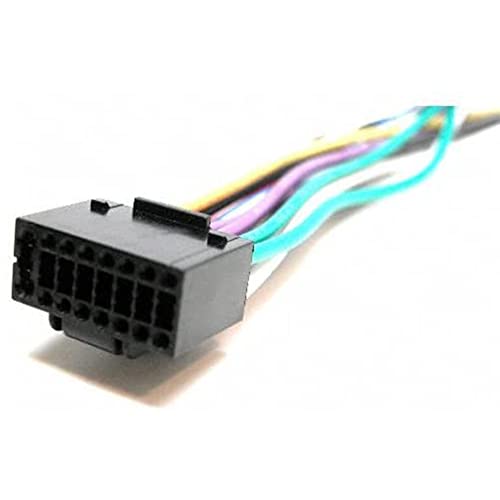
Integrating an aftermarket multimedia receiver or navigation unit into a 2003 Sierra requires careful harness preparation and module integration. Direct wire-to-wire cutting is not recommended; always use a platform-matched vehicle integration interface such as the PAC RP5-GM11 or Metra AXGMLN-01.
- Disconnect the Negative Battery Terminal: Using a 5/16-inch or 8mm wrench, loosen the negative side-terminal battery cable bolt on the primary battery tray. Isolate the cable terminal away from the battery case for at least 10 minutes to discharge the SIR (airbag) backup power reserve before removing any dash panels.
- Bench-Prep the Integration Interface Harness: On an open workbench, map the aftermarket radio connector wires to the integration module pigtail. Strip individual conductors 3/8-inch and join using heat-shrink butt connectors or mechanical soldering followed by dual-wall polyolefin heat shrink tubing:
- Join the Yellow wire (+12V Battery Constant) from the radio to the harness Yellow (which routes to OEM Pin B1 Orange).
- Join the Red wire (+12V Switched Accessory) of the aftermarket radio to the Red accessory output coming from the integration module logic board.
- Join the Black wire (Chassis Ground) to the harness Black (OEM Pin A12).
- For amplified Bose systems, connect the Blue/White wire (Amp Turn-On) from the radio to the module’s Blue/White lead, which routes into the factory Pink turn-on wire.
- Configure Audio Output Paths:
- Non-Bose Trucks: Join the eight high-level speaker leads color-for-color (White/White-Black to Front Left, Grey/Grey-Black to Front Right, Green/Green-Black to Rear Left, Violet/Violet-Black to Rear Right).
- Bose Trucks: Solder male RCA ends to the harness pigtail inputs and connect directly to the front and rear preamp RCA outputs on the aftermarket unit (rated at 2V to 4V RMS) to prevent clipping the input stage of the Bose console amplifier.
- Prepare the Steering Wheel Control Interface: If the vehicle is equipped with steering wheel controls (RPO UK3), wire the interface module’s dedicated SWC output wire (typically Blue/Yellow or 3.5mm headphone connector) to the aftermarket radio’s remote input jack. Refer to our guide on steering wheel control interface programming to configure the DIP switches for proper resistance detection on OEM Pin A8 (Dark Green).
- Dash Disassembly and Head Unit Extraction: Tilt the steering column downward to its lowest position. Engage the parking brake, insert the ignition key, turn to the “RUN” position without starting the engine, and pull the shift lever down to 1st gear. Firmly grab the perimeter bezel surrounding the instrument cluster and radio, unclipping it by pulling straight out. Extract the two 7mm hex head screws securing the factory head unit mounting ears, draw the chassis forward, release the antenna lock, and disengage the grey 24-pin and black 12-pin connectors by depressing the central thumb tabs.
- Chassis Ground Verification and Final Interfacing: Probe the OEM factory black wire (Pin A12) with a digital multimeter calibrated to ohms. Connect one probe to the harness Black wire and the second probe to an unpainted structural dashboard brace; resistance must measure under 0.2 ohms. If higher resistance is observed, route a dedicated 16 AWG grounding strap from the aftermarket radio harness directly to the metal dashboard structural framework. Plug in the primary harness, interface box, chime retention speaker, and antenna adapter before reinstalling the mounting hardware.
Troubleshooting 2003 GMC Sierra Radio Wiring Diagram Faults
Diagnosing electrical anomalies in 2003 GMT800 audio installations requires an orderly process of elimination focusing on databus corruption, ground faults, and power rail integrity.
- Unit Completely Inoperative (No Display, No Audio): Verify that the Orange wire at Pin B1 exhibits unbroken battery voltage (+12.0V to +14.4V DC) with a multimeter. If 0V is read, inspect the 15A “RADIO” fuse located in the engine compartment fuse block. Next, inspect the switched Red wire generated by your interface module; if Pin B1 is hot but the Red wire shows 0V while the ignition is in “ACC” or “RUN”, the aftermarket integration interface is failing to decode the serial data from Pin A1. For broader bus troubleshooting, inspect the GMT800 Body Control Module wiring schematic.
- Parasitic Battery Draw Over 48-72 Hours: Factory quiescent draw across the Sierra’s BCM and radio circuit should not exceed 35 milliamps (0.035A) after a 20-minute sleep cycle timeout. An improper switched accessory bypass—such as tapping the Orange constant wire to feed both yellow and red receiver leads—keeps the head unit in full stand-by mode, drawing between 400mA and 850mA and draining the battery. Always supply switched ignition via a data interface module or an add-a-fuse tapped into an ignition-switched source like the “SEO ACC” or “WPR” fuse in the interior instrument panel fuse box.
- Missing Factory Warning Chimes: If door open, headlamp, and seatbelt chimes stop sounding after radio replacement, the front-left speaker channel is miswired or an un-amplified interface was used. The factory radio produces these chimes through the Tan (Pin A5) and Grey (Pin A4) speaker circuits. Ensure your interface retention module is connected directly to the primary vehicle harness and that the volume gain potentiometer on the interface box is dialed up to audible levels.
- Severe Audio Distortion or Speaker Buzz: Occurs almost exclusively in Bose-equipped Sierra models when an aftermarket head unit’s amplified high-level speaker outputs are wired directly into the low-level pre-amp inputs of the Bose amplifier. This setup over-drives the amp’s differential receiver stages, introducing harsh harmonic clipping at low volume. To resolve this, wire the aftermarket head unit’s RCA preamp level outputs (low impedance, max 4V) into the harness audio inputs, or insert an adjustable four-channel line output converter (LOC) between the high-level radio output and the factory harness.
- High-Pitched Engine Whine / Alternator Whine: Caused by a ground loop potential difference between the aftermarket radio and the factory Bose amplifier. Verify that Pin A12 and the receiver’s ground lead terminate together cleanly. Adding a ground-loop isolator (audio isolation transformer) to the front RCA channels will break the common ground reference and eliminate induced stator ripple noise.
2003 GMC Sierra Radio Wiring Diagram Frequently Asked Questions
Where is the switched 12-volt ignition wire located in the 2003 Sierra radio harness?
There is no switched 12V accessory wire in the factory 24-pin radio harness. The 2003 GMC Sierra uses the Violet Class 2 Serial Data line (Pin A1) to notify the factory head unit when the ignition cylinder turns. To power an aftermarket radio switched circuit, you must either install an electronic data bus integration adapter (such as a PAC RP5-GM11 or Crux SOCGM-17) or run an individual 18 AWG fused wire down to the driver-side interior instrument panel fuse block, tapping an auxiliary switched terminal like the “IGN 0” or “Wiper” circuit.
Can I bypass the factory Bose amplifier without rewiring the speakers?
Bypassing the factory Bose amplifier requires accessing the amplifier harness under the center floor console. You must unplug the Bose amplifier’s input and output connectors and install custom jumper leads bridging each low-level input pair to its corresponding door speaker output lead. However, standard aftermarket radios struggle to drive factory Bose front woofers over extended periods because the speakers operate at a nominal 1.9-ohm load. Running high-volume signals into 2-ohm loads from an internal radio amplifier rated for 4 ohms will trigger the head unit’s internal thermal-overload protection, causing the audio to cycle off intermittently.
What does the Class 2 Serial Data wire do on the 2003 GMC Sierra?
The Class 2 Serial Data wire (Pin A1, Violet) is a single-wire digital communications link operating on the SAE J1850 VPW (Variable Pulse Width) protocol at 10.4 kbps. It handles digital operational packets between the factory radio, Body Control Module, and Instrument Cluster. Signals passed over this line include ignition key status, vehicle speed sensor (VSS) data for speed-compensated volume control, Retained Accessory Power shutdown delay signals, instrument illumination brightness parameters, and driver warning chime audio triggers.
Why does my aftermarket stereo stay on after turning the key off?
This behavior is normal if the aftermarket receiver is wired through a Class 2 data interface module equipped with Retained Accessory Power (RAP) simulation. The factory GMT800 architecture keeps the radio and power windows powered after the ignition is switched to the “LOCK” position until the driver’s door opens, or until a factory timeout of 10 to 20 minutes expires. If the radio stays powered indefinitely even after the driver door is opened, the door jamb pin switch circuit (integrated into the door latch assembly) has failed, or the aftermarket Red and Yellow power wires have been cross-wired backwards.
How do I identify if my 2003 Sierra has the standard base audio or the Bose package?
Inspect the three-digit alphanumeric RPO (Regular Production Option) codes on the SPID sticker inside the glovebox. Code UQ7 indicates the standard Bose high-output 6-speaker dynamic sound system with an external console amplifier, while code Y91 indicates the premium “Luxury” Bose sound processing package (commonly found on Denali trims). If you see code UQ3 or UQ5, the truck has standard base audio, meaning all speaker channels are powered directly from the radio without an outboard amplifier.