Ram 1500 Tire Pressure Sensor Reset: Step-by-Step TPMS Guide 2026

If your Ram 1500 tire pressure reset is not working, the problem is almost always that you are following a procedure built for the wrong generation of truck. The 2009–2018 Ram 1500 has no dashboard reset button at all.
The 2019+ DT generation uses a Uconnect menu. The Ram 1500 Classic sits in between. One wrong method, and you will spend 30 minutes doing nothing useful.
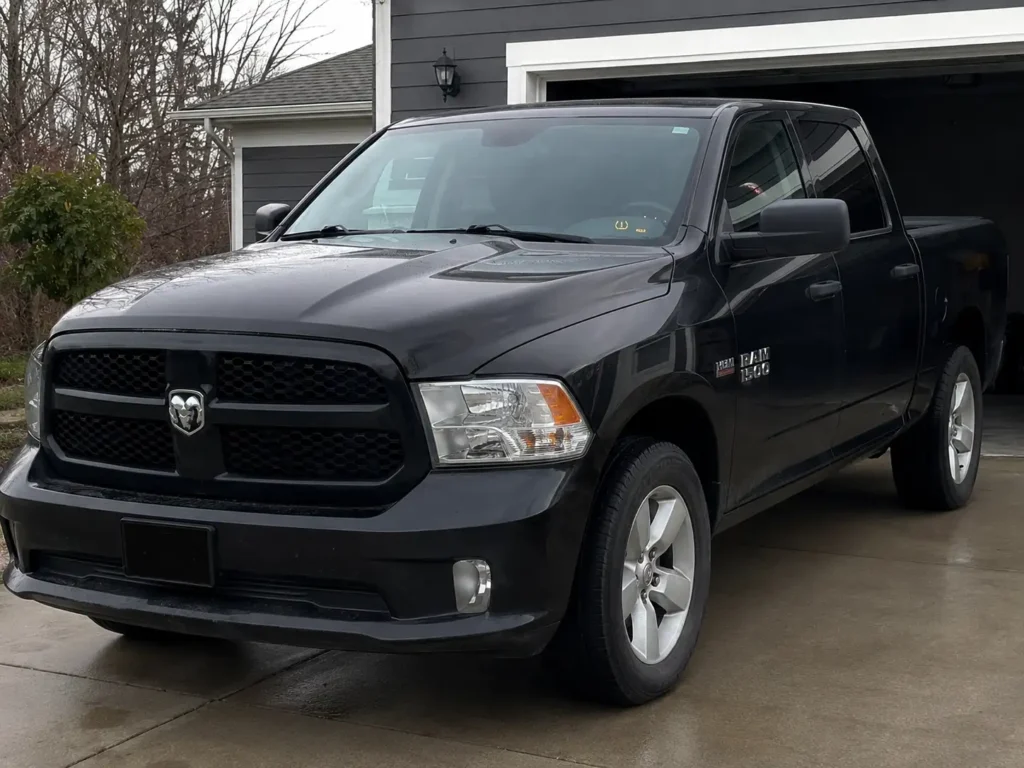
This guide maps the correct reset procedure to each generation so you clear the TPMS light the first time. Start by reading your light, then find your generation, and follow the steps that match your truck.
Ram 1500 TPMS Reset Infographic — decode your warning light and find the correct reset procedure by generation
Recommended Best Deal Products


Ram 1500 TPMS Reset — Quick Reference
Identify your light type, find your generation, follow the correct procedure. Three different trucks, three different methods.
Step 1 — Read the warning light
Low tire pressure
One or more tires dropped 25%+ below the door placard PSI. Inflate to spec, then follow the reset steps below for your generation.
System fault
A sensor stopped communicating. No reset will clear this. Diagnose sensor battery, frequency mismatch, or BCM registration failure.
Step 2 — Match your generation, follow the steps
4th Gen DS / DJ
No reset button- Inflate all 4 tires to door placard PSI
- Check spare — it may carry a sensor too
- Drive 15+ mph for up to 20 minutes
- Light clears during drive cycle
- Disconnect battery, wait 10 min, reconnect
Classic DS
No reset button- Same DS platform as 4th gen — same procedure
- Inflate to door placard PSI
- Drive 15+ mph for up to 20 minutes
- VIN 6th digit 6 or 7 = this platform
- Disconnect battery, wait 10 min, reconnect
5th Gen DT
Uconnect menu- Start engine, leave in Park
- Uconnect 4C: Vehicle → Tires → Learn
- Uconnect 5: Settings → Vehicle → Tire Pressure
- Follow on-screen prompts to confirm
- Drive 15+ mph for 20 min still works on DT
Step 3 — Light won’t clear? Check these 4 causes
What Your Ram 1500 TPMS Light Is Actually Telling You
Before you reset anything, read the light. A solid Ram 1500 TPMS light and a flashing one are not the same problem. Acting on the wrong diagnosis wastes time and can leave a real fault undetected.
Solid TPMS Light After Inflating Tires
A solid amber TPMS light means one or more tires dropped below the low-pressure threshold. Under FMVSS No. 138, that threshold is 25 percent below the placard pressure printed on your driver’s door jamb. If your placard reads 36 PSI, the warning triggers at approximately 27 PSI.
A solid light after you have already inflated the tires is not a sign of sensor failure. It means the system has not yet registered the new pressure. That requires either a drive cycle or a manual reset depending on your generation.
Flashing TPMS Light Before It Goes Solid
A TPMS light that flashes for 60 to 90 seconds and then goes solid is a different problem entirely. According to REDI-Sensor, this flash pattern signals a system fault. The most common cause is a sensor that has stopped communicating with the truck’s receiver. No reset procedure will clear a fault-code light. The sensor itself needs diagnosis.
If your light flashes then stays solid despite correct tire pressure on all four tires, skip to Section 5 on sensor faults before attempting any reset.
Does Your Ram 1500 Spare Tire Have a Sensor
Many Ram 1500 owners forget the spare. Older 4th generation DS trucks (2009–2018) can carry a TPMS sensor on the spare mounted under the bed. If the spare pressure drops below threshold, the light triggers even when all four mounted tires are correct. Check the spare before troubleshooting the four corners.
Once you know what the light means, the next step is matching your reset procedure to the right Ram 1500 generation.
Which Ram 1500 Generation Do You Have and Which Reset Method Applies
Recommended Best Deal Products


The reset procedure that works on a 2022 Ram 1500 DT will not work on a 2016 Ram 1500 DS. That single mismatch is why most tire shops give Ram owners the wrong instructions. Identify your generation first using the table below, then go directly to the matching section.
The easiest identifier is the 6th digit of your VIN. A 6 (2WD) or 7 (4WD) means DS platform. An E (2WD) or F (4WD) means DT platform. You can also check the front fascia: the DS grille has been the same design since 2009. The DT grille is a completely new body style launched in 2019.
| Generation | Year Range | Platform | Reset Button | Primary Method | Backup Method |
|---|---|---|---|---|---|
| 4th Gen | 2009–2018 | DS / DJ | No | Drive relearn (15+ mph, 20 min) | Battery disconnect reset |
| Classic | 2019–2024 | DS (rebranded) | No | Drive relearn (15+ mph, 20 min) | Battery disconnect reset |
| 5th Gen | 2019–present | DT | Uconnect | Uconnect menu TPMS reset | Drive relearn (15+ mph, 20 min) |
For correct PSI by trim level and wheel size before starting any reset, see our Ram 1500 tire pressure guide by year and configuration.
If you own a 2009–2024 Ram 1500 DS or Classic, go to Section 3. If you own a 2019–present Ram 1500 DT, go to Section 4.
How to Reset TPMS on a 2009 to 2024 Ram 1500 Classic With No Button
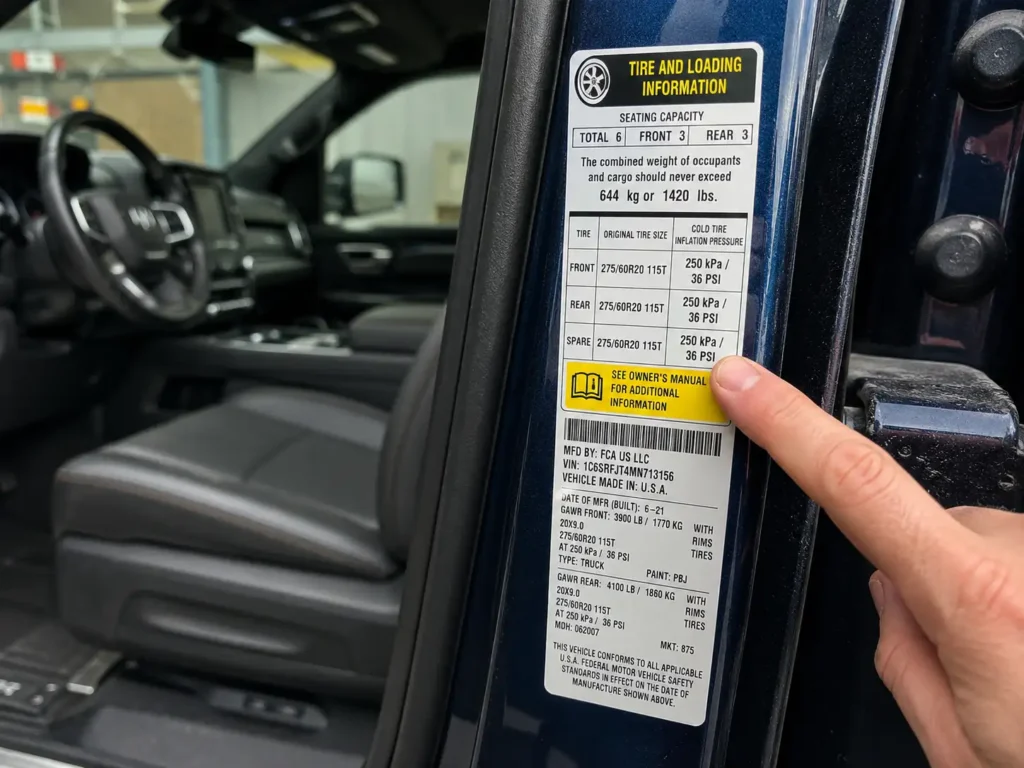
The 2009–2024 Ram 1500 DS and Classic do not have a TPMS reset button. Your two options are the drive-relearn method and the battery disconnect backup. The drive method resolves the majority of post-inflation and post-rotation light situations without any tools. For older heavy-duty trucks with a Light Load switch and the full Ram picture, see our Dodge Ram TPMS reset button location guide.
Step-by-Step Drive Relearn Method
- Check the driver’s door jamb sticker for your placard PSI. Do not use the max pressure printed on the tire sidewall.
- Inflate all four tires to the exact placard value. If the light still did not clear after your last inflation, inflate 3 to 5 PSI over the placard, drive the cycle below, then reduce to the correct spec. RamForum.com members have confirmed this over-inflate trick clears the sensor register faster when the standard pressure alone fails.
- If your truck has a spare with a sensor, inflate that to its placard value as well. Check the same door sticker. Ram lists spare PSI separately.
- Drive continuously at 15 mph or faster for up to 20 minutes. ATEQ TPMS confirms the Ram 1500 direct TPMS system requires this drive cycle to transmit updated sensor readings to the ECU. The sensor relearn sequence fires in this order: left front, right front, right rear, left rear.
- The light should extinguish within the drive cycle. If it does not clear after the full 20 minutes, proceed to the battery disconnect method below.
Battery Disconnect Backup Reset
- Confirm tires are inflated to the correct placard PSI before starting.
- Turn the ignition off and open the hood.
- Disconnect the negative battery cable first, then the positive.
- Touch the two disconnected cables together for 3 to 5 seconds. This discharges residual power from the BCM capacitors.
- Wait 10 minutes with both cables disconnected.
- Reconnect the positive cable first, then the negative.
- Start the truck and drive for a few miles. The TPMS system will reinitialize and register the current sensor pressures.
The Ram 1500 DS uses a single central TPMS receiver located in the center of the cab. Unlike Ford trucks, which place a receiver near each wheel well, the Ram relies on sensor signals broadcasting across the full chassis. This is why tire rotation alone rarely triggers an auto-relearn on this generation. If TPMS positions are still wrong after rotation, an OBD relearn tool or dealer programming is required.
For 2019–present Ram 1500 DT owners, the Uconnect infotainment system adds a faster third option.
How to Reset TPMS on a 2019–2024 Ram 1500 DT via Uconnect
Recommended Best Deal Products


The 2019–2024 Ram 1500 DT adds a Uconnect menu reset that the DS and Classic do not have. The menu path differs slightly between Uconnect 4C (2019–2020) and Uconnect 5 (2021+), but both support TPMS reset without driving first.
Uconnect 4C Menu Reset Steps
- Start the engine and leave the vehicle in Park.
- On the Uconnect 4C touchscreen, tap Vehicle from the home screen.
- Select Tires, then tap Learn Tire Positions or Reset TPMS.
- Follow the on-screen prompts. The system may ask you to drive briefly at low speed to confirm the new sensor readings.
- If the menu option is greyed out, the system has detected that one or more tires are not yet at placard pressure. Inflate to spec first, then return to the menu.
Uconnect 5 Menu Reset Steps
- Start the engine and leave the vehicle in Park.
- On the Uconnect 5 touchscreen, tap Settings (gear icon).
- Select Vehicle, then scroll to Tire Pressure.
- Tap Learn Tire Positions and confirm when prompted.
- Drive at low speed for a short distance if the system requests sensor confirmation.
After a sensor replacement on the DT generation, the Uconnect menu alone may not be sufficient to register new sensor IDs. New or aftermarket sensors need their unique IDs written to the truck’s BCM through an OBD TPMS programming tool. The Uconnect reset teaches positions, not new sensor identities. If the light returns within a day of replacing sensors, this is likely the cause.
If neither method clears the light after two full drive cycles, the problem is not the tire pressure. It is the sensor itself.
4 Reasons Your Ram 1500 TPMS Light Won’t Clear After Reset
If the TPMS light returns the next day or stays on despite correct tire pressure and multiple drive cycles, one of four underlying problems is the actual cause.
Dead Sensor Battery
Each TPMS sensor runs on a non-replaceable internal battery rated for 8 to 10 years. RamForum members report that 2009–2015 trucks are now entering the failure window in volume. The symptom is a flashing light at startup, or the EVIC cluster showing dashes instead of a PSI reading for one or more wheels. Inflate the tires to spec and read the EVIC. Any wheel showing dashes has a failing or failed sensor. Replacement requires tire dismount at a shop with a TPMS programming tool.
Wrong TPMS Sensor Frequency
Ram 1500 trucks built before mid-2009 used 315 MHz sensors. Starting mid-model-year 2009, Ram switched to 433 MHz. Installing a 315 MHz sensor in a 433 MHz truck, or vice versa, results in the sensor never communicating with the receiver. The truck cannot detect it at all. Always verify sensor frequency by VIN before purchasing replacements. Mopar OEM sensors matched by VIN are the safest route, as aftermarket sensors with incorrect part numbers have shipped with wrong frequencies even from reputable retailers.
Troubleshooting a persistent new-sensor fault? Our guide on new TPMS sensors not reading after installation walks through the full diagnosis sequence.
Post-Rotation Position Relearn Failure
After a tire rotation, the Ram 1500 DS and Classic rarely auto-update sensor positions. The single central receiver cannot consistently distinguish which sensor is now at which corner. The EVIC may still show pressures, but the displayed positions can be wrong. If a position error is triggering a low-pressure flag on the wrong wheel, no amount of driving will fix it. A tire shop with an OBD TPMS relearn tool can reprogram positions in about 10 minutes. Dealer service runs approximately $50 to $100 depending on location.
Aftermarket Sensors Not Registered to the BCM
Many aftermarket sensors sold as “pre-programmed” are programmed to a generic ID, not to your truck’s specific BCM. The sensors broadcast signal, but the truck has no record of their ID and ignores the data. After any aftermarket sensor installation, require the tire shop to perform an OBD relearn that writes the new sensor IDs to the BCM. Without this step, the light will not clear regardless of tire pressure or drive cycles.
If you are seeing the specific “Service Tire Pressure System” message rather than a standard TPMS low-pressure warning, that is a system-level fault code rather than a pressure trigger. Our dedicated guide on the Service Tire Pressure System warning on Ram trucks covers that diagnostic path separately. For sensors that are showing incorrect pressure readings rather than no reading, see our TPMS sensor reading wrong pressure troubleshooting guide.
Use the table in Section 2 to confirm you are using the right reset method before booking a shop visit.
Get Your Ram 1500 TPMS Light Off and Keep It Off
The Ram 1500 tire pressure reset process comes down to one thing: using the right method for your generation. The DS and Classic require a drive cycle or battery disconnect. The DT generation adds a Uconnect menu option that resolves most situations faster. Neither generation has a steering-column reset button.
For the majority of Ram 1500 owners, the fix is simple. Inflate all tires to the door placard PSI, drive at highway speed for 20 minutes, and the system clears itself. If the light comes back within a day, check sensor age on pre-2016 trucks and verify frequency on any recently replaced sensors.
If the light is flashing rather than solid, do not reset. Diagnose the sensor fault first. Resetting a system fault just masks the problem until a tire fails at the worst possible moment.
Frequently Asked Questions
Does the Ram 1500 have a TPMS reset button?
The 4th generation Ram 1500 DS (2009–2024 Classic) does not have a TPMS reset button. The 5th generation DT (2019–present) uses the Uconnect touchscreen menu instead of a physical button. No Ram 1500 across any generation uses a traditional steering-column reset button like some other manufacturers.
How long do I need to drive to reset Ram 1500 tire pressure?
Drive at 15 mph or faster for up to 20 minutes continuously. The Ram 1500 direct TPMS system requires this drive cycle to transmit updated sensor readings to the ECU. Most systems clear before the full 20 minutes if tire pressure is correct.
Why is my Ram 1500 TPMS light still on after I filled the tires?
Inflating the tires does not instantly update the TPMS. The sensors need to transmit the new pressure data during a drive cycle. Inflate to the door placard PSI, then drive at highway speed for 15 to 20 minutes. If the light persists, try inflating 3 to 5 PSI over the placard, driving the cycle, then reducing to spec.
What does a flashing TPMS light mean on a Ram 1500?
A flashing TPMS light indicates a system fault, not low pressure. It typically means one or more sensors have stopped communicating with the receiver due to a dead sensor battery, wrong sensor frequency, or an unregistered sensor ID. A standard tire pressure reset will not clear a fault-code light.
Do I need a special tool to reset TPMS after replacing sensors on a Ram 1500?
After sensor replacement, yes. New sensor IDs must be written to the truck’s BCM through an OBD TPMS programming tool. The drive relearn method and Uconnect menu can confirm tire positions but cannot register new sensor IDs. Any tire shop with TPMS scan tool capability can perform this relearn in about 10 minutes.
![Ram 1500 Bed Replacement [2026]](https://truckguider.com/wp-content/uploads/2026/03/featured-714c2e0f.webp)